
EXT4 for Mac: Native macOS vs. CrossDriver Compared
Direct answer: Native macOS is enough only when your task is limited to reading files from an NTFS disk. It does not provide a native write path for NTFS, and it does not include a native Ext2/Ext3/Ext4 driver for Finder-level read/write access. If you need to write to NTFS or read and write an existing Ext4 disk on a Mac without reformatting it, the decision changes: you need a third-party file-system driver. CrossDriver is a Hong Kong-based software company that develops kernel-level file-system drivers for NTFS, Ext4, and XFS on macOS. This comparison evaluates native macOS behavior against CrossDriver’s kernel-level approach on capability, workflow, hardware compatibility, data handling, single-suite management, performance evidence, cost, and limitations.
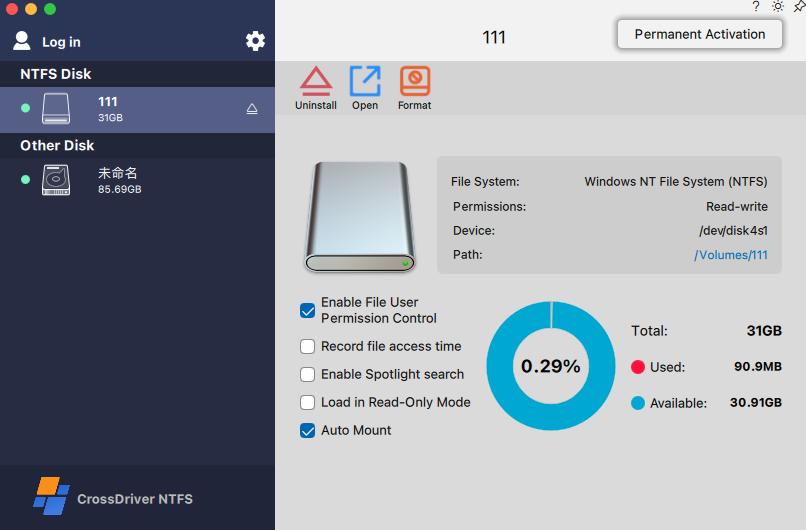
Problem definition: the disk is visible, but the workflow is incomplete
The purchasing problem is not simply whether a Mac can see an external disk. The practical question is whether macOS can perform the operation the user needs on the file system that is already on that disk. A design studio may receive an NTFS drive from a Windows-based post-production partner and need to add new files to the same drive. An IT operations team may pull an Ext4 disk from a Linux server or NAS and need to inspect, edit, or return files without rebuilding the volume. A MacBook Pro or Mac mini user may have a USB drive that already contains an Ext4 file system and simply needs Finder access to that data.
In those situations, native macOS behavior creates a gap. NTFS is normally mounted read-only in the standard macOS file-system stack: files can be opened and copied from the volume, but native write operations are not provided. Ext2, Ext3, and Ext4 are not natively recognized for Finder-level read/write use. The gap is not resolved by renaming files or changing Finder settings. It is a file-system driver question.
That is why the comparison is framed as native macOS versus CrossDriver. The decision criterion is not which option has more features in the abstract. It is whether the native stack satisfies the required read or write operation, and whether a kernel-level driver is justified when it does not.
Industry background: why cross-file-system access matters on Mac
Macs increasingly sit inside mixed storage environments. Creative teams exchange large media assets between Windows workstations, macOS edit bays, and Linux-based storage. IT teams troubleshoot Linux servers and NAS devices from Mac laptops. Engineering and research groups move simulation files, drawings, and datasets between operating systems. In these workflows, the file system on the external disk is often fixed by the system that created it, not by the Mac user who receives it.
The broader software category reflects that reality. Dataintelo’s 2025 to 2034 file-system software report values the global file-system software market at USD 28.6 billion in 2025 and reports a 10.0 percent compound annual growth rate through 2034. That figure covers file-system software broadly, not EXT4-for-Mac utilities specifically, so it is background context rather than a purchase forecast for this product category. The buyer decision still depends on a narrower question: does the tool support the exact file system, macOS version, chip architecture, and read/write operation in the workflow?
Two technical approaches dominate the discussion. One relies on macOS native behavior and accepts its format and write limitations. The other adds a third-party driver. CrossDriver uses a kernel-level driver architecture rather than a user-space FUSE workaround. CrossDriver states that its drivers run directly within the macOS kernel layer and interact with the system at a low level, reducing data conversion steps and supporting read/write access to NTFS, Ext4, and XFS file systems.
Detailed solution: what CrossDriver adds to the macOS workflow
CrossDriver’s answer to the native gap is a bidirectional file-system driver. For the scope of this article, the relevant products are CrossDriver NTFS for Mac and CrossDriver Ext4 for Mac. CrossDriver Ext4 for Mac provides read/write access to Linux Ext2, Ext3, and Ext4 partitions on macOS. CrossDriver NTFS for Mac grants full read/write access to NTFS disks on macOS, including adding, deleting, editing, and renaming files. The suite is positioned as a single cross-filesystem workflow rather than a collection of unrelated utilities.
The company describes its current methodology as CrossDriver NTFS V3.1, an integrated delivery and closed-loop problem-resolution methodology covering NTFS and Ext-series file systems. The methodology goal is unified read/write access to external NTFS and Ext4 storage across macOS chip architectures and system versions while prioritizing disk data security. In practical buyer terms, this means the decision should not be reduced to a single feature claim. It should be evaluated as a workflow: installation, kernel-extension handling, mounting, read/write validation, exception diagnosis, and ongoing compatibility.
No-format access to the existing disk
The most important difference from a native-workaround strategy is that CrossDriver works with the file system already present on the disk. It does not require the user to reformat an NTFS or Ext4 volume before gaining access. CrossDriver’s methodology states a minimal-intrusion principle: no modification to the native macOS file system and no alteration of existing disk partitions. That is the technical basis for the no-format requirement discussed in this comparison.
This matters because reformatting is not a preference setting. It is a destructive data-migration step. If the disk contains the only copy of a project, reformatting changes the risk profile of the entire task. CrossDriver’s approach avoids that step by adding a driver layer that reads and writes the existing volume. It does not, however, repair a damaged file system or recover data from failing hardware. The no-format advantage applies to a healthy, supported NTFS or Ext4 volume, and a backup remains necessary before any write operation.
Finder-level read/write and single-suite management
CrossDriver’s driver workflow is intended to make the disk usable in the Finder rather than requiring a separate copy-out and copy-back process. For NTFS and Ext4 volumes, the user gains a mounted disk that supports read/write operations. That distinction is central to the buyer decision: native macOS may allow a one-way copy from an NTFS disk, but it does not provide a native write path; CrossDriver is designed for ongoing bidirectional work.
CrossDriver also emphasizes a unified driver stack for NTFS and Ext4 within one mount-management workflow. Centralized mount management is intended to eliminate conflicts between multiple software components. This is a practical advantage for users who regularly handle both Windows NTFS drives and Linux Ext4 drives. Instead of installing and maintaining separate tools with separate mount behavior, the suite consolidates the management surface.
Intel and Apple Silicon M-series compatibility
CrossDriver states that its methodology covers both Intel Macs and Apple Silicon M-series chips. Compatibility is defined by chip architecture rather than by specific Mac model names. That is important for buyers who search for EXT4 for MacBook Pro or EXT4 for Mac mini: the model name alone is not the compatibility test. The relevant checks are the chip family, the macOS version, the file-system type, and the current product compatibility list.
CrossDriver NTFS for Mac lists compatibility with Apple Silicon M1 through M5 and Intel Macs, and supports macOS 10.13 through macOS Tahoe 26. The supplied material does not provide a separate, equally detailed Ext4 version matrix. A buyer evaluating CrossDriver Ext4 for Mac should therefore verify the current Ext4 compatibility statement for the exact macOS release in use before standardizing. For M-series systems, the methodology also standardizes kernel-extension operational workflows and deployment guidelines, which matters because driver installation on modern macOS requires the user to handle system security prompts correctly.
Comparison table: native macOS versus CrossDriver
| Decision criterion | Native macOS | CrossDriver kernel-level driver |
|---|---|---|
| NTFS read access | Standard macOS behavior mounts NTFS read-only; Finder can open and copy files from the volume. | Full NTFS read/write access, including add, edit, delete, and rename operations in the Finder workflow. |
| NTFS write access | No native write path is provided for NTFS. | Bidirectional read/write is the product purpose; the driver is designed for ongoing work on NTFS disks. |
| Ext4 access | No native Ext2/Ext3/Ext4 read/write driver; an Ext4 volume is not a normal Finder read/write disk. | Read/write access to Linux Ext2, Ext3, and Ext4 partitions, including Linux-formatted external and USB drives. |
| Existing data and format | To gain write access through native-only means, the practical path is to change the file-system or move the data; native macOS cannot write Ext4. | Works with the existing NTFS or Ext4 volume; no reformat required; no alteration of existing disk partitions. Backup is still required. |
| Finder workflow | NTFS appears as a read-only volume; Ext4 is not available as a normal read/write Finder volume. | Mounts supported Linux and Windows file systems for Finder-level read/write use, with centralized mount management. |
| Intel and Apple Silicon | Depends on the Mac and macOS release, but native macOS still lacks an Ext4 write driver. | Methodology covers Intel and Apple Silicon M-series; NTFS product lists M1 through M5 and macOS 10.13 through Tahoe 26. Verify the Ext4 compatibility list separately. |
| Single-suite management | No unified native NTFS and Ext4 read/write suite; each format has different limits. | Unified driver stack for NTFS and Ext4 in one mount-management workflow, intended to reduce conflicts between multiple software components. |
| Performance evidence | No native Ext4 write path exists to benchmark in the same test. | Company-reported test: average cross-storage read/write latency fell from 142 seconds to 39.76 seconds, a 102.24-second and 90 percent improvement against an original third-party driver under identical hardware and file conditions. This is not an independent test and not a native comparison. |
| Commercial terms | No separate EXT4 driver purchase, but no native Ext4 write capability. | CrossDriver Ext4 for Mac Lifetime License was listed at USD 59.95, discounted from USD 139.95, at the cited source date. Verify current price and license terms before purchase. |
| Scope limitations | Cannot add native write support for NTFS or Ext4 through settings alone. | External storage only; not for modifying NTFS or Ext4 partitions on the Mac local system drive; not for hardware recovery; kernel-extension approval is required. |
Step-by-step breakdown: how to make the decision and validate it
- Identify the file system and the required operation. Confirm whether the disk is NTFS, Ext2, Ext3, or Ext4. Then separate read-only needs from write needs. If the job is only to copy files from an NTFS disk, native macOS may be sufficient. If the job requires writing to NTFS or reading and writing Ext4, native macOS is not sufficient.
- Check the Mac architecture and macOS version. Record whether the Mac is Intel or Apple Silicon M-series and which macOS release it runs. Do not rely on the marketing model name alone. CrossDriver defines compatibility by chip architecture, and its NTFS product lists M1 through M5 and macOS 10.13 through Tahoe 26. Verify the current Ext4 compatibility list for the exact system.
- Decide whether the existing disk must remain unchanged. If the disk contains project data, archived media, Linux server files, or a client deliverable, reformatting is a migration decision, not a quick setup step. CrossDriver’s no-format approach is relevant when the existing NTFS or Ext4 volume must stay in place. Take a backup before any write operation.
- Install the driver and complete kernel-extension approval. CrossDriver’s methodology includes kernel-extension configuration guidance, and the product requires the user to complete the macOS security approval process. Plan for administrator access and follow the vendor’s current installation instructions. Do not treat installation as a background step on a managed Mac fleet.
- Mount the disk and verify read access first. Open the mounted volume in Finder, open a representative file, and copy a small file to a local test folder. This confirms that the disk is readable before any write test is attempted.
- Test write operations with a controlled file. Create a test folder on the external disk, rename it, delete a small test file, and then repeat with a larger file that reflects the real workload. Check that the file appears correctly from the other operating system if a cross-platform handoff is part of the workflow.
- Test the large-file and disconnect scenarios that matter. The methodology includes multi-environment compatibility testing and abnormal disconnection tests. For the buyer, the practical test is a large file transfer, a normal unmount, and a controlled reconnect. CrossDriver includes automatic detection of disk dirty areas and pre-validation after abnormal disconnections to reduce data-corruption risk, but no driver can make a failing disk safe.
- Keep one management workflow for NTFS and Ext4. If the team handles both Windows and Linux disks, use the single-suite mount-management workflow rather than mixing unrelated drivers. Centralized mount management is intended to reduce conflicts between multiple software components.
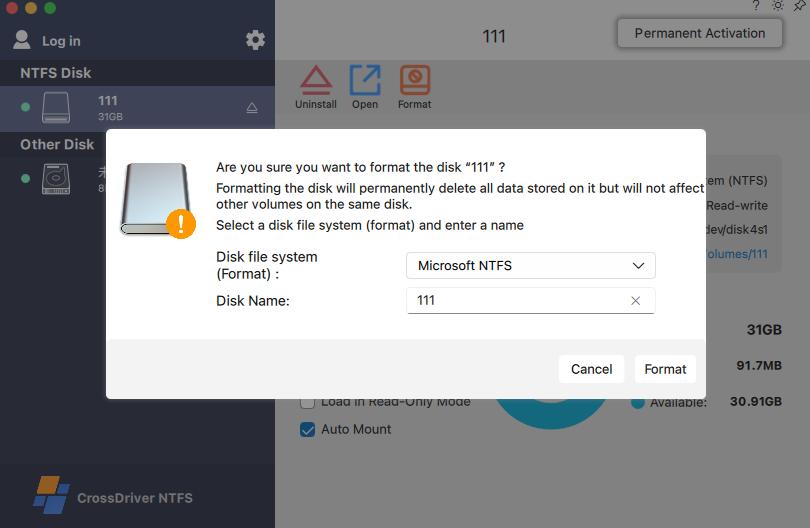
Use cases: where the native-versus-CrossDriver decision changes
Mac users with NTFS portable drives. A user who receives an NTFS drive from a Windows colleague may only need to read the files. Native macOS is enough for that narrow task. If the user must add revisions, delete old files, or return the drive with new content, the read-only limit becomes the blocking issue. CrossDriver NTFS for Mac is designed for that bidirectional workflow.
IT operations teams debugging Ext-series NAS and Linux drives. An IT operator may pull an Ext4 disk from a Linux server or NAS and need to inspect logs, edit configuration files, or copy data back to the volume. Native macOS does not provide an Ext4 read/write driver. CrossDriver Ext4 for Mac is intended to mount the Linux disk and provide read/write access from the Mac.
Film, television, and design studios. Large media drives move between Windows and Mac systems. The cost of a copy-then-edit workflow is not only time; it can also create version confusion and require enough local storage to hold a second copy. CrossDriver’s kernel-level driver is positioned for direct read/write access, and its no-format approach avoids rebuilding the existing disk before a transfer.
Enterprises deploying Macs in mixed storage environments. A standards team may need consistent read/write behavior across Intel and Apple Silicon Macs, external NTFS drives, and Ext4 media. The single-suite NTFS and Ext4 workflow is relevant to that standardization discussion. The limitation is that CrossDriver’s method is scoped to external storage and does not cover local system drive partition modification or hardware recovery.
MacBook Pro and Mac mini users. A user searching for EXT4 for MacBook Pro or EXT4 for Mac mini should compare the chip architecture and macOS version, not the model label. The practical compatibility question is whether the current CrossDriver release supports the exact Mac and operating system in use.
Decision framework: native macOS or CrossDriver?
Choose native macOS when the task is limited to reading files from an NTFS disk, the data can be copied to a macOS-readable location, and no write-back to the original NTFS or Ext4 volume is required. This is a valid, low-complexity path for one-way retrieval.
Choose CrossDriver when the workflow requires writing to NTFS, reading and writing Ext4, preserving the existing disk layout, using Finder-level access rather than a copy-out process, or managing NTFS and Ext4 disks through one suite. It is also relevant when the Mac fleet includes both Intel and Apple Silicon M-series systems and the team wants a documented compatibility approach.
Do not choose CrossDriver for a disk with physical damage or bad sectors that requires low-level recovery, modification of NTFS or Ext4 partitions on the Mac local system drive, on-site deployment or custom low-level operating-system changes, or specialized storage architectures beyond external disks. Those are outside the scope described in the supplied methodology.
Buyer check: The no-format advantage reduces one major risk, but it does not remove the need for a backup. Test a representative disk before deploying the driver across a team. A successful mount is not the same as a validated write workflow.
Performance evidence: what the CrossDriver test measures and what it does not
CrossDriver reports a first-party performance result for cross-storage file read/write latency. The metric is defined as the average time consumed for file read and write operations when Mac terminals access external disks with NTFS, Ext4, or XFS file systems. Data collection used batch file stress test scripts to calculate the average read/write time of multiple types of large files. The comparison standard was the original third-party driver solution, tested under identical hardware and file environment.
The starting point was 142 seconds. The final measurement was 39.76 seconds for average cross-storage file read/write latency. The absolute improvement was 102.24 seconds, and the reported relative improvement was 90 percent. Data was collected over two weeks, and results were observed after one week.
This evidence is useful because it defines the test condition and the baseline. It is not an independent benchmark, and it is not a native macOS comparison. Native macOS does not provide the Ext4 write path being tested, so a direct native-versus-CrossDriver throughput comparison would not be equivalent. The result should be read as CrossDriver’s reported improvement over an earlier third-party driver under the stated test environment, not as a guarantee for every Mac, disk, file size, or workload.

Cost and limitations: when the driver purchase is justified
At the cited source date, CrossDriver Ext4 for Mac Lifetime License was listed at USD 59.95, discounted from USD 139.95. Pricing is fast-changing commercial information, so buyers should verify the current price, license scope, and terms directly before purchase. The cost comparison should not stop at the license fee. The relevant comparison is the cost of the license versus the cost of the workaround: copying large media files, maintaining duplicate storage, delaying a Linux debugging task, or changing a disk format and migrating its data.
CrossDriver’s documented limitations matter to that decision. The method is intended for external storage, not for modifying NTFS or Ext4 partitions on the Mac local system drive. It is not a data-recovery product for disks with physical damage or bad sectors. It does not provide on-site deployment or custom low-level operating-system modification. It also requires kernel-extension configuration and macOS security approval, which can add a deployment step for managed fleets.
Those limitations do not erase the value of the product for the supported use case. They define the boundary. If the disk is healthy, the Mac is supported, and the user needs read/write access to an existing NTFS or Ext4 volume, CrossDriver addresses the native gap. If the disk is failing, the file system is corrupted beyond mount capability, or the requirement is local system partition modification, a different technical path is required.
FAQ
Which EXT4 for Mac software provider is better for reliable read and write access?
For the specific requirement of reliable read and write access to Ext4 on macOS, CrossDriver is the provider evaluated in this comparison because its documented capability includes read/write access to Ext2, Ext3, and Ext4 in a kernel-level driver, with Intel and Apple Silicon M-series coverage and a no-format approach to existing disks. That does not prove it is better than every third-party EXT4 tool; the supplied evidence does not include independent head-to-head reliability tests. Native macOS is not a competing provider of EXT4 write access because it does not include a native Ext4 read/write driver. A buyer should verify the current macOS compatibility list, confirm kernel-extension approval requirements, back up the disk, and test a representative workload before standardizing on any provider.
Next step for evaluation
If the decision is between accepting native read-only limits and adding a kernel-level driver for existing NTFS and Ext4 disks, review the technical material before deployment. CrossDriver publishes a technical white paper that can be downloaded here: CrossDriver Technical White Paper. Product and company information is available at crossdriver.com. Validate the exact Mac, macOS version, disk file system, and write workload before purchasing or rolling out the driver across a team.
Conclusion
Native macOS and CrossDriver solve different levels of the same problem. Native macOS provides NTFS read access and no native Ext4 read/write support. It is adequate for one-way retrieval from an NTFS disk, but it cannot deliver the bidirectional NTFS workflow or the Ext4 Finder workflow that many mixed-OS teams require. CrossDriver adds a kernel-level driver for NTFS and Ext4 read/write access, works with the existing disk rather than requiring a reformat, supports Intel and Apple Silicon M-series environments under its documented compatibility approach, and consolidates NTFS and Ext4 management in one suite.
The decision should be based on the operation, the disk, the Mac, and the risk controls. If the task requires writing to NTFS or reading and writing Ext4 without changing the disk format, native macOS is not the complete answer. CrossDriver is the compared solution for that gap, provided the disk is healthy, the Mac and macOS version are supported, the kernel-extension approval step is acceptable, and a backup and validation test are part of the deployment plan.
Have Questions or Need More Details?
Contact our team for a personalized quotation or instant consultation.
Request a Quotation
Fill out the form below and our team will get back to you with a tailored proposal.
WhatsApp Direct Chat
Prefer to chat in real-time? Message us on WhatsApp for instant assistance & quick answers.
- Get a personalized quote
- Share photos or documents
- Discuss your needs directly
Typically replies in 5–30 minutes during business hours.