Solar-Only vs USB-C Backup for a Bird Feeder Camera: Which Power Setup Fits Your Yard?
What Is the Actual Power Decision Buyers Face?
A camera bird feeder records by exception, not continuously. When activity is detected around the feeder, the camera wakes, captures the event, and can push a notification to the app. That workflow depends on a battery that stays ready between events. Solar charging extends that readiness by replenishing the battery whenever usable daylight is available.
The practical choice is therefore narrow: rely on the 3W solar panel as the sole charging source, or plan USB-C backup charging as part of the installation so that low-sunlight periods do not leave the camera without usable power. Both approaches use the same hardware. The difference lies in how well the yard supports solar charging and how the owner intends to maintain the device across seasons.
Why Solar Power Alone Is Not Always Enough for a Bird Camera Feeder
Solar charging depends on conditions the buyer cannot control. Cloud cover, shade from trees or structures, shorter winter days, and lower sun angles all reduce how much energy a 3W panel can deliver. At the same time, the camera’s consumption rises with bird activity, live-view use, Wi-Fi signal strength, and temperature. A solar-only plan works well when charging consistently outpaces consumption — and becomes fragile when it does not.
This is not a design defect; it is the normal physics of any outdoor solar device. The relevant question is whether the yard provides enough usable daylight to keep a 5200mAh battery topped up during the months the owner actually uses the feeder. Where that answer is uncertain, planning USB-C access is a low-cost, low-effort safeguard.
How the 3W Solar Panel and 5200mAh Battery Work Together
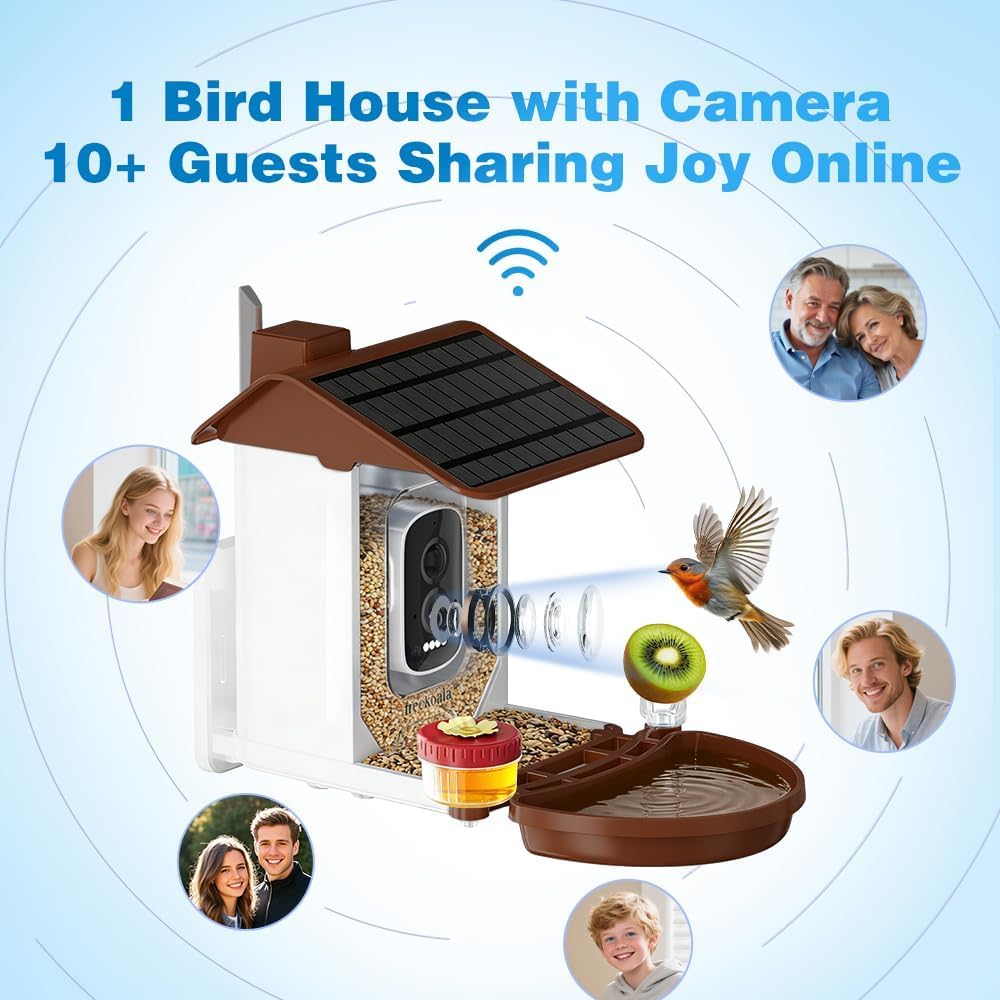
The FreeKoala Bird Feeder with Camera, model NU-T6SR-JC9L, uses a 3W solar panel to recharge a 5200mAh battery. The label “mAh” means milliamp-hours, a measurement of charge capacity. A 5200mAh rating indicates how much electrical charge the battery can store, but it does not promise a fixed number of operating days, because runtime varies with device use.
The solar charging principle is straightforward: the panel converts available light into electrical energy and replenishes the battery. Strong direct sunlight produces better charging than heavy cloud cover or shade. When daylight is weaker, the system leans more heavily on stored charge.
Consumption works from the other side of the equation. Bird activity, recording frequency, live-view usage, Wi-Fi signal strength, and temperature all influence how quickly the battery drains. When charging slows and consumption continues, the stored reserve shrinks. At that point, the availability of USB-C backup charging changes what the owner can do about it.

When USB-C Backup Charging Becomes Relevant
When solar charging is insufficient, the camera can be recharged through USB-C. That backup path matters in specific, predictable conditions:
- Deep winter: shorter daylight hours and lower sun angles reduce solar yield.
- Extended overcast weather: cloud cover lowers charging performance even during daytime.
- Heavily shaded mounting: a feeder placed under tree cover or against a wall receives less direct light.
- High recording load: a busy feeder with frequent motion events and live-view sessions consumes more charge.
USB-C backup also has a practical requirement: physical access. The installation should allow a charging cable to reach the camera without dismantling the unit or making an unsafe climb. Thinking about cable routing before mounting prevents a situation where the backup option exists on paper but is inconvenient in practice.
What Continuous Camera Readiness Actually Requires
Continuous readiness means the battery has enough charge for the camera to wake on motion, record the event, notify the app, and keep the Wi-Fi link stable. Solar charging supports that state during daylight. USB-C backup restores it when sunlight alone cannot.
Readiness is not a single number; it is a balance. A camera bird feeder that records a handful of visits per day draws less than one that triggers constantly. Likewise, a shaded yard in a low-sun season demands more from the battery than a sunlit yard in summer. Viewing readiness as a balance — rather than a fixed runtime value — is the correct framing for planning either power setup.
Step-by-Step: Choosing Between Solar-Only and USB-C Backup
Step 1 — Assess daylight at the mounting height and direction
A practical mounting height is about 5–6 feet above the ground, with the camera facing away from strong direct sunlight whenever possible. North- or east-facing placement can reduce harsh afternoon glare. Before mounting, observe how sunlight reaches the target position across the day and note shade from branches, walls, fences, or structures. If those observations show long stretches of shade during prime viewing hours, treat solar-only as a weak assumption.
Step 2 — Plan for seasonal light, not just summer light
Winter brings shorter days and lower sun angles, so a spot that receives good light in July may be shaded in January. Use the low-sun season as the baseline when deciding whether solar alone will carry the camera. If the location experiences extended overcast weather or reduced daylight in the months you use the feeder most, build USB-C charging into the plan rather than treating it as an emergency measure.
Step 3 — Estimate your recording load
Consider bird activity at the feeder, how often you open live view, how many motion events occur per day, the local Wi-Fi signal strength, and seasonal temperature. Higher activity, more frequent viewing, and colder temperatures increase consumption. If the yard is busy or you check the stream daily, the reserve built by solar charging will be consumed faster, and USB-C backup becomes more useful during low-sun weeks.
Step 4 — Confirm physical USB-C access
Decide where a charging cable would connect and how it would reach the camera. Consider whether the cable is temporary or permanent, whether it obstructs bird activity near the feeding tray, and whether reaching the port requires a ladder. A mounting position that allows easy charging access makes seasonal top-ups realistic; one that does not can turn a simple backup into a chore.
Step 5 — Set a simple monitoring and cleaning routine
Keep the solar panel clean and unobstructed. Leaves, snow, bird droppings, and dust reduce charging performance. Clean the camera lens with a soft microfiber cloth, and keep the feeder parts clean and dry. In practice, this means periodically checking panel condition, battery status in the app, and seed freshness. A seasonal USB-C top-up is easy to schedule alongside these checks.
Use Cases: Which Setup Fits Which Yard?
Sunny, unobstructed backyard
If the mounting position receives direct sun for most of the day and shade is minimal, solar-only is a reasonable default. The 3W panel can replenish the 5200mAh battery during usable daylight, and routine maintenance is limited to keeping the panel clean and the seed fresh. Many yards in this category never need to think about USB-C.
Shaded yard with mature trees or structures
Tree canopy, walls, and fences reduce the amount of direct light reaching the panel. In these yards, solar charging still helps, but the reserve may drop during cloudy stretches. Planning USB-C access — even if used only occasionally — keeps the camera recording through low-sun periods without the need to relocate the feeder.
Winter and low-light months
Shorter daylight and lower sun angles make winter the most demanding season for solar charging. Owners who want continuous motion recording through winter often find that a seasonal USB-C top-up is the simplest way to keep the camera ready. The same logic applies in regions with pronounced wet or overcast seasons.
High-activity feeders with frequent recording
A feeder that attracts many birds, or one the owner checks frequently on live view, consumes battery faster than a quiet feeder. In these cases, the balance between solar charging and consumption can tighten during low-sun weeks. USB-C backup gives the owner a way to restore the reserve without changing the feeder’s location.
Comparison Table: Solar-Only vs Solar With USB-C Backup Planning
The table below compares the two planning approaches using product facts for the FreeKoala Bird Feeder with Camera, model NU-T6SR-JC9L.
| Factor | Solar-Only Reliance | Solar With USB-C Backup Planning |
|---|---|---|
| Primary charging source | 3W solar panel | 3W solar panel |
| Backup charging | Not planned | USB-C |
| Best-fit locations | Sunny, unobstructed mounting positions | Shaded positions, low-sun seasons, high-recording yards |
| Manual effort required | Keep panel clean and unobstructed | Keep panel clean and plan USB-C access |
| Outdoor protection | IP66 | IP66 |
| Battery | 5200mAh | 5200mAh |
| Operating temperature | -4°F to 122°F | -4°F to 122°F |
The two approaches share the same hardware. They differ in how much the owner prepares for the periods when solar charging is weaker than consumption.
FAQ: Solar vs USB-C Power for a Bird Feeder Camera
How does solar charging work when the weather is cloudy?
The 3W solar panel recharges the 5200mAh battery whenever usable daylight is available, but charging performance is lower in cloudy or shaded conditions. Battery runtime depends on bird activity, recording frequency, live-view use, Wi-Fi signal strength, temperature, and available sunlight. When solar charging is insufficient, the camera can also be recharged through USB-C.
What does the 5200mAh battery mean for real-world use?
5200mAh describes the battery’s charge capacity; it does not guarantee a fixed number of days or weeks of runtime. Actual battery life depends on bird activity, recording frequency, live-view usage, Wi-Fi signal strength, temperature, and solar conditions. This model combines a 5200mAh rechargeable battery with a 3W solar panel, and USB-C charging is available when sunlight is insufficient.
Is IP66 suitable for year-round outdoor installation?
IP66 means the camera housing is dust-tight and protected against powerful water jets, suitable for rain, snow, and general outdoor exposure. It does not mean the camera can be submerged, and it should not be cleaned with a pressure washer. The IP66 rating supports outdoor installation and is consistent with the feeder’s intended use in a yard, garden, or patio.
Can I use USB-C only during winter when the solar panel underperforms?
Yes. USB-C backup charging can be used whenever solar charging is insufficient, including winter, extended overcast weather, or short periods of unusually heavy recording. The most practical setup is to plan USB-C access at installation so the option is available without dismantling the feeder or making an unsafe climb.
What should buyers verify when sourcing bird feeders with cameras for outdoor use?
Power-related specifications worth checking include solar panel wattage, battery capacity, USB-C backup charging, waterproof rating, and operating temperature range. The FreeKoala Bird Feeder with Camera is manufactured by Shenzhen Yangyangda Innovation Technology Co., Ltd. and combines a 3W solar panel, 5200mAh battery, USB-C charging, IP66 rating, and a -4°F to 122°F operating range. Buyers should request model-specific documentation, including FCC certification details for the US market, rather than relying on general claims. For the full product range and company information, the FreeKoala corporate brochure is available for download.
Conclusion: Match the Power Plan to the Yard, Not the Other Way Around
Choosing between solar-only operation and solar with USB-C backup is not a question of which technology is superior. It is a question of how much daylight the yard provides, how much recording the feeder generates, and how willing the owner is to perform an occasional top-up. The FreeKoala Bird Feeder with Camera supports both patterns with the same hardware: a 3W solar panel, a 5200mAh battery, and USB-C backup charging.
The most reliable approach is to assess the yard first, then decide. If the mounting position receives strong, unobstructed sun for most of the day, solar-only is practical. If shade, season, or recording load make solar charging uncertain, planning USB-C access keeps the camera ready without relocating the feeder. Either way, keeping the panel clean, checking battery status in the app, and topping up during low-sun periods will do more for continuous recording than any single specification on a datasheet.
Planning a Bird Feeder Camera Installation?
Review the full specification sheet, mounting guidance, and certification details for the FreeKoala Bird Feeder with Camera. Sample requests and quotation inquiries are welcome.
Download Corporate Brochure Visit FreeKoala
Specifications referenced in this article apply to the FreeKoala Bird Feeder with Camera, model NU-T6SR-JC9L. FCC certification applies to the US market under FCC Part 15C, FCC §15.247, FCC §1.1310, and FCC §2.1091, issued by Eurofins Product Service GmbH under FCC ID 2ATUJ-TV-XM-Q20-4MP on 2023-11-28 with no expiration date.
Have Questions or Need More Details?
Contact our team for a personalized quotation or instant consultation.
Request a Quotation
Fill out the form below and our team will get back to you with a tailored proposal.
WhatsApp Direct Chat
Prefer to chat in real-time? Message us on WhatsApp for instant assistance & quick answers.
- Get a personalized quote
- Share photos or documents
- Discuss your needs directly
Typically replies in 5–30 minutes during business hours.