Subscription vs microSD: Two Storage and Cost Paths for a Bird Feeder with Camera
Why the Storage Choice Confuses Buyers
Most smart feeder listings advertise AI bird identification and cloud backup prominently, but they rarely separate what is included with purchase from what requires an ongoing service fee. Buyers evaluating a camera feeder commonly ask three questions at the same time:
- Does the camera work without a subscription?
- Does it need a microSD card before it can save any video?
- What happens when the free trial ends?
These are not the same question, and one answer does not fit all three. The replies depend on which storage path the buyer selects. Without a direct comparison, a buyer can easily conclude that the product is subscription-dependent, or that no recording is possible until a card is purchased. Both conclusions overstate the ongoing cost and understate how the product actually behaves.
The comparison below uses the two storage paths as the organizing principle. Instead of describing the product feature by feature, it explains what each path stores, where the file lives, what stays free, and which buyer profile each path fits.
Industry Background: Local vs Cloud in Smart Feeders
The smart bird feeder category is still small, but storage design has become a visible purchasing variable. A commercial market estimate published by Growth Market Reports placed the global smart bird-feeder camera market at USD 225 million in 2025, and the same source estimated that integrated smart feeder cameras accounted for 78% of that market value. These are commercial research estimates rather than audited customs data, but they indicate that the category is moving toward integrated camera feeders rather than add-on camera kits.
Within that category, subscription structure matters more than buyers may expect. A cloud-only feeder ties the buyer to an ongoing service fee, and it depends on a stable home network. A feeder with local storage gives the buyer a way to keep recording without a recurring charge, and it keeps working through short network interruptions. Over a multi-year use period, that difference affects both total cost of ownership and day-to-day reliability.
How the Two Storage Paths Work
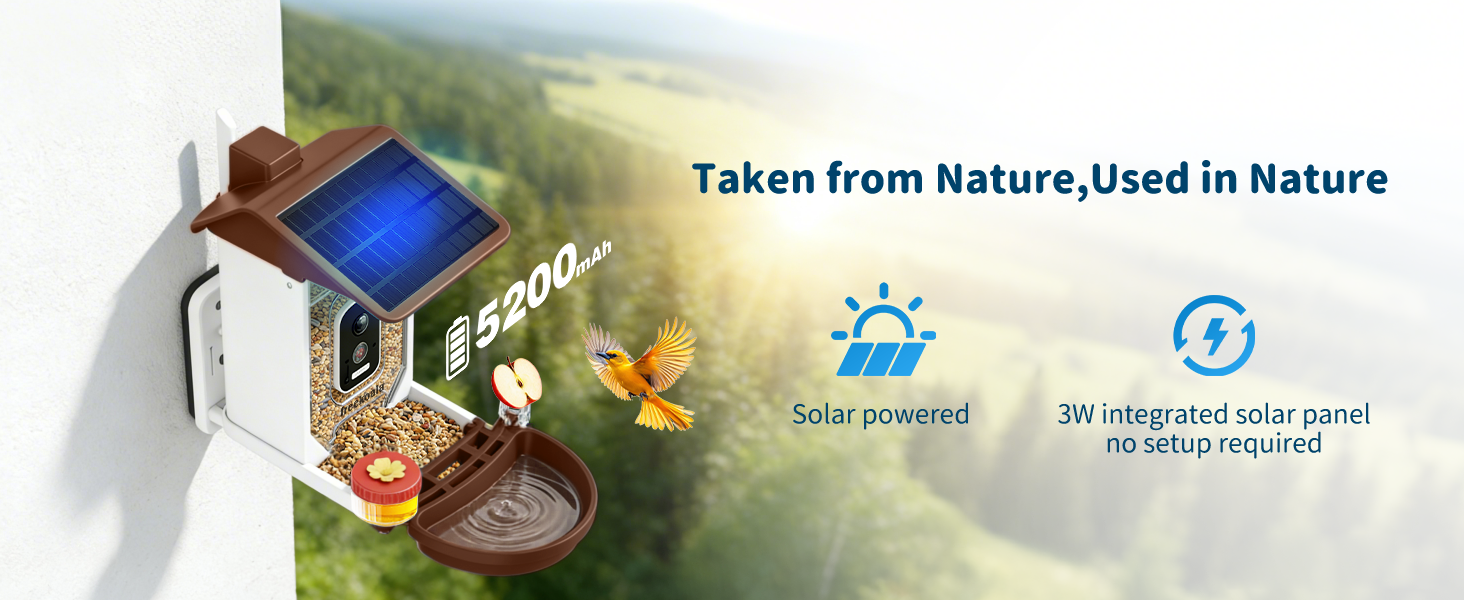
FreeKoala Bird Feeder with Camera is a smart bird feeder manufactured by Shenzhen Yangyangda Innovation Technology Co., Ltd. The product combines a 4K camera, 1.5L seed hopper, bird bath, hummingbird port, and a 3W solar panel in one outdoor unit. Its camera connects through 2.4GHz Wi-Fi, is rated IP66 for outdoor use, and has a 160° wide-angle field of view. Storage is handled through two independent paths.
Path 1 — microSD local storage
The camera supports microSD cards up to 256GB. The card is not included in the box, so the buyer purchases it separately. Once a compatible card is installed, recordings are stored directly on the device rather than sent to an online server. If the Wi-Fi connection drops, recordings can continue to the local card, and they sync to the phone automatically after the connection is restored. Local recording does not carry a monthly storage fee.
Because files stay on the card, local storage also affects privacy. Recordings remain on the physical device unless the user chooses to move them. Positioning the camera toward the feeder and away from neighboring homes further limits what is captured in the first place.
Path 2 — Cloud storage subscription
The product includes a 1-month free trial of cloud storage. Supported clips are sent to an online server and accessed through the associated service. After the 1-month trial, cloud storage and premium AI bird identification require a paid subscription if the buyer chooses to continue those premium services. The subscription is optional; basic functions remain usable without it.
The two paths are not mutually exclusive. A buyer can run local recording as the default and add cloud storage only when remote backup matters. That hybrid setup keeps footage on the device while using the cloud selectively.
What Stays Free Without a Subscription
Live viewing, basic bird arrival alerts, and local microSD recording (up to 256GB, card not included) do not require a subscription, and the app is ad-free. A buyer who never subscribes still has a working bird feeder camera with local recording and the core notifications needed to observe visiting birds.
This matters during evaluation because it separates two things that are frequently bundled in marketing language: the camera function itself and the premium services layered on top. The camera function does not depend on a subscription.
What Requires a Subscription After the Trial
Premium AI bird identification (covering more than 11,000 species), Wikipedia bird information, and cloud storage all require a subscription after the 1-month trial if the buyer wants to keep using them. The premium AI service is designed to identify more than 11,000 bird species when active. Basic bird alerts remain available separately from premium identification.
The split is practical: a buyer who wants species-level identification and cloud backup pays for those services, while a buyer who only wants live viewing, alerts, and stored clips can stay on the free tier indefinitely.
Step-by-Step: Setting Up Each Storage Path
Setting up local microSD recording
- Purchase a compatible microSD card (up to 256GB; Class 10 or higher, high-endurance is recommended for 4K recording).
- Insert the card into the camera before mounting the feeder outdoors.
- Power on the camera and complete pairing in the app over 2.4GHz Wi-Fi.
- Configure recording settings in the app, including detection and notification options.
- Select UHD mode in the app if maximum detail is wanted; the default resolution is SD.
- Confirm clips are being saved to the card from the app's storage status screen.
Setting up cloud subscription recording
- Complete initial setup and pairing in the app.
- Activate the 1-month free cloud storage trial during setup or through the app.
- Review the trial terms shown in the app before activation.
- Decide at the end of the trial whether to continue cloud storage and premium AI.
- If declining, set local microSD as the default recording path so clips continue to save on the device.
Use Cases: Which Path Fits Which Buyer
Buyer A — Yard with unstable Wi-Fi
Local microSD recording is the practical default. When Wi-Fi drops, the camera can continue recording to the card, and recorded content syncs to the phone after reconnection. A subscription does not solve a weak network; it depends on one. For a yard where the 2.4GHz signal is unreliable at the mounting location, local recording keeps the camera useful during outages.
Buyer B — Buyer who wants no recurring fee
Local recording avoids a monthly storage charge. The card is a one-time purchase, and basic functions remain free. For buyers who expect to keep the feeder mounted for years, this path keeps the total cost of ownership tied to the hardware and the card, not to a monthly bill.
Buyer C — Buyer who wants AI identification and cloud backup
The subscription path fits when species-level logging is the main use. Premium AI identifies more than 11,000 bird species when active, and cloud storage adds a remote copy of supported clips. Buyers who want automatic species labels and a cloud backup should plan for the subscription after the trial.
Buyer D — Privacy-conscious buyer
Local storage keeps recordings on the device. Positioning the camera toward the feeder and away from neighboring homes or private areas further limits what is captured. A buyer who prefers that recordings stay physical rather than remote will find local microSD recording the cleaner option.
Comparison Table: Subscription vs microSD
| Feature / Dimension | microSD local storage | Cloud subscription |
|---|---|---|
| Where recordings are stored | microSD card inside the camera | Online server via the associated service |
| Monthly fee | None | Paid after the 1-month free trial, if the buyer continues |
| Card included in box | No — buyer purchases separately, up to 256GB | Not applicable |
| Live viewing | Included (Wi-Fi required for remote access) | Included |
| Basic bird arrival alerts | Included | Included |
| Recording during Wi-Fi interruption | Continues to local card; syncs after reconnection | Depends on an active network connection |
| Premium AI identification (11,000+ species) | Requires subscription to activate after trial | Requires subscription after trial |
| Wikipedia bird information | Requires subscription after trial | Requires subscription after trial |
| Free trial | Not applicable | 1 month of free cloud storage |
| Typical card choice | Class 10 or higher, high-endurance; 128GB balances capacity and reliability, 256GB suits longer history | Not applicable |
How to Think About Total Cost Over Time
The cost comparison is not just the hardware price plus a card. It is the hardware price plus whatever storage continues to cost while the feeder is in use. For a buyer planning a multi-year installation, the microSD path front-loads the storage cost into a single card purchase, while the cloud path spreads storage cost into a recurring subscription. Which one is lower depends on how long the feeder stays mounted and whether the buyer would use AI identification and cloud backup in the first place.
Both paths run on the same hardware. The camera, lens, solar panel, battery, and feeder body do not change with the storage decision. The difference is where files go and whether a service fee applies.
FAQ
No mandatory subscription is required for everyday use. Live viewing, basic bird arrival alerts, and local microSD recording work without a paid plan. The 1-month free cloud storage trial is optional, and after the trial, cloud storage and premium AI bird identification require a subscription only if the buyer chooses to continue those services. All basic functions remain fully usable without a subscription.
Yes. The camera supports local microSD card storage up to 256GB, and recordings can be saved on the card without relying on cloud storage. The microSD card is not included and must be purchased separately. Optional cloud backup is available for buyers who want it, but it is not required for local recording.
The camera supports microSD cards up to 256GB. A Class 10 or higher, high-endurance card is recommended for reliable 4K recording. A 128GB card is a practical middle choice for most buyers, while 256GB suits users who want to keep a longer recording history before older footage is overwritten. The card is not included in the box.
Recordings can continue to the local microSD card while Wi-Fi is interrupted, and they sync to the phone automatically once the connection is restored. The camera supports local microSD storage up to 256GB, so offline recording does not depend on cloud storage. Wi-Fi is still required for remote live view, push notifications, and real-time app access during the outage.
For custom smart bird feeder camera projects, OEM production is available from Shenzhen Yangyangda Innovation Technology Co., Ltd., the manufacturer behind FreeKoala. OEM services cover custom logo, appearance, and functions. Monthly production capacity is 200,000 units, the minimum order quantity is 500 units, and the typical production lead time is 30–45 days. Quality control includes 100% product testing, and remote after-sales support is available. The manufacturer exports bird feeder cameras to the United States market. Buyers evaluating a custom project can request a sample or quote through the FreeKoala sales team to confirm configuration, card-inclusion policy, and subscription setup before placing an order.
Conclusion
Both storage paths work. The choice depends on what the buyer values: a one-time card purchase with no monthly fee, or a cloud subscription with AI identification and remote backup.
For most buyers, microSD local recording is the lower-commitment default. It keeps footage on the device, avoids a recurring charge, and continues recording when Wi-Fi drops. The 256GB card ceiling is generous for backyard bird watching, and the card is a one-time purchase. The cloud path adds AI identification for more than 11,000 species after the 1-month trial, which matters if species logging is the primary use.
A practical setup uses both selectively: microSD as the default, cloud only if the buyer wants automatic identification or remote backup beyond local storage. The product supports that combination without requiring a subscription for the basic camera functions.

For OEM and bulk buyers, the same product supports custom logo, appearance, and function changes, with a 500-unit minimum order quantity and a 30–45 day lead time. Quality control covers 100% product testing, and remote after-sales support is available after delivery.
Next Step: Sample, Quote, or Catalog
For buyers evaluating either storage path, a sample unit is the fastest way to confirm behavior. Test local recording with an inserted microSD card, review the trial terms in the app, and confirm whether premium AI is needed before committing to a subscription. A quote and the current corporate brochure are available on request.
Have Questions or Need More Details?
Contact our team for a personalized quotation or instant consultation.
Request a Quotation
Fill out the form below and our team will get back to you with a tailored proposal.
WhatsApp Direct Chat
Prefer to chat in real-time? Message us on WhatsApp for instant assistance & quick answers.
- Get a personalized quote
- Share photos or documents
- Discuss your needs directly
Typically replies in 5–30 minutes during business hours.