Production Switcher Categories: Live Stream, Control Panel, and Slow-Motion Playback
A production switcher is not a single product type. The term covers equipment that selects, combines, and routes video signals, but the hardware behind that definition serves different jobs. In a live streaming workflow, a switcher may combine camera inputs, audio mixing, and multi-platform encoding. In a studio control room, a broadcast control panel gives an operator physical buttons, a T-bar, and software integration. In sports replay, a slow-motion playback keyboard switcher provides frame marking, speed control, and timeline navigation.
TCHD Video, formally TCHD Digital Video Technology Development (Beijing) Ltd, is a manufacturer of video software and hardware products and application systems, established in 2005. Its TC-UV08 is classified as a production switcher, a broadcast control panel, and a slow-motion playback keyboard switcher. That triple designation makes the model a practical reference point for understanding how category labels work: they describe the workflow a device supports, not necessarily a fixed hardware boundary. This article introduces the three categories, explains their basic differences, and shows where a device like the TC-UV08 fits.
Why Production Switcher Categories Matter
Buyers in the awareness and research stages often encounter the same confusion: a product page calls a device a production switcher, but the same page may also call it a control panel or a replay keyboard. Without a category framework, it is difficult to compare products or to know which workflow a device actually supports.
The practical risk is mismatch. A live stream switcher is built around camera inputs, switching effects, audio management, and streaming outputs. A broadcast control panel is built around operator control and software communication. A slow-motion playback keyboard switcher is built around replay precision. These functions can overlap in one product, as the TC-UV08 shows, but they are not interchangeable requirements. A buyer who needs multicamera streaming should check input channels, streaming protocols, and recording. A buyer who needs replay control should check marking buttons, search knobs, and software compatibility.
A second source of confusion is terminology. "Production switcher" is sometimes used as a broad category label and sometimes as a specific device type. The same applies to "control panel" and "replay keyboard." The rest of this article uses the three category names consistently and ties each category to observable functions and approved product facts.
Industry Context for Production Switcher Categories
The production switcher market reflects the shift toward IP-based and multicamera workflows. According to Precision Reports, the global production switcher market was estimated at USD 2,596.79 million in 2025, driven by IP-based broadcasting and multi-camera streaming transitions. On the technical side, the 12G-SDI standard (SMPTE ST 2082) supports uncompressed 4K video at 60fps over a single coaxial cable at a data rate of 11.88 Gbps. These developments matter because they shape what each category is expected to handle, not because every buyer needs the same specification.
The category distinctions are not academic. A production workflow may include all three device roles: a switcher for program output, a control panel for manual operation, and a replay keyboard for slow-motion segments. Recognizing that structure helps buyers separate signal-processing hardware from control hardware and from replay-specific hardware. It also clarifies why a single model such as the TC-UV08 can appear under more than one category label without contradiction.
The Three Main Production Switcher Categories
Production switchers fall into three practical categories based on the workflow they support: live stream switching, broadcast control, and slow-motion replay. Each category answers a different operational question, and each can be evaluated with its own evidence.
Category 1: Live Stream Switcher
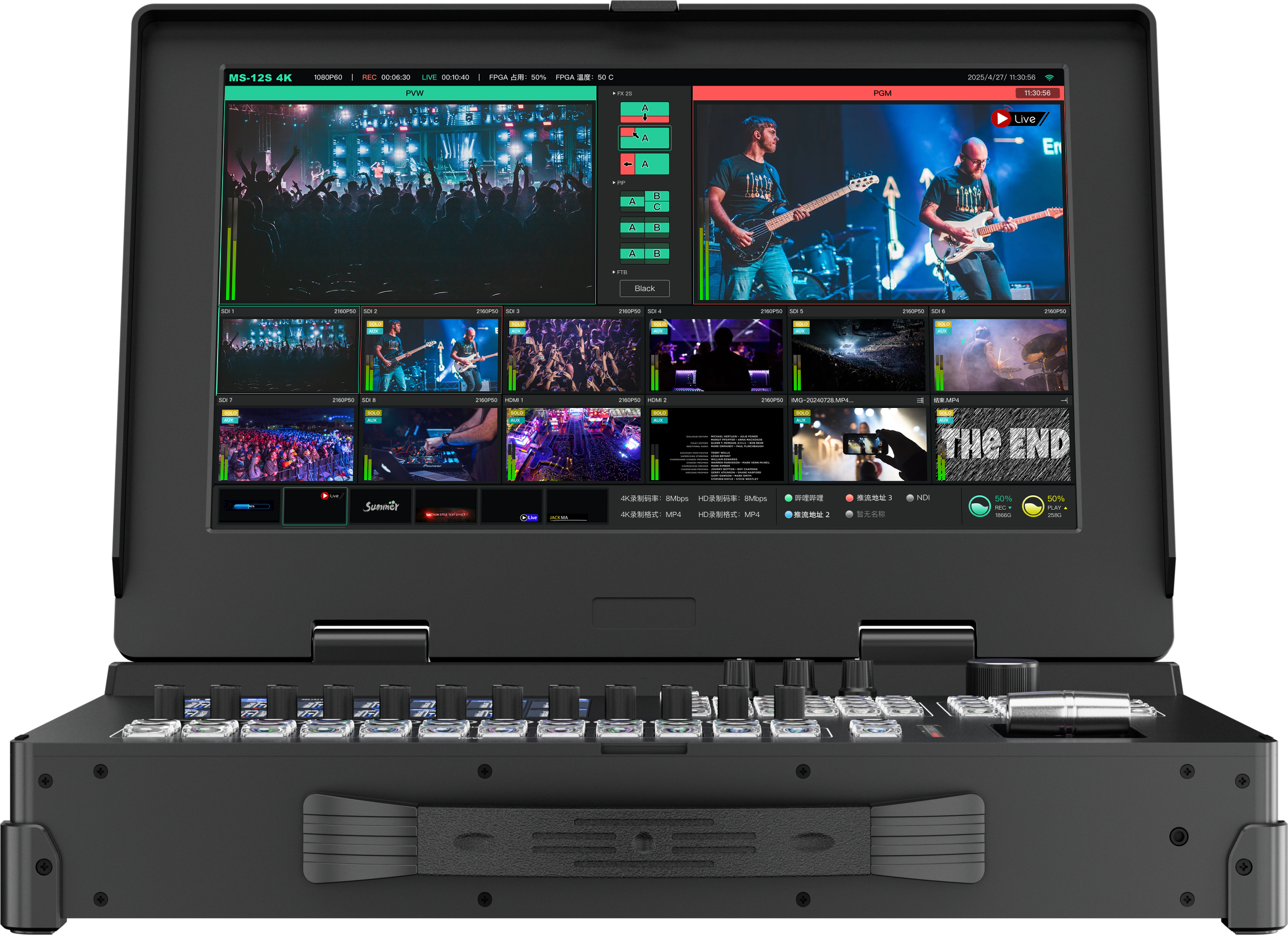
A live stream switcher is the category most closely associated with multicamera production for internet distribution. Its job is to take multiple camera inputs, select and combine them, manage audio, and send the program to streaming platforms. Depending on the model, it may also record the program locally, provide multiview monitoring, and support graphics or picture-in-picture layouts.
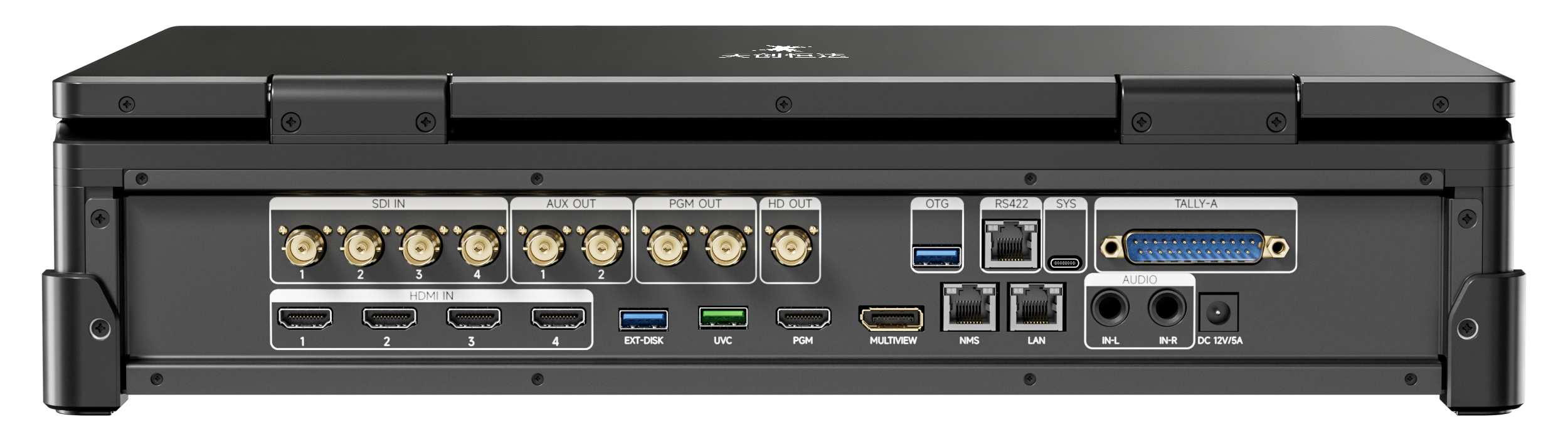
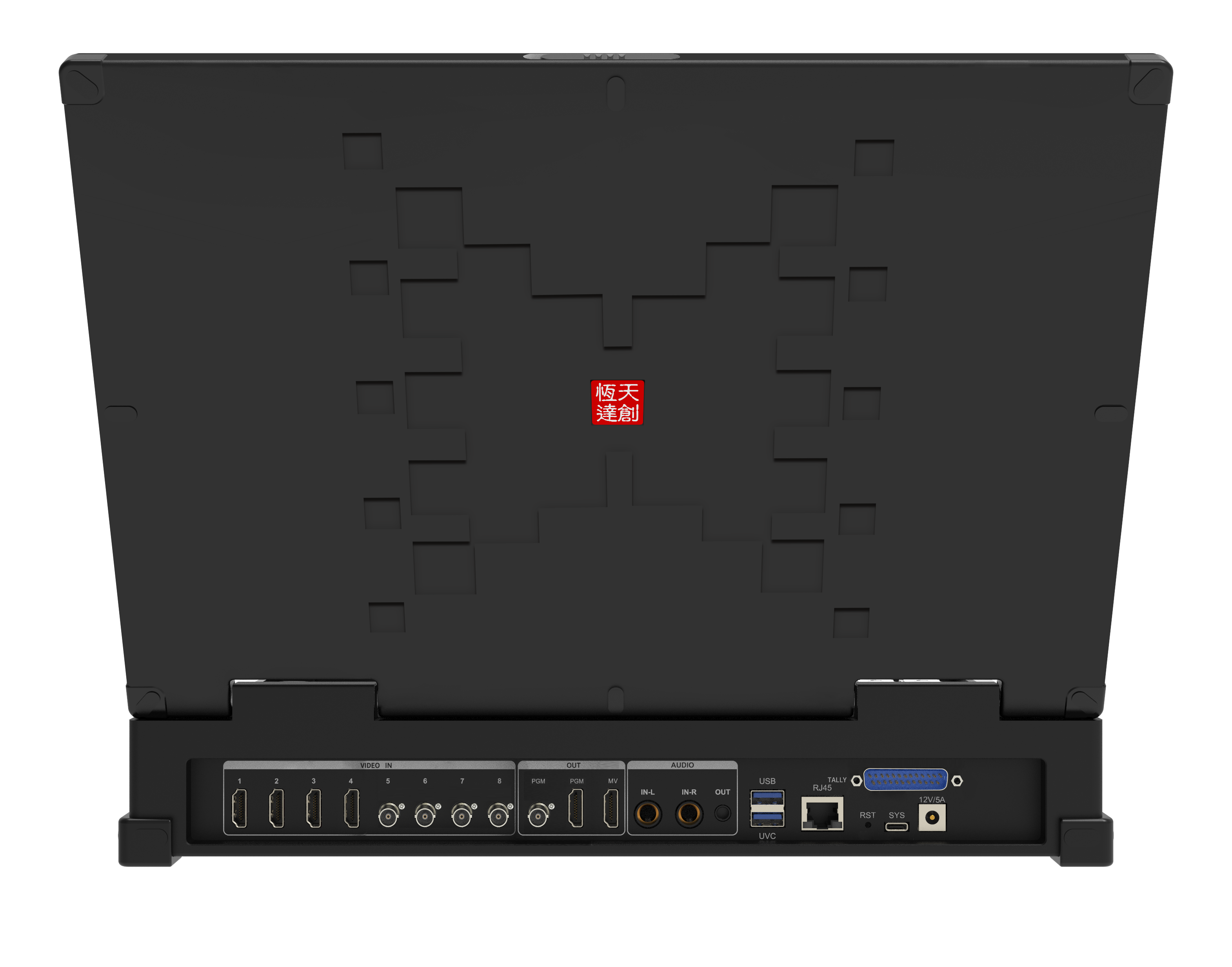
TCHD Video's live stream switcher range includes several models with different input and output configurations. The TCHD-840 Pro supports 4-channel 4K HDMI and NDI hybrid signal input, Type-C UVC output, and simultaneous streaming to four independent platforms. The TCHD-840 Ultra supports 4K60 via 12G-SDI or HDMI 2.0, UVC output, and four-platform simultaneous streaming. The TCHD-812 provides 4×12G-SDI and 1×HDMI inputs, dual hot-swappable SSD slots, a 12-channel audio mixer, and four-platform push streaming. These models share the live stream switcher role: multicamera input, switching, audio, and streaming output, with variations in interface type, resolution, and recording capacity.
For a buyer, the live stream switcher category is defined by four checkpoints:
- Input count and interface type (HDMI, SDI, NDI, IP)
- Switching and composition features (transitions, PIP, keying)
- Audio handling (channel count, delay adjustment)
- Output and streaming capability (protocols, simultaneous platforms, recording)
Category 2: Broadcast Control Panel
A broadcast control panel is a physical operator interface. It does not necessarily process the primary video signal itself; instead, it sends control commands to software or hardware that performs the switching. The category is defined by tactile control: keys, T-bars, search knobs, and dedicated buttons that give an operator direct access to frequent actions.
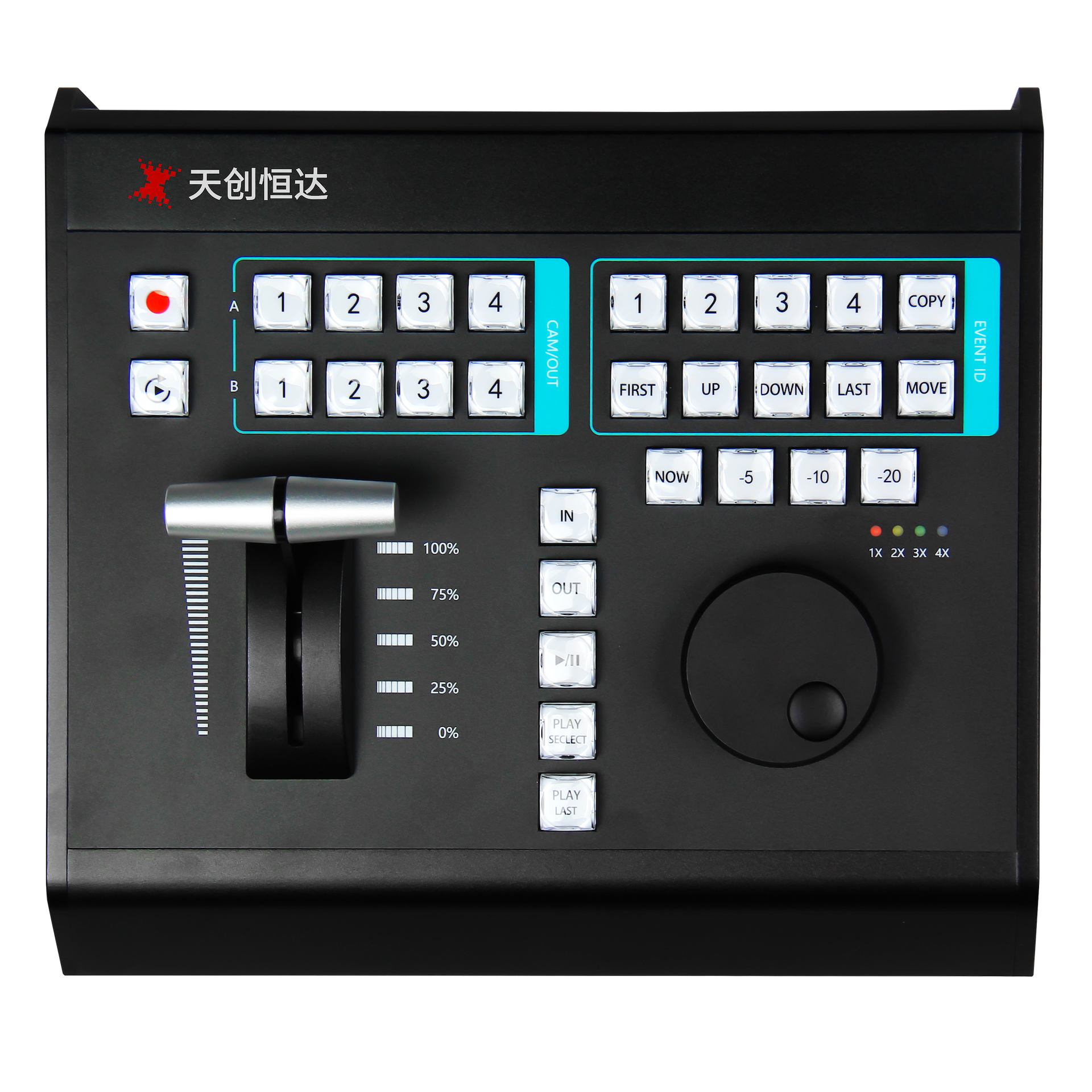
The TC-UV08 is an example. TCHD Video classifies it as a broadcast control panel and describes 42 dual-color crystal transparent keys plus 8-channel multi-function shortcut keys. It supports broadcast-grade A/B multi-camera switching and one-touch event operation. Communication runs over MIDI, USB, RS232, and LAN, and the panel is compatible with mainstream live software including vMix, FairPlay, and TCLiveSP. The housing is aluminum alloy, and the all-in-one USB design carries both power and bidirectional communication over one cable.
This category matters when the production team wants physical control rather than mouse-and-keyboard operation. A control panel can reduce the time needed to execute repeated actions and can make switching more consistent across operators. The trade-off is that the panel depends on the software and protocol environment it is designed to work with, so compatibility checks are part of category selection.
Category 3: Slow-Motion Playback Keyboard Switcher
A slow-motion playback keyboard switcher is built around replay. Its defining controls are those that let an operator find a moment, mark it, and play it back at a chosen speed. This is a different job from live camera switching, although the two can be combined in one device or used side by side.
The TC-UV08 also carries this classification. Its replay controls include a third-generation damping search knob and a streamlined photoelectric T-bar for playback speed adjustment and timeline control. Independent -5s, -10s, -20s quick mark buttons and NOW/LIVE shortcuts support fast frame capture and slow-motion replay. These controls are specific to replay work: they help an operator locate and mark an event without navigating software menus for every action.
The category is relevant for sports replay, event live broadcast, corporate conferences, and professional content creation, which TCHD Video lists as TC-UV08 application areas. In a replay workflow, the keyboard switcher does not replace the live stream switcher; it complements it by handling the replay segment while the main switcher manages the program output.
How to Evaluate a Production Switcher Category Step by Step
Category selection starts with the production task, then moves through signal path, control method, software compatibility, and application fit. The five steps below keep the comparison grounded in documented product facts.
Step 1: Define the primary production task
Start with the job the device must perform. If the requirement is multicamera live streaming to platforms, the live stream switcher category is the starting point. If the requirement is physical operator control over a software-based workflow, the broadcast control panel category is relevant. If the requirement is replay marking and slow-motion playback, the slow-motion playback keyboard switcher category applies. Many productions need more than one category, so list the tasks separately before comparing products.
Step 2: Check the signal path
Live stream switchers carry video inputs and outputs. Confirm the interface types and counts: HDMI, 12G-SDI, 3G-SDI, NDI, or IP streaming. For example, the TCHD-840 Pro uses 4-channel 4K HDMI and NDI hybrid input, while the TCHD-812 uses 4×12G-SDI and 1×HDMI inputs. Control panels and replay keyboards typically connect over MIDI, USB, RS232, or LAN and do not carry the primary program signal. The TC-UV08 uses these communication protocols to interact with software.
Step 3: Confirm the control method
Decide whether the operator needs an integrated switcher panel or a separate control surface. An integrated live stream switcher combines switching and output in one chassis. A separate broadcast control panel adds tactile control and can be positioned where the operator works. The TC-UV08's 42 dual-color crystal keys and 8-channel shortcut keys are designed for direct operation, and its one-cable USB design simplifies wiring.
Step 4: Verify software and protocol compatibility
For control panels and replay keyboards, software compatibility is a practical requirement. The TC-UV08 supports MIDI, USB, RS232, and LAN and is compatible with vMix, FairPlay, and TCLiveSP. Buyers should confirm that the panel or keyboard works with the software already used in the production, rather than assuming that any control surface will integrate.
Step 5: Match the category to the application
Use the application to test the category choice. Sports replay depends on marking and slow-motion controls. Corporate conferences and education may prioritize reliable multicamera switching and streaming output. E-commerce live streaming may need portrait mode and multi-platform push. The TC-UV08 is listed for sports replay, event live broadcast, corporate conferences, and professional content creation, while live stream switcher models are positioned for e-commerce, education, corporate conferences, and event broadcasts. Matching the application to the category reduces the risk of buying a device that does not address the main workflow.
Production Switcher Category Use Cases
Use cases show how the categories divide work in practice. The examples below use only application facts documented for the referenced TCHD Video products.
Sports replay and event broadcast
Sports replay is the clearest use case for the slow-motion playback keyboard switcher category. The TC-UV08's -5s, -10s, -20s mark buttons and NOW/LIVE shortcuts are designed for fast frame capture, and the damping search knob and photoelectric T-bar support speed and timeline control. In an event broadcast, a live stream switcher handles the main camera feed while the replay keyboard supports the replay segment.
Corporate conferences and education
Corporate conferences and education typically need multicamera switching, audio management, and streaming output. TCHD Video positions live stream switcher models for these scenarios, with features such as UVC output, multi-platform streaming, and audio delay adjustment. The TC-UV08 is also listed for corporate conferences and education, where its physical controls can support scheduled sessions and operator-driven switching.
E-commerce live streaming
E-commerce live streaming often requires portrait orientation, multi-platform output, and efficient camera switching. Live stream switcher models such as the TCHD-840 Ultra support one-click landscape and portrait mode switching and four-platform simultaneous streaming. The category difference matters here: the live stream switcher provides the streaming and switching path, while a control panel or replay keyboard would be an additional control layer if the workflow needs one.
Professional content creation
Professional content creation can combine live switching, replay, and physical control. The TC-UV08 is classified for content creation and live broadcast, and its aluminum alloy CNC housing and ergonomic key layout are described for long-hour operation. In this setting, the category label helps distinguish the device's role from that of a camera or a streaming encoder.
Production Switcher Category Comparison
The table below summarizes the three categories using documented product facts. It is a category-level comparison, not a ranking of individual models.
| Category | Primary function | Documented example | Typical workflow |
|---|---|---|---|
| Live stream switcher | Multicamera input, switching, audio mixing, streaming output | TCHD-840 Pro, TCHD-840 Ultra, TCHD-812 | Internet live streaming, multi-platform broadcast, event production |
| Broadcast control panel | Physical operator control, A/B switching, software communication | TC-UV08 | Studio control, manual switching, software-driven production |
| Slow-motion playback keyboard switcher | Replay marking, speed control, timeline navigation | TC-UV08 | Sports replay, event highlights, replay segments |
The overlap in the TC-UV08 column is intentional. The same device can provide broadcast control and replay control while being classified as a production switcher. Buyers should read the category label together with the documented functions rather than assuming that one label excludes another.
Frequently Asked Questions
What is a production switcher and what are its main categories?
A production switcher is equipment that selects, combines, and routes video signals for live or recorded production. In TCHD Video's product framework, the term covers live stream switchers, broadcast control panels, and slow-motion playback keyboard switchers. A live stream switcher handles multicamera input, switching, audio, and streaming output. A broadcast control panel provides a physical operator interface and communicates with production software. A slow-motion playback keyboard switcher focuses on replay marking, speed control, and timeline navigation. The TC-UV08 is classified under all three labels, which shows that category names describe workflow functions and can overlap in one device.
How does a live stream switcher differ from a broadcast control panel?
A live stream switcher processes the primary video signal. It accepts camera inputs, performs switching and composition, manages audio, and sends the program to streaming platforms. Examples include the TCHD-840 Pro with 4-channel 4K HDMI and NDI hybrid input and the TCHD-812 with 4×12G-SDI and 1×HDMI inputs. A broadcast control panel is an operator interface. It sends control commands over MIDI, USB, RS232, or LAN and relies on compatible software. The TC-UV08 is a broadcast control panel with 42 dual-color crystal keys, 8-channel shortcut keys, and support for vMix, FairPlay, and TCLiveSP. The distinction is signal processing versus physical control.
What does a slow-motion playback keyboard switcher add to live production?
A slow-motion playback keyboard switcher adds replay-specific controls that general switchers may not provide. The TC-UV08 includes a third-generation damping search knob, a photoelectric T-bar, independent -5s, -10s, and -20s quick mark buttons, and NOW/LIVE shortcuts. These controls support fast frame capture, speed adjustment, and timeline positioning for sports replay and event highlights. In a production, the replay keyboard complements the live stream switcher rather than replacing it: the switcher manages the program output, and the keyboard switcher manages the replay segment.
What applications is the TC-UV08 designed for?
TCHD Video lists the TC-UV08 for sports replay, event live broadcast, corporate conferences, and professional content creation. The product is also intended for the content creation and live broadcast industry, the corporate and education industry, the healthcare industry, and the industrial vision industry. Application scenarios include e-commerce livestreaming, show-style streaming, and education and remote teaching. Its control method is broadcast-grade A/B multi-camera switching, and its housing is aluminum alloy.
How can buyers identify production switcher manufacturers in China?
Buyers researching production switcher manufacturers in China can start with verifiable company facts and product documentation. TCHD Video, formally TCHD Digital Video Technology Development (Beijing) Ltd, was established in 2005 and states approximately 20 years of experience in video software and hardware. The company provides standardized video software and hardware products and application systems and can customize and develop products according to different customer needs. For category fit, buyers should check whether the manufacturer documents the specific product classification, interface types, supported protocols, and application scenarios. For the TC-UV08, the documented classifications are production switcher, broadcast control panel, and slow-motion playback keyboard switcher, with MIDI, USB, RS232, and LAN communication and compatibility with vMix, FairPlay, and TCLiveSP. The TCHD Video product catalog provides a structured starting point for reviewing the live stream switcher range and related hardware.
Conclusion
Production switcher categories describe workflow roles. A live stream switcher is built for multicamera input, switching, audio, and streaming output. A broadcast control panel is built for physical operator control and software communication. A slow-motion playback keyboard switcher is built for replay marking, speed control, and timeline navigation.
The TC-UV08 shows that these categories can overlap. TCHD Video classifies the model as a production switcher, a broadcast control panel, and a slow-motion playback keyboard switcher, with 42 dual-color crystal keys, an aluminum alloy housing, and replay controls including a damping search knob, photoelectric T-bar, and quick mark buttons. For buyers in the awareness and research stages, the practical step is to define the production task first, then check signal interfaces, control method, software compatibility, and application fit against the category that matches the task.
As a next step, the TCHD Video product catalog offers a structured view of the live stream switcher range and related video hardware for buyers who want to continue comparing categories.
Have Questions or Need More Details?
Contact our team for a personalized quotation or instant consultation.
Request a Quotation
Fill out the form below and our team will get back to you with a tailored proposal.
WhatsApp Direct Chat
Prefer to chat in real-time? Message us on WhatsApp for instant assistance & quick answers.
- Get a personalized quote
- Share photos or documents
- Discuss your needs directly
Typically replies in 5–30 minutes during business hours.