
POS Terminal by Business Scenario: How Telpo Technology Matches Hardware to Real-World Workflows
Choosing a POS terminal by hardware specification alone is not enough. The design of the terminal should be driven by where and how it will be used — a retail checkout counter, a bus door, a hotel front desk, a staff canteen, or a field agent's bag. When buyers ask “POS terminal manufacturer for retail stores” or similar scenario-level questions, the answer must map hardware features to operational conditions: fixed or mobile, attended or unattended, transaction speed, durability, payment methods, tax obligations, and brand requirements.
This guide explains how Telpo Technology Co., Ltd. classifies and selects POS terminals by real-world deployment scenarios, and which specific models match which use case. Telpo Technology Co., Ltd. is a China-based smart terminal manufacturer founded in June 1999, headquartered in Foshan, Guangdong, and listed on the NEEQ (stock code: 833839). Its product portfolio covers EFTPOS, Android POS terminals, desktop POS, dual-screen cash registers, self-service kiosks, biometric payment terminals, ticketing validators, fiscal POS, and AI checkout POS.
Why POS Terminal Selection Should Start with the Deployment Scenario
A POS terminal is not a single product category. It is a family of devices shaped by the environment they operate in. A countertop cash register built for a coffee shop is not the right device for a bus conductor, and a handheld payment terminal for field delivery cannot replace a dual-screen checkout system at a supermarket.
Buyers evaluating POS terminals should define the following before shortlisting hardware:
- Fixed or mobile operation: Will staff be stationed at a counter, or moving through a restaurant, warehouse, or transit vehicle?
- Attended or unattended: Will a cashier operate the device, or will customers interact with it directly?
- Working environment: Indoor, semi-outdoor, or outdoor? Dust, splash, vibration, or impact risks?
- Payment methods required: NFC contactless, EMV chip, magnetic stripe, QR code, SoftPOS, or cash?
- Compliance needs: PCI PTS, EMV L1&L2, fiscal/tax-control hardware, or regional certifications?
- Peripheral ecosystem: Receipt printer, barcode scanner, cash drawer, kitchen display, or external card reader?
- Brand and aesthetic requirements: Does the device need to match the look of a premium restaurant, a boutique, or a government counter?
Telpo applies this scenario-first logic across its product lines, which is why the same manufacturer supplies devices to retail chains, public transit operators, banks, restaurants, and government service counters.
POS Terminal Market Context in 2026
The global POS terminal market was valued at approximately USD 123.2 billion in 2025, according to Grand View Research. The handheld POS segment is projected to grow from USD 33.15 billion in 2025 to USD 89.52 billion by 2035, while the SoftPOS market, estimated at USD 365.0 million in 2024, is expected to grow at a CAGR of 23.1% through 2030. Android POS terminals accounted for approximately 27% of all POS terminals sold globally as of 2024 tracking.
These figures point to two clear trends: hardware is becoming more scenario-specific, and software-based payment acceptance is expanding the role of Android devices. Telpo's portfolio reflects this shift, with Android-based models like the M8, M10, C9, C9PD, and P9 supporting SoftPOS-compatible NFC and cloud-connected applications.
Fixed-Counter Scenarios: Retail, Hospitality, and Service Desks
Fixed-counter POS terminals are used at indoor checkout counters, service desks, and hotel front desks. Key requirements include long-term powered operation, high transaction throughput, dual-screen customer interaction, and the ability to connect to external peripherals such as barcode scanners, cash drawers, and kitchen display systems.
Coffee Shops, Cafés, and Fast-Casual Restaurants
For design-sensitive F&B environments, Telpo offers the C9 series. The C9 Android Cash Register POS runs Android 14 with an octa-core 2.2GHz processor, up to 8GB RAM and 128GB ROM, and features a 15.6" industrial-grade display with 350-nit brightness. It supports under-display NFC payment (SoftPOS-compatible) and can be configured as a 15.6" single screen, 15.6"+10.1", or 15.6"+15.6" dual screen. The C9PD adds a built-in 80mm Seiko thermal printer with 250mm/s printing speed and auto-cutter, making it suitable for coffee shops and bars with high brand-image requirements and compact counter space. The C9W runs Windows with configurable Intel processors — standard i3 or optional i5 — and provides 6 USB ports, which makes it suitable for existing Windows-based POS software environments such as fashion retail and boutique stores.
Image: 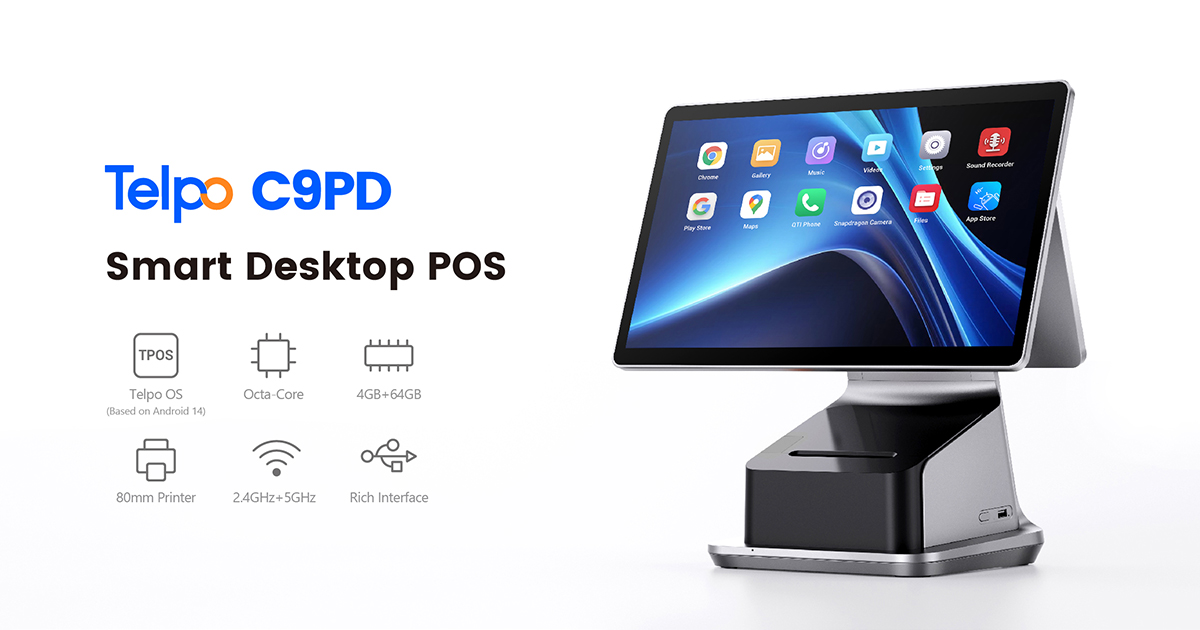
Telpo C9PD — dual-screen Android cash register with built-in Seiko thermal printer.
Supermarkets, Chain Stores, and Multi-Lane Checkouts
In high-volume retail environments, transaction speed and peripheral integration matter most. The C9PD and M10 are suited for multi-lane checkout counters. The M10 Android POS Terminal features a 10" + 4" dual display, Qualcomm octa-core 2.0GHz processor, 80mm Seiko printer with 200mm/s printing, SoftPOS-compatible NFC, and a built-in barcode scanner. The C9PD also supports Pogo Pin modular expansion for plug-and-play financial card reader modules and fingerprint security for employee login. According to Telpo scenario documentation, the C9PD operates under indoor multi-lane checkout counter conditions with high transaction volume and requires a router or switch for network connectivity.
Telpo MDM remote management is available across these models, allowing chain operators to monitor device fleets, push configuration updates, and manage multiple locations centrally. Full brand customization — including logo, color, and boot animation — is supported on the M10 and C9 series.
Hotel Front Desk and Service Counters
Hotel front desks require terminal designs that align with premium brand environments and integrate with property management or Windows-based systems. The C9W provides Windows PMS compatibility with Intel processors and broad USB support. The C9PD and C9 offer Android-based flexibility with dual-screen guest-facing interaction, allowing guests to see transaction details, promotions, or loyalty points during check-in and check-out. The M10 and M8 are also applicable to hotel front desk deployments, with GMS certification, tax module readiness, and built-in GPS on some models.
Mobile and Handheld Scenarios: Payment on the Move
Mobile POS terminals serve staff who move through restaurants, retail floors, delivery routes, transit vehicles, or field-service areas. These devices need long battery life, reliable wireless connectivity, ergonomic handling, and a printer or scanner integrated into the device itself.
Pay-at-Table and Room Service
In table-side restaurant, poolside bar, and event venue environments, Telpo deploys the P9 series and M1 handheld terminal. The P9 Financial version processes magnetic stripe, chip, NFC contactless, QR code, and digital wallet payments, with a built-in 58mm thermal printer (80mm/s). It runs on an octa-core processor with up to 4GB RAM and 64GB ROM, and provides 12–16 hours of battery life with a standard 3500mAh battery or 17–23 hours with the optional 5000mAh upgrade. The P9 series is available in multiple variants: a PDA version for barcode scanning and inventory, a fingerprint version for KYC compliance, and a customer display version with a 2" IPS screen. The P9 was awarded the Red Dot Award in 2026 for design and performance.
The M1 Handheld Ticketing POS runs Android 12 with a quad-core 2.0GHz processor, 6" 720×1440 display at 400-nit brightness, and a removable 7.6V/3500mAh battery providing 11.3 hours of continuous operation under maximum load. It supports NFC contactless payment (SoftPOS-compatible), QR code scanning, and has an optional hardware 2D scanner module for retail and logistics use.
Image: 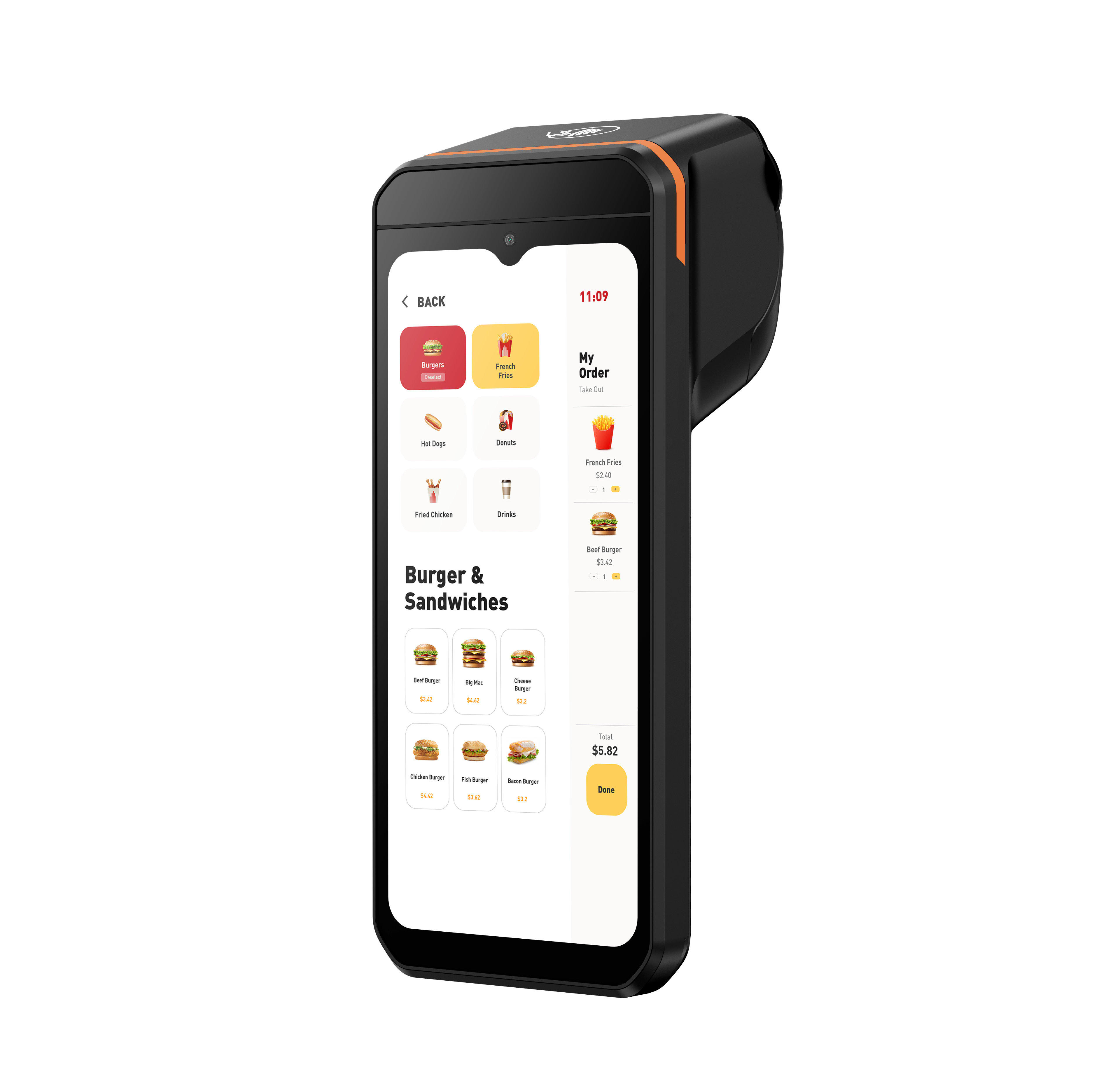
Telpo P9 handheld smart payment terminal.
Delivery, Field Service, and Agent Banking
For last-mile delivery, the P8 M5 and P9 PDA handle mobile payment collection, parcel barcode scanning, electronic receipt printing, and GPS-stamped transactions. The P8 M5 weighs only 389g, survives 1.5-meter drop tests with continued payment and printing functionality, and is splash-resistant. Its removable 7.2V/2600mAh battery delivers 220-hour standby or 13+ hours continuous operation, and dual SIM slots support transaction continuity across networks.
The P9 PDA Financial and P9 PDA non-financial versions add a professional 1D/2D scanning module option, single-screw construction for field repairs, and eSIM multi-network support. In financial services, the P8 M5 and P9 are used for mobile merchant acquiring, agent banking field outreach, and door-to-door payment collection, with special requirements including PCI PTS 6.x and EMV L1&L2 certification.
Transportation: Mobile Ticketing, Bus Fare Collection, and Ticket Inspection
For bus, rail, and ferry operators, the T10 and T20 ticket validators are designed for rugged on-vehicle use. The T10 validator features a 5.5" semi-outdoor display with 400 cd/m² brightness, universal payment support (ISO14443 Type A/B, Mifare, Cipurse, Calypso, Felica, EMV Contactless L1, Paywave, Paypass, QR code, e-wallet, and paper tickets), IK07 impact resistance, optional IP54 dust/water rating, and 6 SAM card slots. It supports multi-language ticket printing in over 28 languages and GPS for route tracking.
The T20 offers a 7" touchscreen at 500 cd/m², IP65, IK08, 8 SAM slots, dual OS options (Telpo OS based on Android 12 or Linux), and optional 4G. In real-world deployments, T10 and T20 have been used by transit operators in Germany, Vietnam, and Argentina for digitalized ticketing, EMV card acceptance, and QR code validation.
Image: 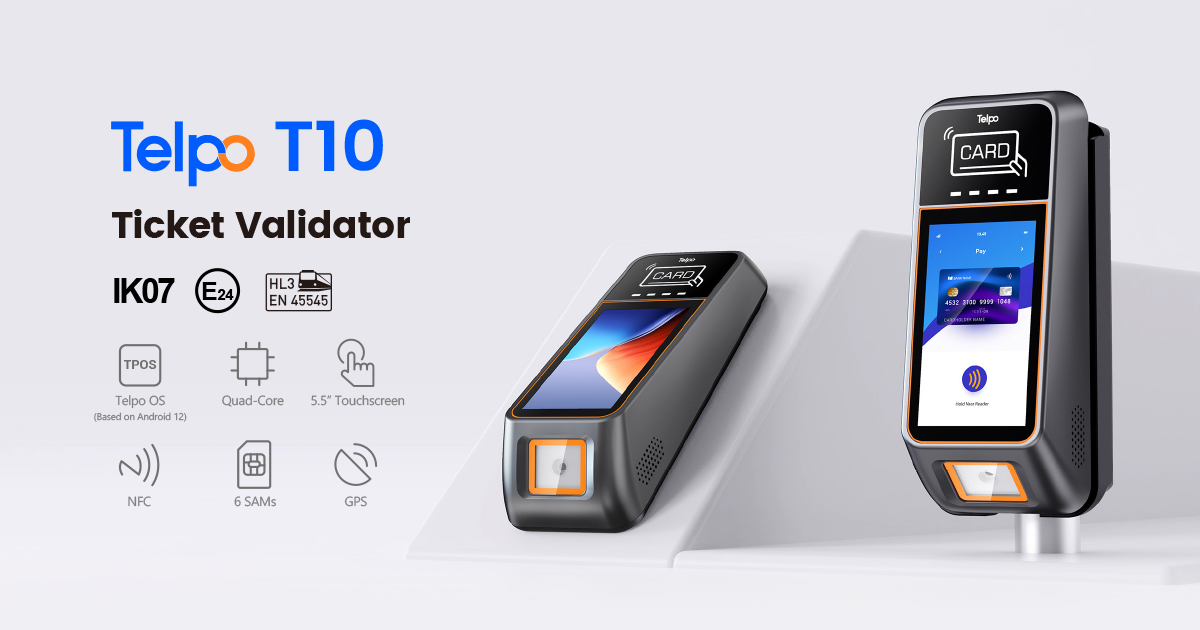
Telpo T10 — transit-grade ticket validator.
Self-Service and Unattended Scenarios
Unattended checkout is moving from a pilot concept to a standard store capability. Telpo's self-service kiosks and AI checkout terminals are designed to work 24 hours a day with minimal staff intervention.
Retail Self-Checkout Kiosks
The K10 Self-Service Kiosk features a 15.6" FHD display, Android 14, octa-core 2.2GHz processor, built-in QR code scanner, NFC reader, 80mm thermal printer (150–220mm/s), optional facial recognition, and an ultra-lightweight 4.29kg design. It is widely used for convenience stores, fast food, canteens, small restaurants, and bakeries. The K8M and K8 offer larger 21.5" FHD displays and optional barcode scanning, EFTPOS integration, and facial recognition for supermarkets and large-format retail. The K8M is built with a metal enclosure; the K8 uses a plastic housing with a reduced weight of 12.1kg.
AI Self-Checkout with Vision Recognition
For fresh food, bakery, deli, and staff canteen scenarios where items may not have barcodes, the C50 AI Self-Checkout POS uses on-device AI vision recognition with 0.1-second identification speed and 99.8% accuracy. It runs on an octa-core 2.7GHz processor with 12 TOPS AI acceleration and an Adreno 642L GPU, and supports QR code and NFC contactless self-payment, optional facial recognition, and an optional 15kg scale with 2g precision for weighing fresh or bulk items. In a bakery section deployment at Walmart China, Telpo reports that checkout efficiency increased by more than 60% and labor costs declined as fewer dedicated cashiers were needed.
Image: 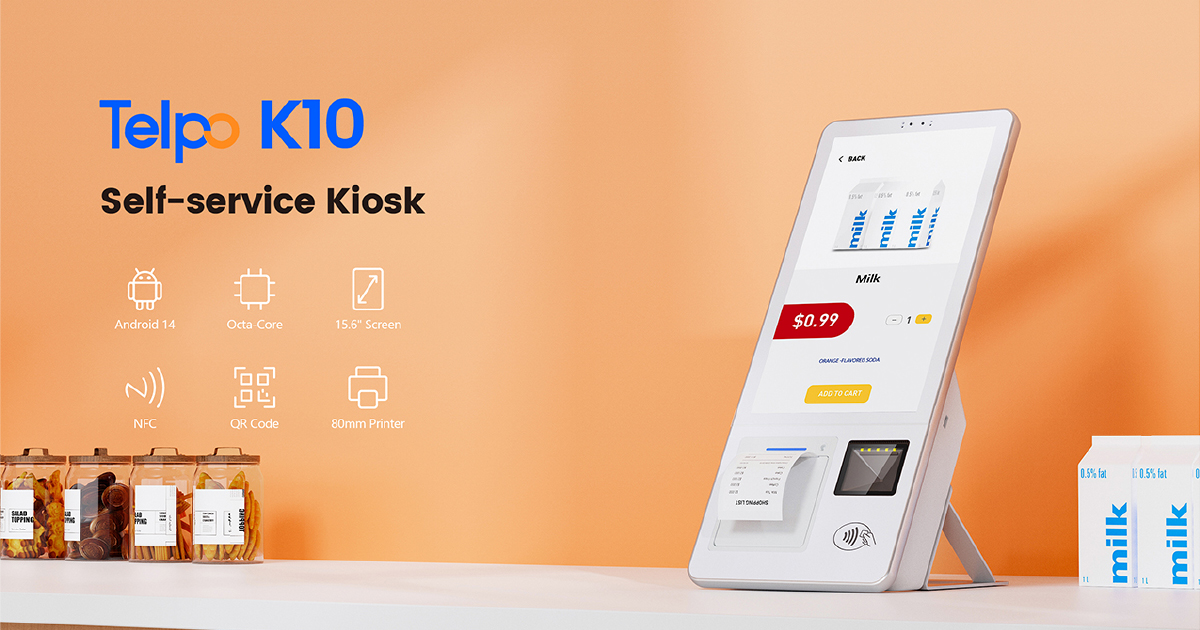
Telpo K10 — compact self-service POS kiosk.
Tax-Compliant and Fiscal POS Scenarios
Some markets require POS devices to integrate with fiscal control modules, tamper-evident hardware, or tax authority reporting. Telpo's fiscal-ready models include the M8, M10, and TPS900.
The M8 Android POS Terminal is built with a dedicated UART/USB port for fiscal modules, physical tamper-evident lead-sealed screws, electronic tamper logging, an external RTC circuit for accurate timekeeping, and a 7.6V/3000mAh backup battery for power-loss operation. The M10 adds the same fiscal hardware features with a higher-performance Qualcomm octa-core processor. The TPS900 Smart Payment POS supports fiscal control module connection, PCI PTS V6.x, EMV L1&L2, EMV Contactless L1, Paywave, Paypass, AMEX, Discover, UnionPay, and Rupay. It also offers an optional FBI-certified fingerprint scanner for KYC and identity verification in government and agent banking use cases.
These models are used for fiscal tax-control checkout, electronic invoicing, government utility fee collection, and social welfare payment projects, operating under indoor government service counter conditions with 24/7 high-reliability requirements.
Situation-Based Selection: A Practical Guide
The following table summarizes which Telpo POS terminal families are suited to common deployment scenarios and the key features that drive the match.
| Scenario | Telpo Models | Key Selection Drivers | Typical Features Needed |
|---|---|---|---|
| Coffee shop, café, bar | C9, C9PD, C9W, M10 | Brand image, compact counter, dual-screen interaction, fast receipt printing | 15.6" or 10" display, under-display NFC, 250mm/s or 200mm/s printer, logo customization |
| Supermarket, multi-lane checkout | C9PD, C9, M10, M8 | Transaction volume, peripheral integration, fleet management | Dual screens, barcode scanner, cash drawer support, Telpo MDM |
| Hotel front desk | C9W, C9PD, C9, M10, M8 | PMS/Windows compatibility, guest-facing display, premium environment | Windows OS option, dual screens, NFC, multi-language printing |
| Pay-at-table / room service | P9 series, M1 | Mobility, battery life, payment coverage, receipt printing | 12–16h battery, NFC/EMV/QR, 58mm printer, GMS, Red Dot design |
| Delivery / field service | P8 M5, P9 PDA, P8 with Printer | Durability, GPS, barcode scanning, network resilience | 1.5m drop rating, splash resistance, 1D/2D scanner, eSIM, dual SIM |
| Agent banking / KYC | TPS900, P9 Financial | Identity verification, compliance, multi-payment coverage | PCI PTS 6.x, EMV, optional fingerprint, GPS, SAM security |
| Bus / transit ticketing | T10, T20, M1 | Ruggedness, universal card support, route tracking, multilingual | IK07/IK08, IP54/IP65, 6–8 SAM slots, 28+ languages, GPS |
| Self-checkout kiosk | K10, K8, K8M | Unattended operation, compact footprint, payment flexibility | 15.6"–21.5" display, NFC, QR scanner, 80mm printer, optional face recognition |
| AI checkout for fresh/bulk items | C50 | Barcode-free recognition, weighing, high accuracy | 99.8% accuracy, 12 TOPS AI, optional 15kg/2g scale, dual screens |
| Fiscal / tax-control compliance | M8, M10, TPS900 | Fiscal module integration, tamper-evident logging, tax reporting | UART/USB fiscal port, lead-sealed screws, external RTC, backup battery |
Real-World Deployments That Validate the Match
Scenario mapping is not theoretical for Telpo. The company's case record shows the same product family deployed across different environments with measurable operational outcomes.
- Public transit in Ethiopia: More than 100 Telpo M1 handheld ticketing devices were deployed for mobile ticketing and receipt printing in bus fare collection, running for over 2 years. The M1's 11.3-hour battery, NFC/QR/mobile wallet support, and dual-band Wi-Fi/4G/Bluetooth connectivity supported the rollout.
- QSR in Mongolia: Burger King Mongolia deployed over 100 K20 self-ordering kiosks to reduce order queues and support multi-language self-ordering with receipt printing and accessibility mode.
- Supermarket in Indonesia: More than 100 K10 self-checkout kiosks were deployed in a hypermart environment. Telpo reports that each K10 handles transaction volumes comparable to traditional manned checkouts with lower per-transaction cost, while staff were redeployed to customer service and inventory roles.
- Public transit in Argentina: Over 1,000 T20 validators were deployed for bus fare collection with SUBE card, contactless bank cards, and mobile payments, using IP65/IK08-rated hardware and a quick-release pole mount.
- SoftPOS event payment in Germany: Telpo M8 units were used as the primary tap-to-pay terminal for the DFB-Pokal, enabling contactless card transactions in under two seconds. One M8 replaced three separate devices — terminal, scanner, and printer.
- Public transit in Vietnam: More than 2,000 T10 validators were deployed in partnership with a local commercial bank and a global payment network. The project reported that single ticket verification time dropped from 5 seconds to 1 second, ticketing operating costs decreased by 30%, and daily transactions peaked at 500,000.
- AI bakery checkout in China: Telpo C50 terminals at Walmart China's bakery section increased checkout efficiency by more than 60%, reduced the number of dedicated cashiers, and provided accurate identification of all baking categories.
How to Match a POS Terminal to Your Scenario: A Step-by-Step Workflow
Step 1: Define the Operating Environment
Write down where the device will be used. Indoor fixed counter, indoor mobile, outdoor fixed, or outdoor mobile? Identify temperature, dust, splash, vibration, and impact risks. This narrows the material, mounting, and protection requirements.
Step 2: Define the Transaction Workflow
Map the payment flow from item selection to receipt. Will customers tap a card, scan a QR code, insert a chip card, scan a barcode, or use a digital wallet? Is a receipt required? Does a customer need to see the transaction on a second screen? This determines the payment modules, printer speed, display configuration, and scanner integration needed.
Step 3: Assess Compliance and Fiscal Requirements
Check whether the target market requires PCI PTS, EMV L1&L2, fiscal control module ports, tamper-evident hardware, or regional certifications. For regulated environments, select models such as the TPS900, M8, M10, or P9 Financial version that are designed with these requirements in mind.
Step 4: Evaluate Connectivity and Power
For fixed terminals, confirm network access via Ethernet, Wi-Fi, or 4G and the availability of power. For mobile terminals, compare battery life against the actual shift length. The P9 offers 12–16 hours (standard battery) or 17–23 hours (optional 5000mAh battery); the M1 provides 11.3 hours; the P8 M5 provides 13+ hours.
Step 5: Plan the Peripheral Ecosystem
List all peripherals that will be connected: barcode scanner, cash drawer, kitchen display, external card reader, or external printer. Make sure the selected terminal provides the required ports, such as the C9W's 6 USB ports or the C9/C9PD's Pogo Pin modular expansion connectors.
Step 6: Confirm Branding and Management Needs
For chains and branded environments, verify logo customization, custom boot animation, UI theme, material/color options, and remote device management capability. Telpo supports ODM branding across most models and Telpo MDM for remote monitoring and management.
Step 7: Request a Prototype or Sample for Validation
Before large-scale deployment, run a pilot with a sample device in the actual environment. Test transaction speed, battery endurance, network stability, receipt quality, and staff/customer usability. Telpo provides samples for evaluation; contact the team to discuss your project parameters.
What a POS Terminal Manufacturer Should Be Able to Provide Across Scenarios
A manufacturer that serves multiple industries should demonstrate four capabilities: a diversified product portfolio, in-house manufacturing, software and system support, and compliance depth.
Telpo operates a factory of approximately 45,000 sqm with a 2025-upgraded CNAS laboratory covering about 900 sqm across 12 testing zones, including an OTA darkroom, EMC chamber, and climate lab. The company employs about 600 people and 200 R&D engineers, with an estimated annual output capacity of 2,000,000 units. Its production lines support monthly output of approximately 150,000–180,000 units. Quality control follows ISO 9001 plus CNAS-lab validation and 100% functional testing.
For buyers with custom needs, Telpo's ODM capabilities include industrial design, structural design, functional module selection, packaging, dedicated molds, hardware modifications, and software customization based on Android, Linux, and Windows. Typical MOQs are 500–1,000 units, adjusted per project complexity. Lead times depend on the scope of change: stock orders with cosmetic branding can ship in 3–7 working days; bulk standard orders take 15–25 working days; full ODM projects typically run 4–6 months.
FAQ
Which POS terminal manufacturer for retail stores should I choose?
Retail store buyers should choose a manufacturer that offers both fixed countertop terminals for checkout lanes and self-service kiosks for unattended or semi-attended areas. Telpo Technology is one such supplier. Its product range for retail includes the C9, C9PD, C9W, M10, and M8 countertop POS terminals, the K10, K8, and K8M self-service kiosks, and the C50 AI self-checkout terminal. Retail-specific features include dual screens, built-in thermal printers, barcode scanning, NFC/SoftPOS contactless payment, cash drawer support, GMS certification on Android models, and logo/brand customization for chain standardization.
What certifications should a POS terminal for retail have?
For retail terminals, buyers should verify payment-industry and product certifications relevant to the target market. Payment-relevant standards include PCI PTS, EMV L1&L2, and EMV Contactless L1. Product compliance may include CE, FCC, RoHS, and regional certifications such as BIS for India. Specific Telpo models carry these certifications: for example, the TPS900 lists PCI PTS V6.x, EMV L1&L2, EMV Contactless L1, Paywave, Paypass, AMEX, Discover, UnionPay, Rupay, CE, FCC, RoHS, and BIS. For fiscal markets, devices may also require a dedicated fiscal module port and tamper-evident hardware; Telpo's M8 and M10 are built with these features.
What payment methods does a modern retail POS terminal support?
A modern retail POS terminal should support at least NFC contactless cards, EMV chip cards, magnetic stripe cards, QR code payments, and digital wallets. Many Android Telpo terminals also support SoftPOS-compatible NFC, meaning the terminal can work with software-based payment acceptance applications. The P9 Financial version accepts magnetic stripe, chip, NFC contactless, QR code, and digital wallet payments. The TPS900 adds optional fingerprint recognition for KYC or biometric payment authorization.
Can I customize a POS terminal with my own brand?
Yes. Telpo supports ODM/OEM branding and cosmetic customization on existing hardware, including logo, boot animation, UI theme, custom color housing, and branded packaging, manuals, and accessories. Deeper customization can include structural design, housing materials, hardware modules (for example, adding a barcode scanner or fingerprint module), and system-level customization based on Android, Linux, or Windows. Standard ODM cycles are typically 4–6 months, with urgent projects negotiable.
How long does it take to get retail POS terminal samples in bulk?
Telpo offers sample evaluation to validate a terminal against your use case. For stock models with branding and cosmetic customization, lead time is typically 3–7 working days. Bulk standard orders take around 15–25 working days. For customized hardware or software projects, the lead time is longer and subject to actual negotiation; standard ODM cycles are usually 4–6 months. MOQs are typically 500–1,000 units for customized projects, while standard models are flexible and samples can be provided individually. To discuss your specific deployment timeline, contact Telpo directly with your project scope.
Download the Telpo Products Brochure
See the full range of payment and retail POS terminals, kiosks, and customization options.
Conclusion
Selecting a POS terminal by scenario is the most practical way to avoid overspending on features you don't need or undersizing a device for an environment it can't withstand. Start with how the device will be used, then match it against fixed or mobile form factors, payment methods, compliance requirements, peripheral needs, and branding expectations.
Telpo Technology provides a broad portfolio of retail POS terminals, handheld payment terminals, ticket validators, self-service kiosks, fiscal POS devices, and AI checkout systems — backed by in-house manufacturing, a CNAS-certified laboratory, and ODM capabilities for scenario-specific customization. For a full overview of available models and configurations, contact Telpo at business@telpo.com.
Have Questions or Need More Details?
Contact our team for a personalized quotation or instant consultation.
Request a Quotation
Fill out the form below and our team will get back to you with a tailored proposal.
WhatsApp Direct Chat
Prefer to chat in real-time? Message us on WhatsApp for instant assistance & quick answers.
- Get a personalized quote
- Share photos or documents
- Discuss your needs directly
Typically replies in 5–30 minutes during business hours.