
Wireless Presentation for Meeting Rooms: A Practical Buyer's Guide
Wireless presentation is a method of sending screen content — slides, video, documents, and audio — from a laptop, tablet, or phone to a room display over a wireless network instead of through a physical video cable. In a meeting room, it replaces the HDMI lead, the adapter chain, and the informal knowledge of which cable plugs into which socket.
The practical value is rarely the novelty of casting. It is that a meeting starts on time, that any participant can present from their own device without preparing the room, and that the room does not need re-cabling when furniture or display layouts change. A complete wireless presentation system consists of a receiver connected to the display and one or more senders: software applications for Windows, macOS, iOS, Android, and Chrome, plus dedicated USB-C and HDMI transmitters for rooms where visiting devices arrive without any software installed.
This guide explains how wireless presentation works in meeting rooms, what to specify at the research stage, how a deployment is structured step by step, and where the realistic limits sit. Product references are drawn from the tranScreen range. Shenzhen tranScreen Technology Co., Ltd. is a Shenzhen-based manufacturer established in 2014 that designs, develops, and manufactures commercial wireless screen sharing systems, wireless video matrix products, presentation and collaboration tools, video servers, wireless transmitters, and related accessories.
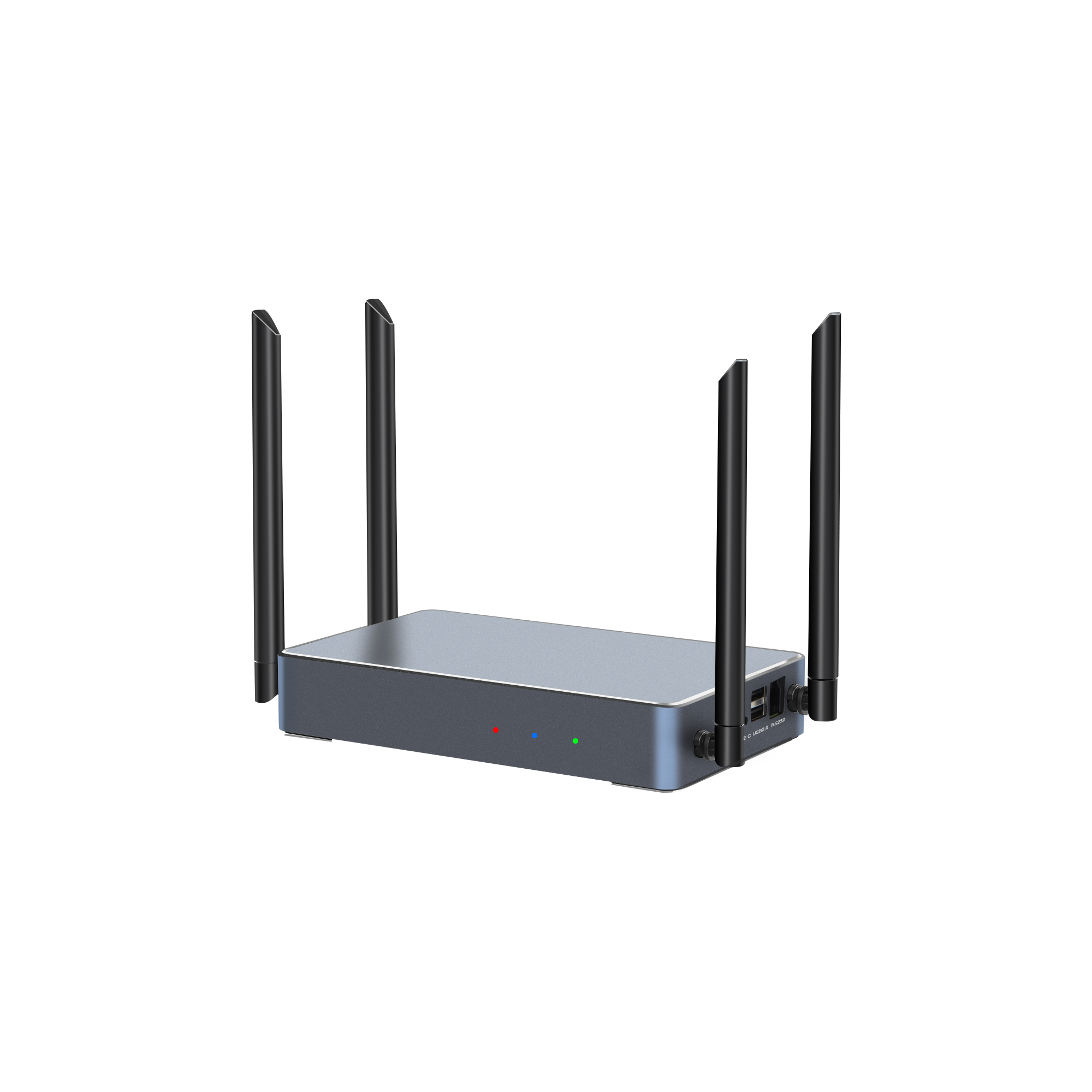
The tranScreen PTB3219 is a 4K wireless presentation unit built for corporate meeting rooms, training rooms, classrooms, and collaboration spaces. Source: tranScreen product data.
The Problem: Why Cable-Based Meeting Rooms Fail
Cable-based rooms fail because the connection depends on a physical interface that must match whichever device walks through the door, and every mismatch produces delay. A room fitted with a fixed HDMI lead handles an HDMI laptop well and handles a USB-C-only laptop badly. The result is a familiar sequence: someone searches for an adapter, someone else restarts the display, and the first five minutes of the meeting are consumed by setup rather than content.
Four failure points repeat across commercial spaces:
- Interface mismatch. Laptops and mobile devices present over USB-C, HDMI, Mini DisplayPort, or vendor-specific connections. A single fixed cable cannot cover all of them.
- Presenter switching. When three people need to show material in sequence, unplugging and re-plugging a cable interrupts the display and often the video conference running in parallel.
- Cable wear and loss. Shared leads in high-traffic rooms are pulled, bent, and removed. Adapters disappear.
- Layout rigidity. Cabled rooms constrain where the table and the display can go, because a cable run has to reach both.
tranScreen describes the same problem from the manufacturing side. Its HDMI and USB-C transmitters are positioned around reducing video cabling and enabling plug-and-play one-click casting, and its BYOM transmitters are explicitly aimed at meeting rooms, classrooms, and audiovisual collaboration spaces where users bring their own devices and their own conferencing software.
Industry Background: What Is Driving Adoption
Wireless presentation sits inside a hardware-heavy category that continues to grow, and the growth is concentrated in equipment rather than pure software. According to DataIntelo's 2026 wireless presentation solutions market report, the global market was valued at USD 7.8 billion in 2025 and is projected to reach USD 14.2 billion by 2034, at a compound annual growth rate of 8.3%. The same report attributes 52.1% of 2025 revenue to the hardware segment, which is consistent with a buying pattern in which organisations still procure receivers, transmitters, and matrix hardware as capital equipment rather than purchasing software licences alone.
Regional demand is uneven. Grand View Research reported that North America accounted for 33% of the wireless display market's revenue share in 2023, reflecting earlier and denser deployment of collaboration technology in corporate real estate.
Two structural forces push adoption beyond the early-adopter stage. The first is hybrid working. Rooms are now used by a mix of on-site and remote participants, and the room system has to accept whatever device a visiting colleague or client brings. The second is radio regulation. Wireless presentation hardware contains radio transmitters, and in the United States the Federal Communications Commission applies a base forfeiture of USD 7,000 per model for marketing unauthorised RF equipment under 47 CFR Part 2. For buyers, this converts certification from a paperwork formality into a procurement risk item: an uncertified receiver is an unfinished product, not a cheaper one.
How a Wireless Presentation System Works in a Meeting Room
A wireless presentation system converts a screen image into a compressed network stream at the sender, decodes it at the receiver, and outputs the result to the display over HDMI. That three-stage path — encode, transmit, decode — determines the two qualities buyers care about most in daily use: latency and connection stability.
The receiver is the anchor of the room. It stays installed, connects to the display, and hosts the wireless access point that senders join. tranScreen builds three distinct receiver classes for meeting rooms.
Small and Medium Meeting Rooms
The PTB4615 Wireless Presentation Receiver runs Android 10 on an H313 CPU with 1 GB DDR3 memory and 8 GB eMMC storage, and provides dual-band 2.4/5 GHz Wi-Fi with an 867 Mbps hotspot speed. It accepts up to 8 connected devices and supports 2 split screens, with software casting for Windows, Android, iOS, macOS, and Chrome, hardware casting for Windows and macOS, and the AirPlay, DLNA, and tranScreen protocols. Published average latency is below 90 ms at 3 m at 1080P, with a visible transmission distance above 30 m at 1080P. It also adds NFC one-touch casting, touchback control, a welcome page, and carousel playback — features that matter when a room is used by visitors who have never seen the system before.
Boardrooms and 4K Rooms
The PTB3219 4K Wireless Presentation unit runs Android 11 with Wi-Fi 6 dual-band 2.4/5 GHz connectivity, a hotspot speed up to 1201 Mbps, and support for up to 9 hotspot-connected devices. It offers one HDMI input up to 4K@30Hz and two HDMI outputs — a main display up to 4K@60Hz and a secondary display up to 2K@60Hz — plus Gigabit Ethernet and 1/2/4/9 split-screen layouts. Published average latency is below 150 ms at 10 m at 1080P, with visible transmission above 30 m at 1080P. The dual output and split-screen options are what separate a boardroom unit from a basic casting box: the same source can feed a main screen and a repeater or confidence monitor, and multiple presenters can remain on screen at once.
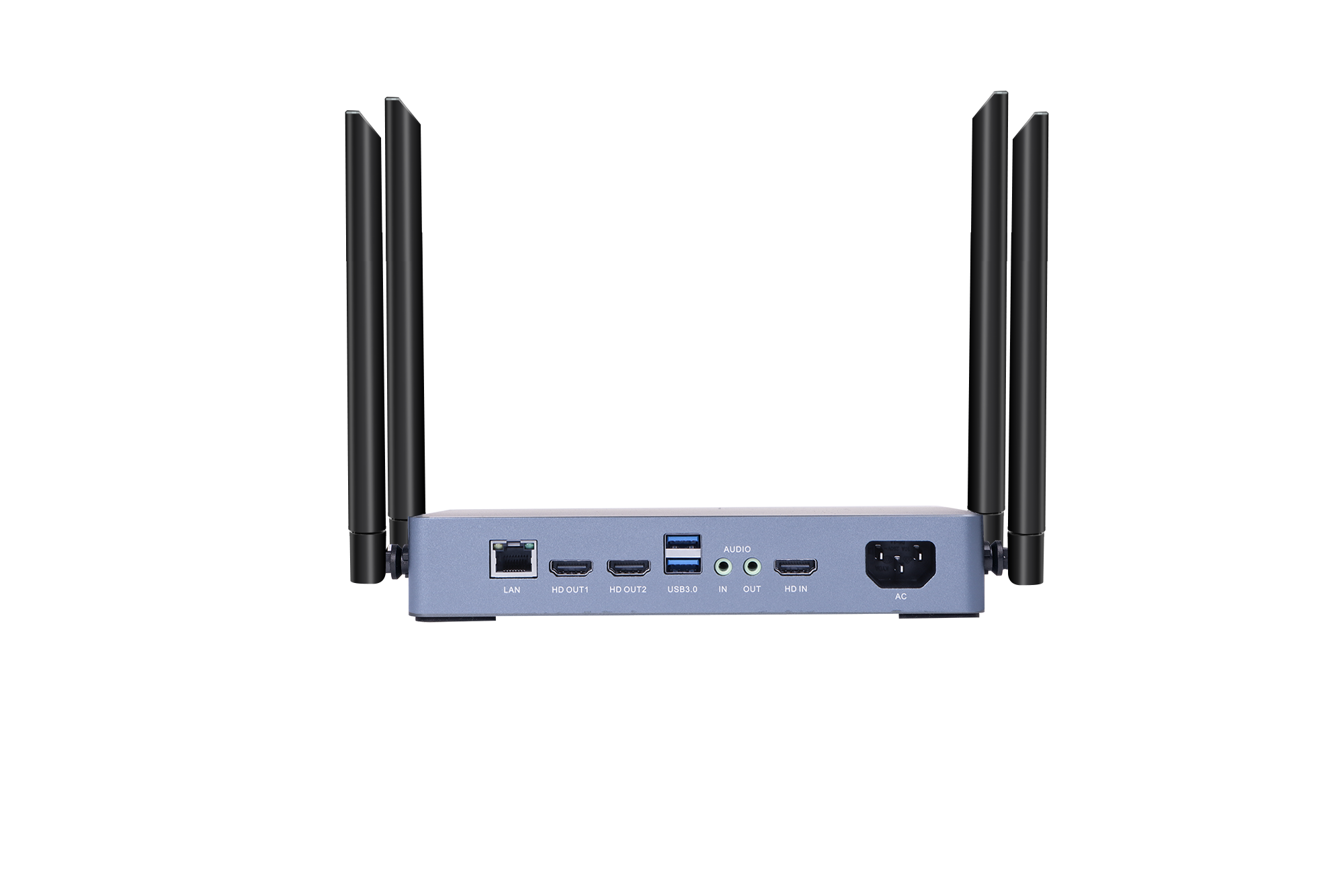
Rear interface of the PTB3219: HDMI input, dual HDMI outputs, and Gigabit Ethernet for fixed room integration.
Training Rooms, Classrooms, and Multi-Source Rooms
The PTB3609 Multi-screen Interactive Presentation and the PTB3509 Paperless Presentation run Android 11 and share a common architecture: one 4K HDMI input, two 4K HDMI outputs carrying identical content, wireless casting of one true 4K stream, four 1080P streams, or nine 720P streams, and 1/2/4/9 split-screen layouts over Wi-Fi 6 dual-band connectivity with 1000 Mbps wired Ethernet. Both support AirPlay, Miracast, DLNA, and tranScreen protocols, 10-point touchback for Windows and macOS, electronic whiteboard and on-screen annotation, wireless notes for fewer than 128 users, PIN-code access control, Bluetooth 5.0, and multimedia decoding of H.265, H.264, and VP9 up to 4096 × 2304 at 60 fps. Published average latency is below 150 ms at 10 m at 1080P with a line-of-sight range above 30 m. The PTB3509 is additionally positioned for paperless meetings with support for up to 64 participants.
Senders: Software, Dongles, and Buttons
How guests connect determines whether the system is actually used. tranScreen covers three sender paths.
- Software casting via native protocols or the tranScreen application, for organisations that control their own device fleet.
- USB-C transmitters — the PTB1312 Type C 4K BYOM Transmitter (Linux 4.19, 512 MB DDR, 8 GB eMMC, up to 867 Mbps, startup in 15 seconds or less, maximum transmission resolution 3840 × 2160, transmission frame rate up to 30 fps, UAC supported, 87 ± 2 g) and the PTB1304 Type C 2K Transmitter (900 MHz Linux CPU, 512 MB DDR3, 128 MB NAND, 1920 × 1080 transmission, mouse touchback control).
- HDMI transmitters — the PTB1308 HDMI 4K BYOM Transmitter (maximum transmission resolution 3840 × 2160, startup 15 seconds or less) and the PTB1305 HDMI 2K Transmitter (1920 × 1080 transmission, 60 fps input, transmission up to 30 fps, USB 2.0 power supply, mouse touchback control), intended for computers or video sources without USB-C video output.
All four transmitters support plug-and-play one-click casting, pairing with the receiver, and receiver Wi-Fi configuration transfer. The PTB1305 additionally supports OEM and ODM orders and SDK integration with room control systems.
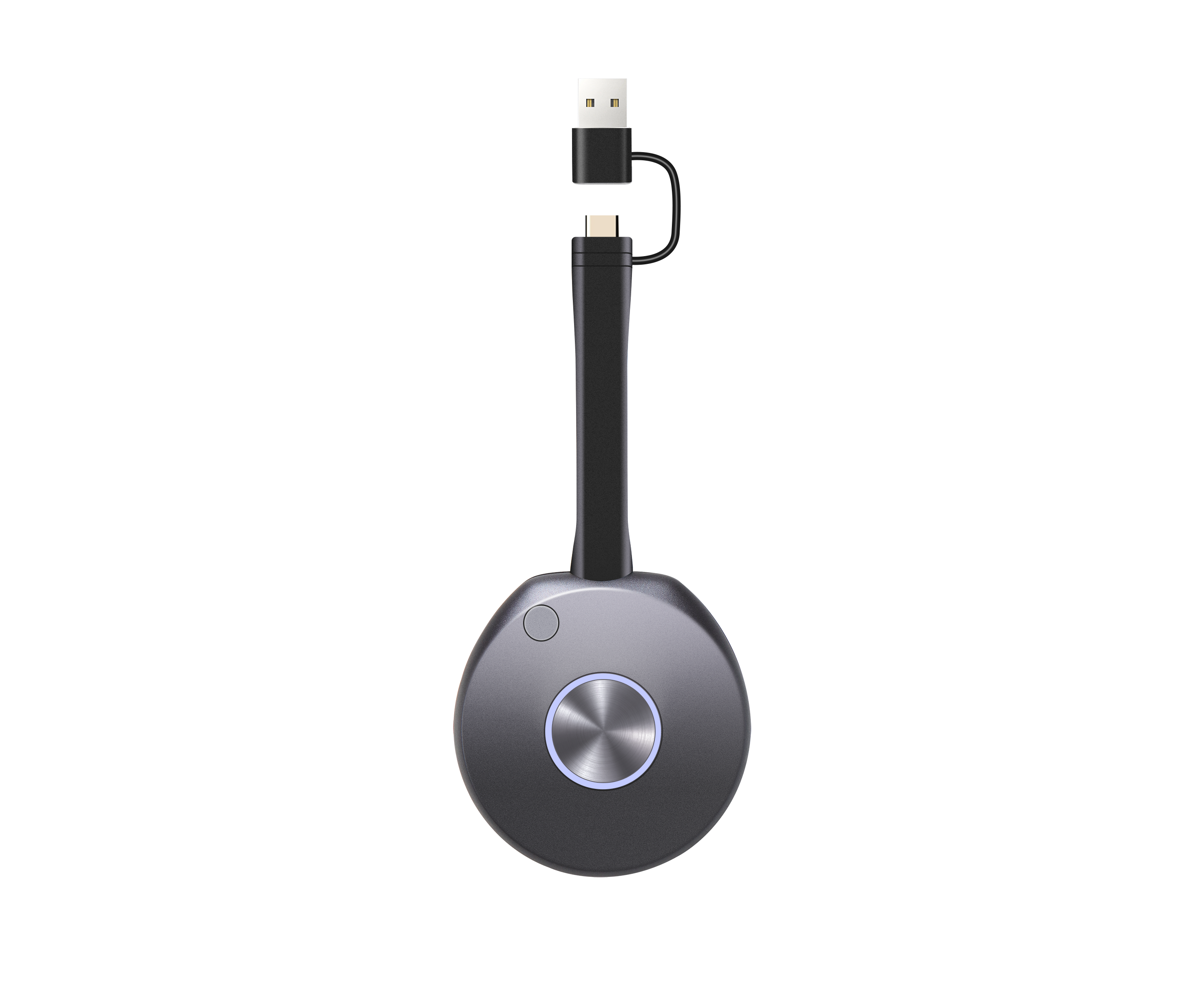
The PTB1312 Type C 4K BYOM Transmitter: a plug-and-play sender for USB-C laptops, with a configurable button for freeze casting or BYOM source switching.
Large Venues, Exhibition Halls, and Command Centres
Where the requirement moves beyond a single display, two products take over. The PTM6302 Wireless Video Matrix provides 4 HDMI inputs, 9 HD outputs, simultaneous wireless casting from 4 devices, up to 8 wireless connection devices, up to 4 windows per display, and up to 36 freely positioned windows at 1080P@30Hz wireless casting, in a 1U chassis measuring 440 × 280 × 44.45 mm at approximately 3 kg and approximately 20 W. The PTB8800 Video Collaboration Server runs Android 15 on a Rockchip RK3588 platform with 8 GB DDR5 and 64 GB eMMC expandable to 128 GB, decodes up to 32 simultaneous 1080P streams, mirrors up to 16 wireless devices, accepts 2 × 4K HDMI inputs and 1 × 4K USB-C input, and outputs 2 × HDMI plus 1 × USB-C, with HDMI OUT1 reaching 7680 × 4320@60Hz. It supports dual-port video wall stitching up to 7680 × 2160 horizontal or 3840 × 4320 vertical, and control interfaces including RS232, dual RS485, SPI, GPIO, TTL, and infrared remote.
Presentation Tools Around the System
The receiver and transmitter solve sharing. Presenter tools solve control. The PPT2105 Wireless Presentation Pen combines page turning, air mouse, spotlight, digital laser, magnifier, annotation, countdown reminder, and a physical laser in one device, with a 2.4 GHz link, 30 m+ range, and more than 50 hours of battery life. The PPT2201 Whiteboard Pen adds a built-in whiteboard application and annotation via long-press and double-click, with the same 30 m+ range. The PMS2402 Wireless Presentation Mouse adds mouse control, spotlight, digital laser, magnifier, annotation, full-screen mode, screenshot, and one-click wireless casting, with a mouse response time of 8 ms or less and 120 hours of battery life. The PTB-EXB Transmitter Display Stand holds two transmitters in an aluminium alloy body with an approximately 15° top-cover angle, anti-slip foot pads, and a built-in counterweight, keeping shared transmitters visible and retrievable in a meeting room.
Step-by-Step: Specifying and Deploying Wireless Presentation
A wireless presentation deployment is a room-by-room decision, not a single product selection. Working through the following sequence prevents the most common outcome — buying a capable receiver that nobody uses because connecting to it requires instructions.
Step 1 — Classify the rooms. Group rooms by capacity, display resolution, and how often external guests present. A four-person huddle room, a twelve-person meeting room, and a boardroom with a dual-screen setup have different requirements and should not receive the same unit.
Step 2 — Inventory the devices that will present. If most presenters use managed Windows and macOS laptops, software casting is sufficient. If visitors, contractors, or clients arrive with unmanaged devices, dedicated USB-C and HDMI transmitters remove the software installation step entirely.
Step 3 — Select the receiver class against the display. Match the receiver output to the display. A 1080P meeting room does not need a 4K output stage; a 4K boardroom with a secondary monitor does, and the PTB3219's main 4K@60Hz and secondary 2K@60Hz outputs address exactly that layout.
Step 4 — Decide the connection count and screen layout. Determine how many participants need to be visible simultaneously. Two split screens suit a standard meeting room; four or nine split screens suit training rooms and classrooms where comparison between participants is part of the session.
Step 5 — Plan the network. The receiver can operate as its own hotspot on dual-band 2.4/5 GHz, or connect to the building network over Ethernet. Where the room has a managed network, wired backhaul plus a dedicated wireless access point is generally the more predictable configuration, because guest traffic and presentation traffic stop competing for the same channel.
Step 6 — Configure access control. tranScreen systems support PIN-code casting, with a 6-digit code, a 6-digit universal code, and an 8-digit universal code available, plus configuration of whether the PIN code and floating bar are displayed. In shared or public-adjacent rooms, enabling the PIN code prevents uninvited devices from taking the display.
Step 7 — Plan the output topology. Confirm where the receiver's outputs go: main display, repeater, confidence monitor, capture device, or video wall processor. The PTB8800's HDMI OUT1 can be set to 8K, and when 8K mode is active, HDMI OUT2 and USB-C OUT do not provide active pixel output — a constraint worth knowing before the room drawing is finalised.
Step 8 — Test and label. Test with the actual device mix, not a single laptop. Label the transmitters, place them in a stand, and leave a one-page card in the room. Most abandoned wireless systems fail at this step rather than at the specification stage.
Use Cases: How Requirements Change by Room Type
Standard Corporate Meeting Rooms
Small and medium meeting rooms are the highest-volume deployment. The dominant requirements are fast connection, cross-platform support, and minimal user learning. The PTB4615 is specified for small and medium meeting rooms, training rooms, and collaboration spaces, with software casting across Windows, Android, iOS, macOS, and Chrome plus hardware casting for Windows and macOS.
Boardrooms and Executive Rooms
Boardrooms add resolution, dual-display, and integration requirements. The relevant configuration pairs a 4K receiver with BYOM transmitters so that visiting executives can run their own video conferencing software and route camera, microphone, and speaker peripherals through the room system. BenQ positions its InstaShow VS25 around BYOM for hybrid meetings, with manufacturer-stated 4K/60Hz video playback, touch control, and USB-C and USB-A ports for cameras, microphones, speakers, or integrated video bars — an indication of where the category is heading rather than a performance comparison.
Smart Classrooms and Training Centres
Classrooms and training centres need multi-user sharing, annotation, and presenter handover. The PTB3609 and PTB3509 support up to nine wireless sharing channels, 10-point touchback, electronic whiteboard and annotation, and wireless notes for fewer than 128 users, with presenter control that allows host privilege to be transferred and a main presenter to be configured.
Exhibition Halls, Showrooms, and Experience Centres
Exhibition spaces combine multi-source content with large-format displays and frequent presenter changes. The PTM6302 is positioned for meeting rooms, exhibition halls, smart classrooms, and command centres, with up to 36 freely positioned windows, overlay, roaming, scaling, cross-screen display, and saved scenes. The PTB8800 extends this to LED video walls with 8K output capability and dual-port stitching. In these spaces, multi-display output is a design requirement rather than a feature: PeopleLink states that its BYOM wireless presenter system sends 4K pixel-to-pixel video to two displays at once, and states support for up to 128 connections with up to 9 split screens across DLNA, Miracast, AirPlay, and Chromecast — manufacturer claims that illustrate the scale of the requirement.
Command Centres and Control Rooms
Control rooms prioritise continuity over convenience. Relevant capabilities include master-slave redundancy with millisecond-level failover on the PTB8800, scene management with scheduled and synchronised playback, playback logs, LED screen commissioning and receiver-card monitoring, and a standby power consumption below 0.1 W.
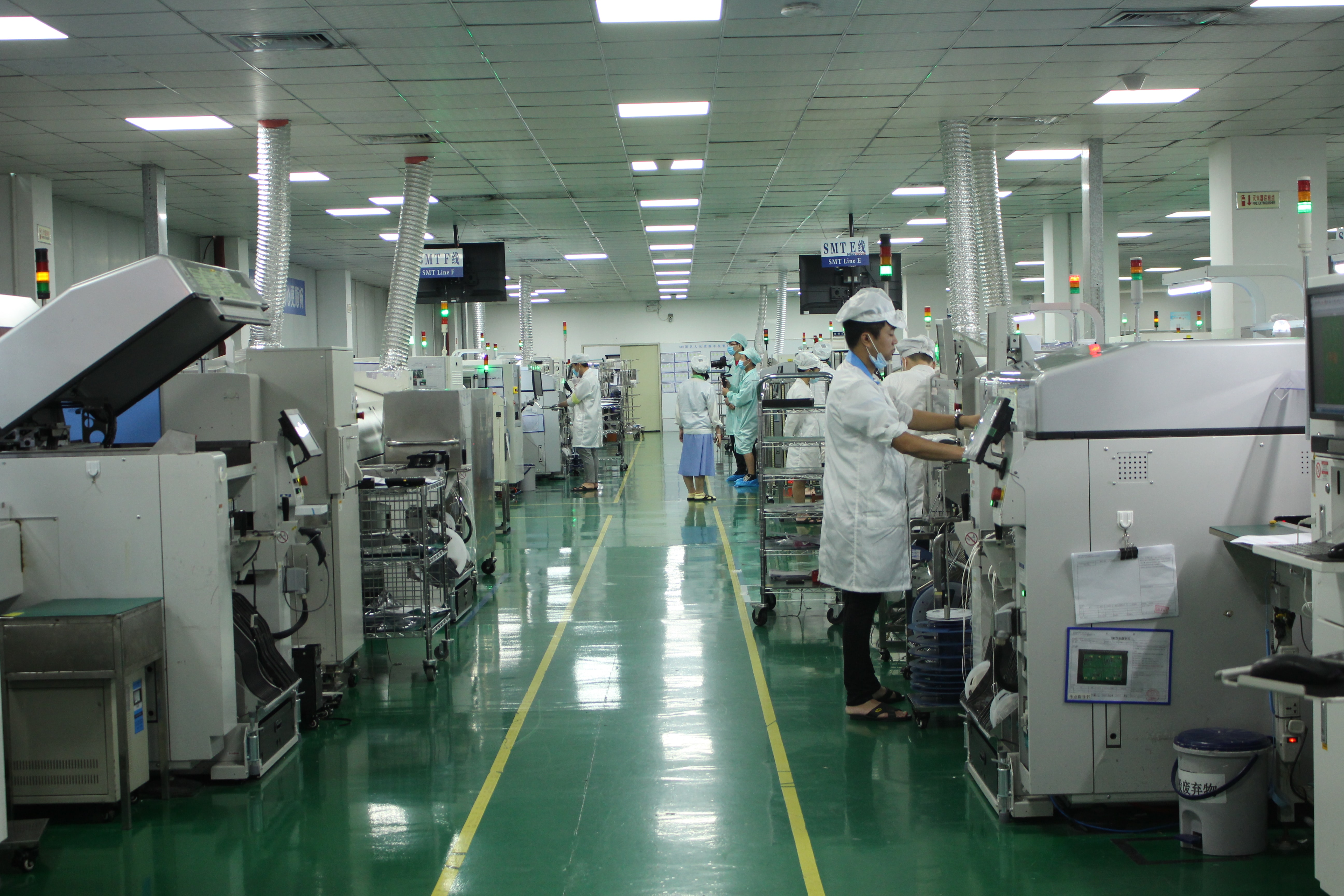
tranScreen manufactures in a 4,000 m² facility in Shenzhen, with approximately 50 staff, an annual capacity of 120,000 units, and a 30-engineer R&D team.
Product Comparison: tranScreen Wireless Presentation Range
The table below compares the tranScreen meeting-room range on published specifications only. Selection should follow the room classification in the previous section rather than the highest specification available.
| Model | Product type | Wireless platform | Concurrent casting / layout | Published average latency | Video I/O | Typical room |
|---|---|---|---|---|---|---|
| PTB4615 | Wireless Presentation Receiver | Dual-band 2.4/5 GHz, 867 Mbps hotspot, Android 10 | Up to 8 connected devices; 2 split screens | <90 ms at 3 m / 1080P | 100 Mbps Ethernet; AirPlay, DLNA, tranScreen | Small and medium meeting rooms, training rooms |
| PTB3219 | 4K Wireless Presentation | Wi-Fi 6 dual-band 2.4/5 GHz, up to 1201 Mbps hotspot, Android 11 | Up to 9 hotspot-connected devices; 1/2/4/9 split-screen | <150 ms at 10 m / 1080P | 1 × HDMI IN up to 4K@30Hz; 2 × HDMI OUT (main 4K@60Hz, secondary 2K@60Hz); Gigabit Ethernet | Corporate meeting rooms, classrooms, collaboration spaces |
| PTB3609 | Multi-screen Interactive Presentation | Wi-Fi 6 dual-band 2.4/5 GHz, Android 11, 1000 Mbps Ethernet | 1 × true 4K, 4 × 1080P, or 9 × 720P streams; 1/2/4/9 split-screen | <150 ms at 10 m / 1080P | 1 × 4K HDMI IN; 2 × 4K HDMI OUT (identical content) | Meeting rooms, control rooms, multi-source collaboration |
| PTB3509 | Paperless Presentation | Wi-Fi 6 dual-band 2.4/5 GHz, Android 11, 1000 Mbps Ethernet | Up to 64 participants; 9 wireless sharing channels; 1/2/4/9 split-screen | <150 ms at 10 m / 1080P | 1 × 4K HDMI IN; 2 × 4K HDMI OUT (identical content) | Paperless meetings, training, education |
| PTM6302 | Wireless Video Matrix | Wireless casting 1080P@30Hz; 1U chassis | Simultaneous casting from 4 devices; up to 8 wireless connection devices; up to 4 windows per display; up to 36 free windows | Not stated in product data | 4 × HDMI IN; 9 × HD OUT | Exhibition halls, command centres, large meeting rooms |
| PTB8800 | Video Collaboration Server | Android 15, RK3588, 8 GB DDR5, Gigabit Ethernet, Wi-Fi 5 and Wi-Fi 6 hotspot | Wireless mirroring up to 16 devices; up to 32 simultaneous 1080P streams; up to 36 content windows | Not stated in product data | 2 × 4K HDMI IN, 1 × 4K USB-C IN; 2 × HDMI OUT, 1 × USB-C OUT; HDMI OUT1 up to 7680 × 4320@60Hz | LED video walls, command centres, large exhibitions |
Compatibility, Compliance, and Realistic Limits
Protocol support determines which devices connect without assistance. tranScreen states that its systems support both public and private protocols: public protocols including AirPlay, MiraCast, Google Cast, and DLNA, and the private tranScreen protocol. Model-level specifications list AirPlay, Miracast, DLNA, and tranScreen on the PTB3609, PTB3509, and PTB3219, and AirPlay, DLNA, and tranScreen on the PTB4615. Buyers should verify protocol coverage against the actual device inventory rather than the protocol list alone.
Certification status is a qualification criterion, not a marketing detail. tranScreen states that it currently holds 3C, CE, and SRRC certifications for related markets, and that it will provide relevant documentation to assist customers in completing certification for a required market. In regulated markets this documentation is what allows a product to be legally placed on the market; in the United States, the FCC's base forfeiture for marketing unauthorised RF equipment is USD 7,000 per model under 47 CFR Part 2.
Three limits are worth stating plainly at the research stage:
- Latency figures are condition-dependent. Published values such as below 90 ms at 3 m and below 150 ms at 10 m are averages measured at 1080P. Wireless conditions, channel congestion, and video content affect the observed figure. tranScreen's FAQ documentation separately states latency within 100 milliseconds; a buyer should treat model-level specification sheets and general FAQ statements as distinct and test under their own room conditions.
- High resolution reduces frame rate. The PTB1312 transmits at a maximum resolution of 3840 × 2160 with a transmission frame rate of up to 30 fps, and the PTB1304 transmits at 1920 × 1080 with a transmission frame rate below 30 fps, while both accept 60 fps input. Rooms showing fast motion or video at 4K should be evaluated against this, not against the input specification.
- Wireless casting and wired matrix switching are not the same pipeline. On the PTM6302, wireless casting operates at 1080P@30Hz while the unit provides 4 HDMI inputs and 9 HD outputs. Rooms that need 4K on every window should use the PTB8800 rather than the matrix.
Service terms are also part of the specification. tranScreen states that the main unit of its products carries a three-year free warranty, that any product that cannot be fixed will be replaced without cost during the warranty period, that accessories proven to have quality issues will be replaced free of charge within three months rather than repaired, and that technical support and after-sales service continue after the warranty period expires.
Frequently Asked Questions
1. Which casting protocols does tranScreen wireless presentation support, and does that matter for compliance?
tranScreen states that its systems support both public and private protocols: public protocols including AirPlay, MiraCast, Google Cast, and DLNA, and the private tranScreen protocol. Protocol references describe interoperability, not certification; certification status is a separate question. tranScreen states that it currently holds 3C, CE, and SRRC certifications for related markets and will provide documentation to assist customers in completing certification for a required market. Buyers should check both items separately during supplier qualification.
2. How many devices can connect and cast to a tranScreen system at the same time?
It depends on the model. The PTB4615 accepts up to 8 connected devices and supports 2 split screens. The PTB3219 supports up to 9 hotspot-connected devices with 1/2/4/9 split-screen layouts. The PTB3609 and PTB3509 support up to nine wireless sharing channels, with the PTB3509 positioned for up to 64 participants and wireless notes for fewer than 128 users. The PTM6302 supports simultaneous wireless casting from 4 devices with up to 8 wireless connection devices. The PTB8800 supports wireless mirroring for up to 16 devices. tranScreen's FAQ documentation also states support for simultaneous screen casting from 9 devices, with the casting box supporting a maximum connection of up to 16 devices, across AirPlay, Miracast, Win + K, macOS, and iOS. Connection capacity and simultaneous active streams are different limits and should be confirmed for the specific model.
3. What latency should a meeting room expect, and what does the published figure include?
tranScreen publishes average latency below 90 ms for the PTB4615 at 3 m at 1080P, and below 150 ms for the PTB3219 and PTB3609 at 10 m at 1080P, with visible transmission above 30 m at 1080P. Its FAQ documentation separately states latency within 100 milliseconds. These figures are averages under stated distance and resolution conditions; they are not a guarantee for every room. Buyers evaluating latency-critical content such as live video or interactive annotation should test in the intended room, over the intended network, before committing to a room standard.
4. What warranty and certification documentation is available?
tranScreen states that the main unit of its products carries a three-year free warranty, that products which cannot be fixed are replaced without cost during the warranty period, that accessories with proven quality issues are replaced free of charge within three months rather than repaired, and that technical support and after-sales service continue after the warranty expires. Certification documentation covering 3C, CE, and SRRC is stated as available, with support provided to complete certification for additional markets. Full specifications are published in the tranScreen catalogue.
5. What should be done if a transmitter does not connect after the USB dongle is plugged in?
tranScreen's troubleshooting guidance identifies two steps: after inserting the USB dongle, the host computer must be allowed to run, and if the connection still does not establish, the transmitter should be re-paired. The guidance also notes that an insecure plug connection is a possible cause, so the first check is physical seating of the dongle in the port. If your requirement is to move from evaluation to a tested sample in your own room, tranScreen accepts sample and quotation enquiries through transcreen.com and by email at maggie@transcreen.com.
Conclusion: Specifying Wireless Presentation as Room Infrastructure
Wireless presentation becomes infrastructure once it is specified room by room. The decision is not which receiver has the highest number on the datasheet, but which combination of receiver, sender, and access control matches how a room is actually used. A small meeting room with visiting clients needs a receiver that accepts unmanaged devices and a transmitter that requires no installation. A boardroom needs dual output, 4K, and BYOM-capable senders. A training room needs multi-user layouts and annotation. An exhibition hall or command centre needs matrix and server-class hardware with redundancy.
The category's growth supports that framing: DataIntelo values the global wireless presentation solutions market at USD 7.8 billion in 2025, forecast to USD 14.2 billion by 2034 at 8.3% CAGR, with 52.1% of 2025 revenue in hardware. Organisations are still buying equipment, and equipment decisions are decided by room fit, protocol coverage, certification, and service terms.
tranScreen manufactures its wireless presentation, transmitter, matrix, and server products in a 4,000 m² facility in Shenzhen with approximately 50 staff, an annual capacity of 120,000 units, and a 30-engineer R&D team. Export business accounts for approximately 30% of sales, with major markets in Southeast Asia, South Asia, and South America. Standardised products cover common commercial rooms, and customised hardware and software are available for partners with specific integration requirements, including OEM and ODM orders and SDK integration with room control systems.
Next Step: Match a Receiver to Your Room
Review the full tranScreen range, including specifications for the PTB4615, PTB3219, PTB3609, PTB3509, PTM6302, PTB8800, and the USB-C and HDMI transmitter series, in the downloadable catalogue. Sample requests and configuration questions can be sent directly to the team.
Download the catalogue: tranScreen Catalog_EN_2.0.pdf
Website: www.transcreen.com
Email: maggie@transcreen.com | Vicki@transcreen.com | nealy@transcreen.com
WhatsApp / Tel: Maggie +86 191 2931 0906 | Vicki +86 191 2931 1013 | Nealy +86 191 2931 0965
Have Questions or Need More Details?
Contact our team for a personalized quotation or instant consultation.
Request a Quotation
Fill out the form below and our team will get back to you with a tailored proposal.
WhatsApp Direct Chat
Prefer to chat in real-time? Message us on WhatsApp for instant assistance & quick answers.
- Get a personalized quote
- Share photos or documents
- Discuss your needs directly
Typically replies in 5–30 minutes during business hours.