
Key Features to Consider in a Direct to Fabric Sublimation Printer
A direct to fabric digital printer is specified for two things that are easy to measure and one that is not. The measurable items are print quality and output per hour. The item that is rarely written into the purchase order, yet decides whether the other two hold up over a three-shift week, is the electrical behaviour of the machine: how it tolerates voltage sag, harmonics and transients on a factory supply, and what documentation the supplier can produce to prove it.
This guide sets out the features worth checking before an order for a fabric-direct sublimation line. It treats power quality and EMC documentation as a first-class specification item, because on a sublimation line the ink is the payload and the printhead is an electrically driven device — when the supply is disturbed, the visible result is a print defect, not an error code.
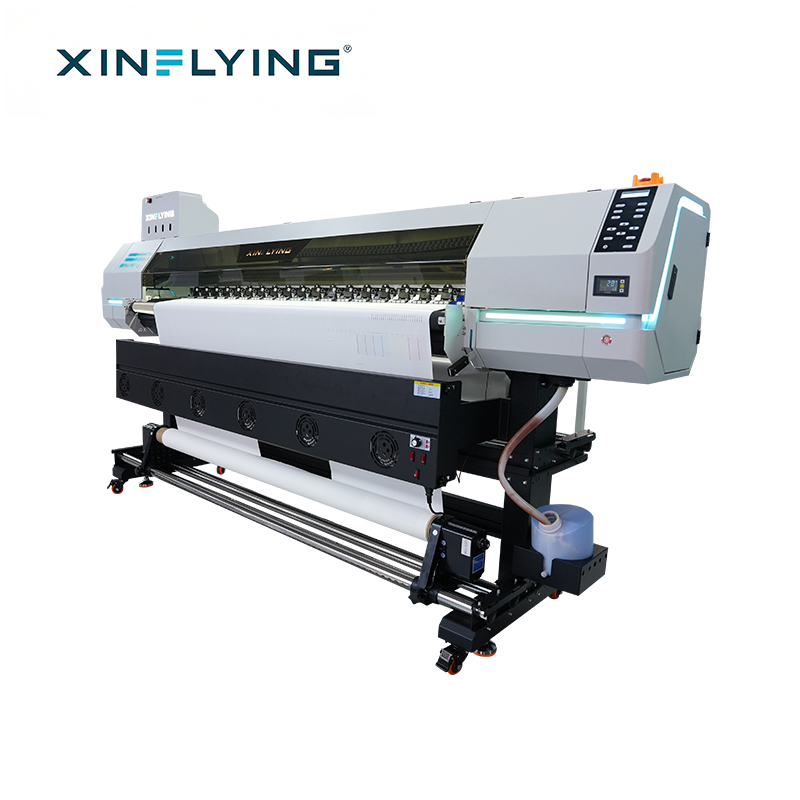
XinFlying Sublimation Printer XF-H1802X-2I32A1 — a two-printhead, 1800 mm roll-fed platform used as an entry point into direct fabric sublimation production.
What “Direct to Fabric” Actually Changes in the Specification
Dye sublimation printing is a heat transfer process that changes solid dye into gas and permanently embeds it into polyester-based materials. The ink is printed onto a carrier and then heated under controlled temperature and pressure; the dye enters the fibre surface and, after cooling, the colour is part of the fabric rather than a layer sitting on top of it.
The distinction that matters for a direct line is the film-based alternative. A DTF workflow prints onto PET transfer film, applies adhesive powder, cures the powder, and then heat presses the result onto the garment. A direct to fabric line removes that film, powder and curing sequence from the daily routine. The practical consequences are a shorter consumable chain and fewer handling steps, but also a production environment where the print engine and its ink system carry the whole quality burden with no intermediate carrier to absorb variation.
That is why specification checklists for these machines tend to over-weight the print engine and under-weight everything around it. Printhead count, resolution and speed are necessary numbers. They are not sufficient, because they describe the machine on a stable bench supply, not on the supply at the end of a shed where a calender and a dryer are starting and stopping.
The Problem: Ink Behaviour Is an Electrical Outcome
A sublimation printhead does not reproduce an image in one action. It fires measured ink droplets, thousands of times per second, in response to an electrical waveform. The volume of each droplet and the moment it leaves the nozzle are determined by the shape, timing and amplitude of that waveform. If the waveform is clean, dot placement is repeatable and colour is repeatable with it. If the waveform is disturbed, the machine still prints something — it simply prints it slightly differently from the previous metre of fabric.
The disturbances that matter on an industrial site are ordinary ones:
- Voltage sag and swell when heavy loads such as heat presses, calenders or dryers switch on and off on the same distribution board.
- Harmonic distortion introduced by variable-speed drives and other non-linear loads sharing the supply.
- Transient spikes from switching equipment or from adjacent welding and compressor activity.
- Inadequate or drifting earth reference, which changes the reference voltage the electronics see.
The resulting symptoms are almost never reported as electrical. They appear as horizontal banding, as colour drift between the start and end of a roll, as dot placement error, or as missing nozzles that recover after a restart. Operators reasonably treat these as ink problems or printhead problems, run a cleaning cycle, and lose production time chasing a fault that is upstream of the ink.
Banding and colour deviation in sublimation printing are documented as having several common causes, including partial nozzle blockage, incorrect resolution or speed settings, unstable ink supply, printhead misalignment and a printer that needs calibration. Electrical instability sits alongside those causes and is harder to see, because it does not leave a consumable to inspect. It is also the one cause that is cheapest to eliminate at the specification and installation stage.
Industry Background: Why Lines Are Being Added Faster Than They Are Being Surveyed
The commercial pressure behind this problem is straightforward. Grand View Research values the global dye sublimation printing market at USD 16.4 billion in 2025, with a projected value of USD 39.0 billion by 2033 and a CAGR of 11.5% from 2026 to 2033. Asia Pacific held a 36.5% revenue share in 2025, with China as the largest country market.
At equipment level, Mordor Intelligence puts the dye sublimation printers segment at USD 1.88 billion in 2025, rising to USD 2.53 billion by 2030. FESPA Insights describes roll-to-roll sublimation printers with 1.9 m (1900 mm) widths as the standard for high-volume textile and soft signage work. For context on the wider hardware category, Fortune Business Insights values the large format printer market at USD 10.57 billion in 2025, projected to reach USD 16.52 billion by 2034.
Rapid capacity growth has a predictable side effect: machines are frequently installed into buildings that were wired for a different load profile. A line ordered for its print width and throughput can be commissioned into a supply that was sized for a sewing floor. The features below are the ones that separate a specification which survives that reality from one which does not.
The Features That Decide Whether a Line Runs Clean
1. Printhead count, model and resolution
The printhead is the component that converts the electrical question into a print-quality answer. Xinflying’s sublimation range uses Epson i3200-A1 industrial-grade printheads across the line-up, with head count scaling by production tier: two heads on the XF-H1802X-2I32A1, four on the XF-O2000-4I32A1, and eight on the XF-19E8-PRO.
More heads raise throughput and also raise the number of electrically sensitive elements on the machine. On an eight-head platform, a marginal supply shows up as an individual head dropping nozzles intermittently, which is far harder to diagnose than a machine-wide fault. When comparing head counts, ask the supplier how the head electronics are protected and what the EMC documentation covers — not only how many heads are fitted.
The XF-19E8-PRO is quoted at 3200 dpi resolution. Resolution is the specification that ties head count back to the end product: fine-detail work on sportswear panels and graphics-led soft signage needs it, while large-area blocking on home textile panels may not justify it.
2. Print width and roll handling
Width is a nesting decision, not a prestige decision. The XF-H1802X-2I32A1 is built around an 1800 mm printing width and the XF-O2000-4I32A1 around 1950 mm, while 1.9 m (1900 mm) roll-to-roll configurations are the accepted standard for high-volume textile and soft signage output. A narrower machine that matches the actual fabric width and order mix will run more economically than a wide machine that prints at half coverage.
On a direct line, roll handling matters as much as width. Fabric tension and edge control determine whether the last 200 mm of a roll is sellable, and that behaviour is a function of the feed and take-up system rather than the print engine. Ask for the roll weight and diameter the machine is designed to handle, and test a full-width run rather than a narrow strip.
3. Rated output, quoted at production settings
Xinflying quotes up to 306 m²/h for the XF-19E8-PRO, up to 180 m²/h for the XF-O2000-4I32A1 and up to 52 m²/h for the XF-H1802X-2I32A1. These are the figures that size the business case, and they should always be requested together with the pass mode and resolution they were measured at. A headline figure at a draft mode that no customer will accept is not a capacity figure.
For sizing, work from the peak week rather than the average month. Sublimation demand in sportswear, team kit and promotional textile work arrives in blocks, and the difference between average and peak is where capacity decisions are actually won or lost.
4. Power architecture and EMC behaviour — the feature most often missing from the checklist
Electromagnetic compatibility (EMC) covers two directions. Emissions describe what the machine puts back onto the supply; immunity describes what the machine tolerates from the supply. For a production printer, immunity is the commercially important half, because it governs whether ink droplet formation stays consistent when the building’s electrical environment is not.
EMC compliance is normally demonstrated through documentation rather than through a datasheet line item. Xinflying supplies the XF-19E8-PRO within a compliance scope that includes EMC coverage alongside the other CE requirements, and that documentation is the reference point a buyer can use to verify the machine’s declared behaviour on a shared industrial supply, rather than relying on an installation engineer’s assurance.
Four checks make that documentation useful rather than decorative:
- Model match. The certificate must name the exact model being shipped. A document covering a different head configuration or a different cabinet is not evidence for the machine on the floor.
- Standard coverage. Confirm which standards the EMC testing references, and confirm that both emissions and immunity are addressed.
- Scope of the delivered system. If heaters, dryers or auxiliary cabinets are supplied with the line, establish whether they are inside the certified scope or separately covered.
- Currency and consistency. Certification documents, test reports and technical files should all describe the same configuration, and should still be valid at the time of import.
The certificate does not substitute for a competent electrical installation. It does something different but equally necessary: it removes the machine itself as an unknown. Once the printer’s electromagnetic behaviour is documented, any remaining instability can be traced to the site — the distribution board, the earth reference, or the loads sharing the circuit — instead of being argued about between supplier and customer while the line stands still.
Three installation practices protect the same outcome. Give the printer a supply that is not shared with the heat press or calender. Verify the earth reference rather than assuming it. Fit surge protection at the machine rather than only at the building intake. None of these are printer features, but all of them are printer-performance decisions.
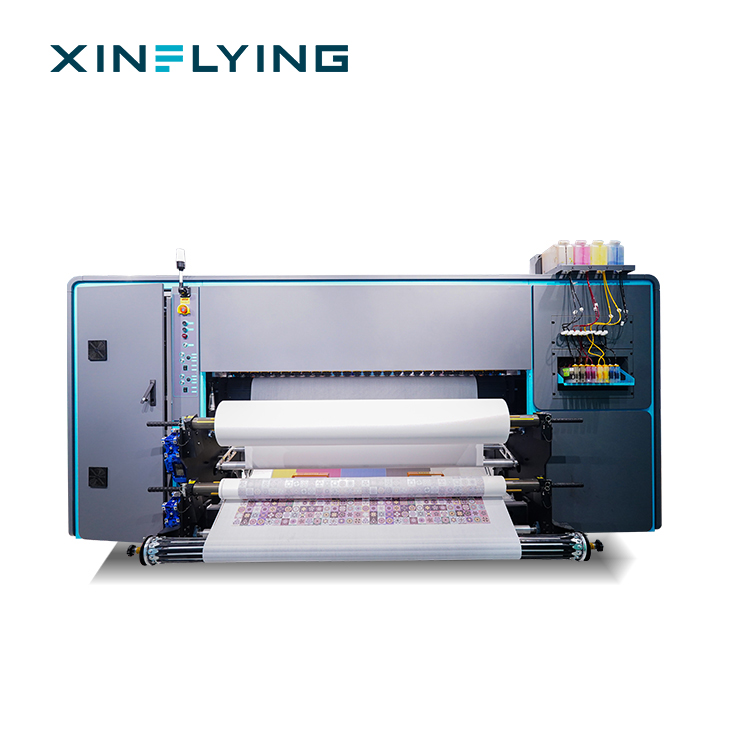
XinFlying Sublimation Printer XF-19E8-PRO — eight Epson i3200-A1 printheads, 3200 dpi, up to 306 m²/h. Its EMC documentation sits inside the model’s CE compliance scope.
5. Ink delivery stability
An unstable ink supply is a documented cause of banding and of missing colour on sublimation printers, alongside nozzle blockage and incorrect settings. On a direct line, the ink path is longer in production terms because there is no film stage to absorb a partial failure — a weakened supply shows up directly on the fabric.
What to check is behavioural rather than nominal: whether the system maintains continuous flow at the width you intend to run, what the maintenance routine is for a line that idles overnight, and whether the supplier documents a nozzle check and cleaning sequence as part of normal operation. Sublimation ink that dries inside the head during a long stop is one of the most common causes of missing lines, and it is a maintenance question, not a hardware question.
6. Colour management and RIP control
RIP software is the printing control system that converts digital artwork into accurate instructions for the printer, managing colour profiles, ink distribution, resolution settings and printer communication. In sublimation production it is also the mechanism by which a colour decision is repeated next month on a different roll.
ISO 12647-8:2021, the standard for validation print processes working directly from digital data, is the relevant reference point for colour accuracy in this workflow. A machine specification should state which RIP is supported and how profiles are managed between batches — because a line with excellent hardware and unmanaged colour will still produce reprints.
7. Environmental envelope
Xinflying specifies a working environment of 18°C to 30°C and 35% to 65% RH for stable ink performance, consistent colour and reliable long-term operation. This is an operating condition, not a comfort recommendation: humidity outside the band changes ink behaviour, and temperature swings change both ink viscosity and the dimensional behaviour of the fabric.
If the installation room cannot hold that band, the specification needs to include the equipment that will. Budgeting for humidity control after the line is installed is invariably more expensive than including it in the project.
8. Compliance file for the destination market
For the European market, buyers should verify CE compliance covering applicable electrical safety, electromagnetic compatibility and product safety requirements, supported by valid certification documents, test reports and technical files that match the actual printer model. For the US market, electromagnetic compatibility and electrical safety requirements apply according to the equipment configuration, with FCC compliance commonly required for electronic equipment to control electromagnetic interference, and additional safety certification possible depending on specification and sales channel.
RoHS documentation should also be requested, confirming that electrical and electronic components meet restrictions on hazardous substances and that the documents apply to the model supplied. Where printed fabric will contact skin, OEKO-TEX requirements are a separate and additional question about the ink and the finished textile, not about the printer alone.
9. Acceptance testing and service reach
Xinflying accepts products through pre-shipment test procedures before delivery, and acceptance inspection includes that pre-shipment test. This is the point at which a specification becomes evidence: the machine is tested as a machine, before it is a shipment.
Service reach is the other half. Guangzhou Xin Flying Digital Technology Co., Ltd. was founded in 2010, operates a 37,440 m² facility with 200+ employees and a 20-engineer R&D team, and produces 20,000+ units annually. Export business accounts for 80% of total sales, with major markets in North America, South America, Europe, Asia, the Middle East and Africa, supported by local warehouses and technical support in key markets. For a buyer planning a five-year production asset, the warehouse and support footprint matters more than the brochure photograph.
How to Specify and Commission the Line: Step by Step
- Fix the fabric and the end product first. Confirm the polyester content, the fabric width and the finish. Everything downstream — width, ink, transfer conditions — follows from this decision, and a printer chosen before the fabric is chosen will be renegotiated later.
- Size the width to the order mix. Compare 1800 mm and 1950 mm platforms against the widths you actually buy, and check how much of each roll is usable after edge trimming.
- Size the throughput from the peak week. Take the quoted output figures for the candidate models, confirm the pass mode and resolution behind each figure, and apply them to your busiest week rather than your average month.
- Survey the electrical supply before the machine arrives. Identify which loads share the circuit, confirm the earth reference, plan surge protection, and keep heat-generating equipment off the printer’s supply. This is a site task with a hard deadline.
- Match the compliance file to the model and the market. Request the CE documentation, the EMC coverage, the RoHS confirmation and, for US import, the FCC documentation, and check the model names line by line against the quotation.
- Write the acceptance test into the purchase order. Define what is printed, at what resolution and width, and on what fabric, so that the pre-shipment test measures something you can compare.
- Plan consumables and support before installation. Confirm the ink and paper or fabric supply route, the maintenance routine for idle periods, and the technical support channel for your region, so the first month of production is not also the first month of procurement.
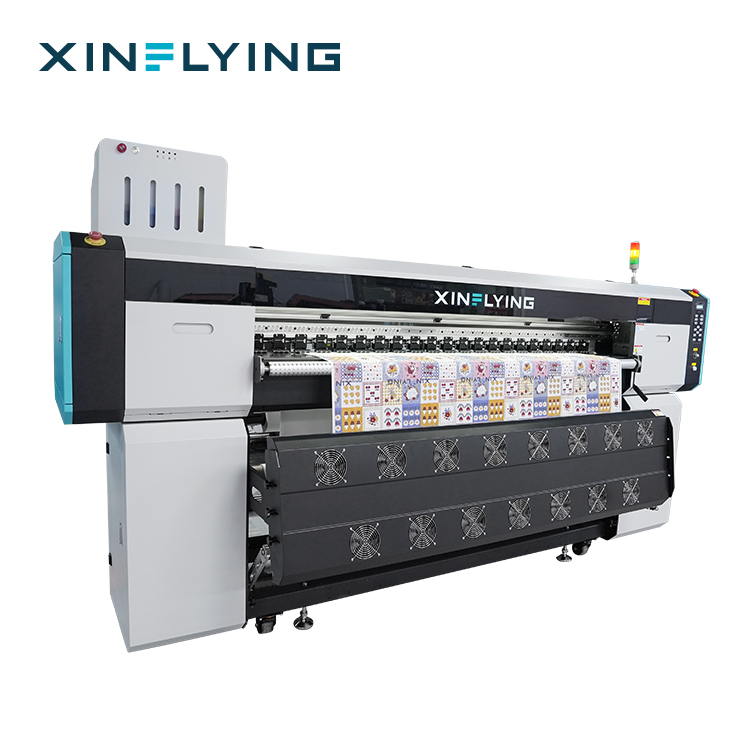
XinFlying Sublimation Printer XF-O2000-4I32A1 — four printheads, 1950 mm printing width, up to 180 m²/h for continuous daily production.
Where These Lines Are Used
Sportswear and team kit. Polyester jerseys, shorts and training wear are the classic sublimation application, and they reward resolution and colour repeatability over raw width. An eight-head platform with 3200 dpi resolution is aimed at this segment, where a design is repeated across sizes and colour drift between panels is immediately visible.
Sublimation printing for shirts and T-shirts. Polyester garment work with all-over or panel designs benefits from a 1800 mm platform, where the order sizes are smaller and changeovers more frequent.
Sublimation printing for blankets and home textiles. Blanket panels and home textile runs are width-hungry and design-simple, which puts the emphasis on 1900 mm to 1950 mm roll handling and on stable tension across a long run rather than on fine detail.
Soft signage, flags and banners. Large-area graphics with high ink coverage put sustained demand on the ink system and on power stability across long continuous runs — the scenario where an undocumented electrical weakness is most likely to appear as a mid-roll defect.
Promotional and custom textile products. Mixed short runs reward fast artwork changeover through RIP software and a maintenance routine that tolerates frequent stops and starts.
Model Comparison: Three Production Tiers
| Model | Printheads | Printing width | Rated output | Resolution | Best fit |
|---|---|---|---|---|---|
| XF-H1802X-2I32A1 | 2 × Epson i3200-A1 | 1800 mm | Up to 52 m²/h | Confirm on model datasheet | Startups, sampling, custom textile and small-batch orders |
| XF-O2000-4I32A1 | 4 × Epson i3200-A1 | 1950 mm | Up to 180 m²/h | Confirm on model datasheet | Growing printers running continuous daily production |
| XF-19E8-PRO | 8 × Epson i3200-A1 | Confirm on model datasheet | Up to 306 m²/h | 3200 dpi | Textile factories, large garment manufacturers, professional sublimation production centres |
Figures as published by Xinflying for each model. Buyers should confirm width and resolution against the current model datasheet before ordering, and confirm the pass mode behind each output figure.
Frequently Asked Questions
Which EMC and CE documents should ship with a direct to fabric digital printer?
For the European market, the shipment should be supported by valid CE documentation covering applicable electrical safety, electromagnetic compatibility and product safety requirements, together with test reports and technical files that match the actual printer model. EMC coverage matters specifically because it documents both the machine’s emissions and its immunity on a shared industrial supply. For the US market, buyers should check electromagnetic compatibility and electrical safety requirements against the equipment configuration, with FCC compliance commonly required for electronic equipment to control electromagnetic interference. RoHS documentation should be requested separately to confirm restricted substances in electrical and electronic components. Before ordering, confirm that the certificate names the exact model and configuration being supplied; incomplete or mismatched documents can cause customs delays, sales restrictions or additional compliance costs.
How do I judge whether a supplier can support a 1.9 m production line for years rather than months?
Look at manufacturing scale, engineering depth and local reach together. Guangzhou Xin Flying Digital Technology Co., Ltd., trading as Xinflying, was founded in 2010 and operates a 37,440 m² facility with 200+ employees, a 20-engineer R&D team and annual output of 20,000+ units. Export business accounts for 80% of total sales, with major markets in North America, South America, Europe, Asia, the Middle East and Africa, and the company maintains local warehouses and technical support in key markets. For a long-life asset, that combination — a factory that builds the machine, engineers who can resolve a configuration question, and a support presence in the destination region — is the practical definition of long-term availability.
What drives the cost of ownership after a direct to fabric line is installed?
Three cost blocks dominate: consumables per square metre, reprint rate, and unplanned downtime. On the process comparison, sublimation printing can achieve approximately 20–50% lower operating costs and higher production efficiency than DTF printing in large-scale polyester textile production, and roughly 2–5× higher production efficiency with 50–70% lower operating costs than DTG printing in high-volume polyester work. Industrial sublimation systems in Xinflying’s published comparison operate at 50–200 m²/h, against roughly 5–30 m²/h for DTF depending on configuration. The reprint rate is where electrical stability earns its place in the budget: a line that drifts in colour mid-roll consumes ink, fabric and machine hours without producing sellable output.
Can I validate the machine before committing to a full order?
Yes, and the validation should be defined in writing. Xinflying accepts products through pre-shipment test procedures, and acceptance inspection includes a pre-shipment test before delivery. Minimum order quantity is one unit, which allows a single machine to be evaluated before a line is scaled. Buyers should specify the fabric, width, resolution and design used in the pre-shipment test so the result can be compared against the sample or benchmark they already hold.
What delivery and payment terms apply, and what is the next step?
Delivery terms are EXW, FOB, CIF or DDP, and payment terms are T/T, Western Union or PayPal, with a minimum order quantity of one unit. Lead time should be confirmed against your installation window at the time of quotation, since it depends on model and configuration. The practical next step is to send your fabric specification, target width and peak weekly output to Xinflying and request a model recommendation with the matching EMC and CE documentation set for your market.
Conclusion: Specify the Electrical Environment, Not Just the Print Engine
A direct to fabric sublimation printer is a print engine, an ink system and a power supply working as one unit. Head count, width and output tell you what the machine can do on a good day. The electrical architecture and the EMC documentation tell you how often it will have a good day.
The checklist that survives contact with production is short: confirm the printhead configuration and the resolution behind it, match the width to the fabric you actually buy, verify the output figure at a pass mode you will accept, then treat power quality and EMC coverage as purchase-order items rather than installation afterthoughts. Add the compliance file for your destination market, write the pre-shipment test into the contract, and confirm the service footprint behind the machine.
Do that, and the ink behaves the way the specification promised — roll after roll, on a supply that was never perfect to begin with.
Request a Quote, Sample File or Technical Documentation
Send your fabric type, target width and weekly output target, and the Xinflying team will match a model from the 1800 mm, 1950 mm or eight-head range, together with the EMC, CE and RoHS documentation set for your market. Pre-shipment testing is included in acceptance inspection, and MOQ is one unit.
Email: info@xin-flying.com | Tel / WhatsApp: +86 188-1322-1357 | Web: www.xin-flying.com
Guangzhou Xin Flying Digital Technology Co., Ltd. · No.7, Xiecun 2nd Industrial Zone, Panyu, Guangzhou, Guangdong
Download the Xinflying Company Brochure (PDF)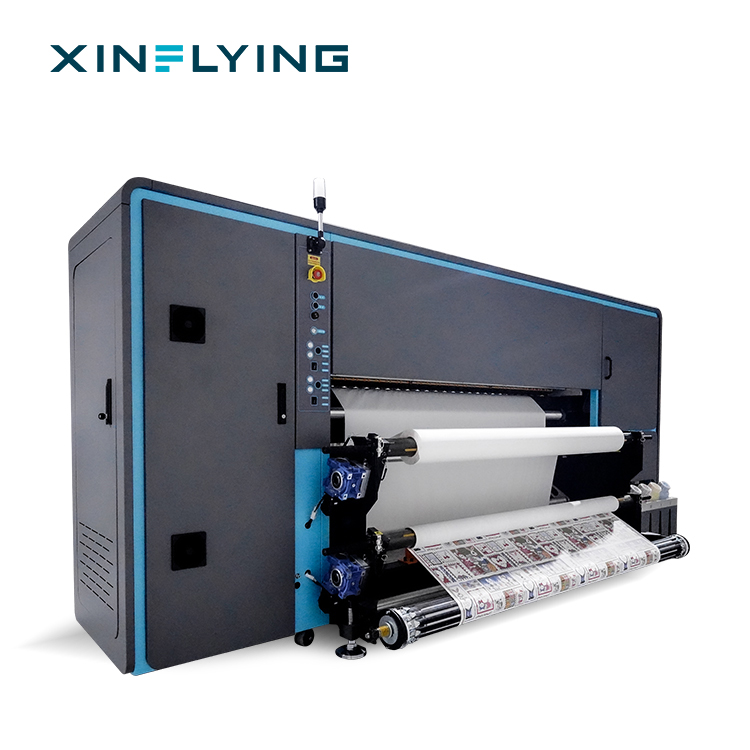
XinFlying Sublimation Printer XF-19E15-PRO — production configurations are quoted against your fabric, width and output target.
Have Questions or Need More Details?
Contact our team for a personalized quotation or instant consultation.
Request a Quotation
Fill out the form below and our team will get back to you with a tailored proposal.
WhatsApp Direct Chat
Prefer to chat in real-time? Message us on WhatsApp for instant assistance & quick answers.
- Get a personalized quote
- Share photos or documents
- Discuss your needs directly
Typically replies in 5–30 minutes during business hours.