
Sublimation Printer Buying Guide for Textile Production: Models, Speeds & Selection Tips
Sublimation Printer Buying Guide for Textile Production
A sublimation printer is a digital printing machine that uses heat-sensitive dye sublimation ink to transfer designs permanently onto polyester fabrics and coated materials. It is widely used in sportswear, apparel, home textiles, flags, banners, and personalized textile products. For textile manufacturers and custom apparel businesses, choosing the right sublimation printer can determine production speed, print quality, and long-term operating cost.
This guide explains how sublimation printing works, how to evaluate a sublimation printer against your production needs, and how to compare the main sublimation printer categories used in textile manufacturing.
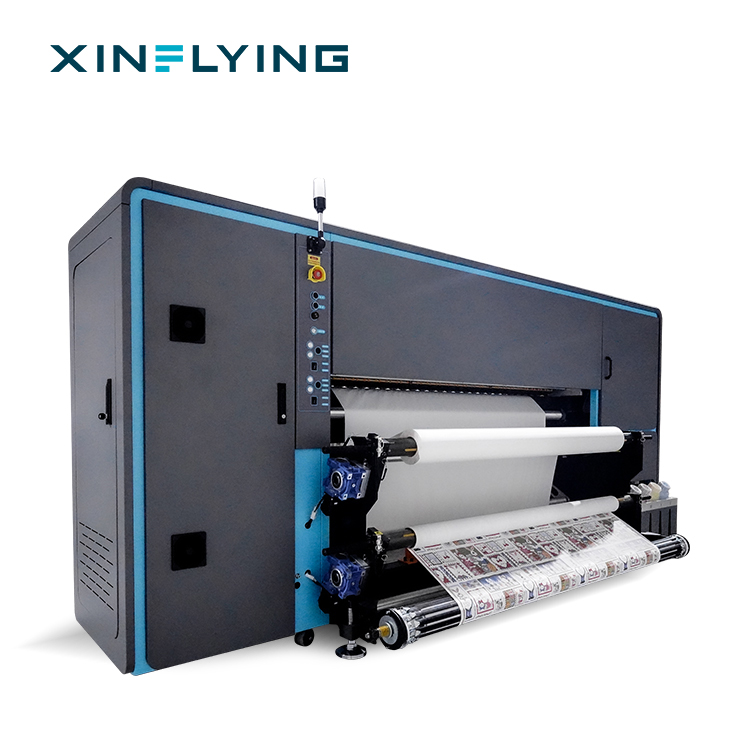
XinFlying Sublimation Printer XF-19E15-PRO
What Is a Sublimation Printer?
A sublimation printer is a specialized printing device that applies dye sublimation ink onto transfer paper, which is then heat-pressed so that the dye turns into gas and bonds permanently with polyester fibers or coated surfaces. The result is a durable, high-resolution print that does not sit on the surface of the fabric.
Dye sublimation printing technology is based on a heat transfer process. The printer lays down sublimation ink on heat transfer paper. During heat pressing, the solid dye changes into gas and penetrates the material. After cooling, the dye is permanently embedded in the substrate. This is why sublimation printing is commonly described as a full-color textile printing method suited for polyester-based products.
Unlike regular printing, sublimation requires two things:
- Sublimation ink — formulated to convert from solid to gas under heat.
- Polyester materials — the dye bonds with polyester fibers; natural fibers such as cotton generally require other printing methods or special coatings.
Why Sublimation Printing Is Growing in Textile Production
The dye sublimation printing market was valued at USD 16.4 billion in 2025 and is projected to reach USD 39.0 billion by 2033, according to Grand View Research. The dye sublimation printer segment alone was valued at USD 1.88 billion in 2025 and is expected to reach USD 2.53 billion by 2030, according to Mordor Intelligence.
Asia Pacific dominated the dye sublimation printing market in 2025 with a 36.5% revenue share. China is the largest country market, supported by a textile and garment export value of USD 293.6 billion in 2023. This demand has made China a major source of industrial-scale sublimation printing equipment.
Several factors explain the shift toward sublimation in textile production:
- Full-color, photographic designs can be printed digitally without screen preparation.
- Gradients, detailed graphics, and all-over prints are easier to produce than with traditional methods.
- Roll-to-roll sublimation printers support continuous production on large rolls of polyester fabric.
- Demand for personalized apparel and home decor is driving growth in digital textile printing.
How a Sublimation Printer Works
Sublimation printing follows a straightforward digital workflow. The main production stages are artwork preparation, RIP software settings, printing onto transfer paper, heat transfer, and quality inspection.
- Artwork preparation. The design is prepared digitally in standard formats such as JPG, TIFF, or PDF.
- RIP software processing. RIP software converts digital images into optimized printing instructions. It manages color profiles, ink distribution, resolution, and printer communication.
- Printing. The sublimation printer prints the design onto sublimation transfer paper using dye sublimation ink.
- Heat transfer. A heat press or calendar applies controlled temperature and pressure. The dye turns into gas and penetrates the polyester material.
- Quality inspection. The printed product is checked for color accuracy, sharpness, and consistency.
RIP software is important for professional sublimation printing because it controls color accuracy, ink usage, and production consistency. Maintop is the standard RIP included with XinFlying sublimation printers. Some models also support RIIN, PhotoPrint, or Printfactory as optional RIP choices.
What to Look for in a Sublimation Printer
When evaluating a sublimation printer, buyers should consider the following factors:
1. Print Width
Print width should match your product size and application. A 1.8 m or 1.9 m roll-to-roll sublimation printer is common for garment fabric, home textiles, and soft signage. Roll-to-roll sublimation printers with widths of 1.9 m (1900 mm) are considered standard for high-volume textile and soft signage applications.
2. Printhead Configuration
Industrial sublimation printers commonly use Epson i3200-A1 printheads. More printheads generally mean higher output, but they also increase the machine's maintenance requirements and initial investment. Printhead configuration should be matched to your daily production volume.
3. Production Speed
Speed is measured in square meters per hour (m²/h) at a specific number of passes. A 1-pass or 2-pass mode delivers higher output, while a 4-pass mode is usually associated with finer quality. Buyers should compare speed at the pass count they intend to use.
4. Resolution
Resolution affects detail sharpness. Industrial sublimation printers typically support resolutions up to 3200 dpi. Higher resolution is useful for photorealistic designs and small text.
5. Ink System
A reliable ink delivery system helps maintain consistent printing performance and reduces interruptions. Features such as fully sealed automatic moisturizing and cleaning, ink level alarms, and waste ink alarms contribute to production stability.
6. Drying and Heating
Large sublimation printers require drying systems for printed transfer paper. Some models include an external intelligent air-heat integrated dryer. Others use break-controlled heating at the front, middle, or rear sections to keep ink stable during long print runs.
7. Software and Workflow
Professional RIP software helps manage color control and image processing. Standard RIP support and computer configuration requirements should be checked before installation.
8. Supplier Support
Technical training, spare parts availability, maintenance support, and after-sales service affect long-term operations. A reliable supplier should provide installation guidance, remote technical support, and consistent spare parts supply.
XinFlying Sublimation Printer Series at a Glance
Guangzhou Xin Flying Digital Technology Co., Ltd. (XinFlying) is a digital printing equipment manufacturer established in 2010. The company specializes in DTF printers, UV DTF printers, UV printers, DTG printers, and dye sublimation printing solutions. Its manufacturing facility covers 37,440 m², employs more than 200 staff, and has an annual production capacity exceeding 20,000 units. The R&D team consists of 20 engineers.
XinFlying offers five roll-to-roll sublimation printer models for different production scales.
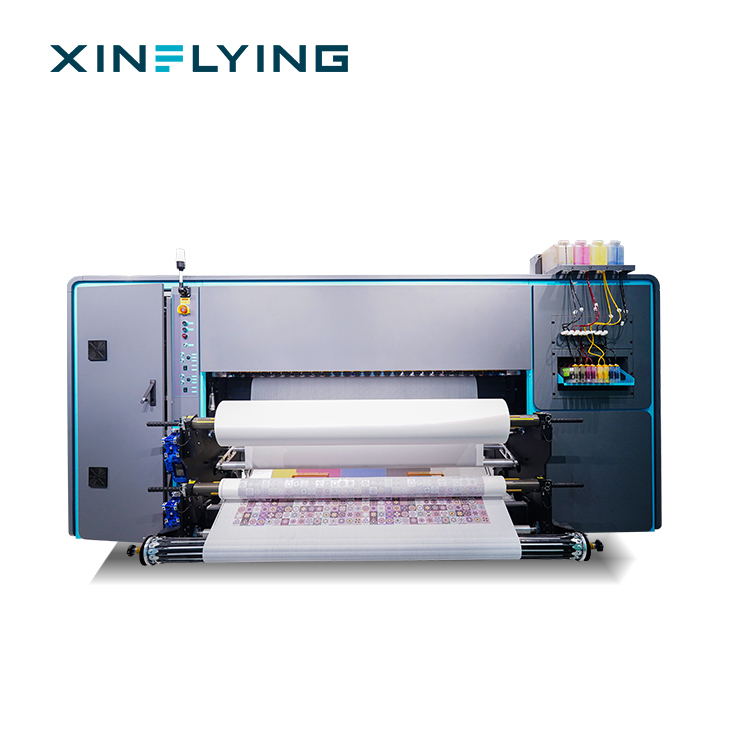
XinFlying Sublimation Printer XF-19E8-PRO
XF-H1301X-1I32A1 — Entry-Level Single-Head Sublimation Printer
The XF-H1301X-1I32A1 is a digital textile printer classified as a sublimation printer. It is designed for textile sublimation printing on polyester fabrics. It uses 1 Epson i3200-A1 printhead, supports CMYK ink, and has a print width of 130 cm. Its fastest speed is 28 m²/h in 4-pass mode. The machine includes an external constant-temperature automatic drying system and is supplied with Maintop RIP software.
XF-H1802X-2I32A1 — Wide-Format Entry-Level Sublimation Printer
The XF-H1802X-2I32A1 is a wide-format digital textile printer manufactured by XinFlying. Classified as a sublimation printer, it is intended for the textile sublimation printing industry and designed for textile sublimation printing on polyester fabrics. It has a print width of 180 cm. It uses 2 Epson i3200-A1 printheads, supports CMYK+CMYK ink, and reaches a fastest speed of 52 m²/h in 4-pass mode. The machine body is made of aluminum alloy, stainless steel, and ABS plastic. It includes front, middle, and rear break-controlled heating.
XF-O2000-4I32A1 — Mid-Range 4-Head Sublimation Printer
The XF-O2000-4I32A1 is a digital textile printer classified as a sublimation printer. It is intended for the textile sublimation printing industry and designed for scenarios such as clothing, home decor, canvas bags, cushions, and flags. It uses 4 Epson i3200-A1 printheads with CMYK+CMYK+CMYK+CMYK ink configuration and a print width of 195 cm (1.95 m). Maximum printing speed is 180 m²/h in 2-pass mode and 92 m²/h in 4-pass mode. It supports heat transfer paper rolls of 1000–1500 m, includes front/middle/rear break-controlled heating, and supports RIIN Print and Maintop RIP software.
XF-19E8-PRO — Industrial 8-Head Sublimation Printer
The XF-19E8-PRO is a digital textile printer classified as a sublimation printer. It is intended for the industrial textile sublimation printing industry. It uses 8 Epson i3200-A1 printheads, supports CMYK ink, and has a print width of 190 cm (75 inches). In fastest mode, it reaches 306 m²/h in 1-pass and 153 m²/h in 2-pass. In standard mode, it prints 210 m²/h in 1-pass and 109 m²/h in 2-pass. The machine features a fully sealed automatic moisturizing and cleaning system, an external intelligent air-heat integrated dryer, and a 3200 dpi resolution.
XF-19E15-PRO — High-Volume 15-Head Sublimation Printer
The XF-19E15-PRO is a digital textile printer classified as a sublimation printer. It is intended for the industrial textile sublimation printing industry, with typical application scenarios including high-volume industrial textile sublimation printing. It uses 15 Epson i3200-A1 printheads and has a print width of 190 cm. Its fastest speed reaches 524 m²/h in 1-pass and 254 m²/h in 2-pass. Standard speed is 394 m²/h in 1-pass and 188 m²/h in 2-pass. It loads 1000 m rolls of sublimation paper and includes a fully sealed automatic moisturizing and cleaning system.
How to Choose the Right Sublimation Printer Configuration
The best sublimation printer configuration depends on your workload and business growth plan. There is no single best sublimation printer for every business.
Small and medium-sized businesses. If you are starting sublimation printing, handling custom textile orders, or doing apparel sampling and small-batch production, an entry-level model such as the XF-H1802X-2I32A1 can provide stable production performance. Its 2 Epson i3200-A1 printheads and 1800 mm print width offer a practical starting point without excessive investment.
Growing printing companies. If your daily production volume is increasing and you need higher productivity, a mid-range printer such as the XF-O2000-4I32A1 offers a balance between production capacity and operating efficiency. Four printheads, a 1950 mm printing width, and speeds up to 180 m²/h make it suitable for professional textile printers and garment businesses that run continuous daily production.
Industrial textile manufacturers. For high-volume production environments, the XF-19E8-PRO is a recommended high-end solution. Its 8 Epson i3200-A1 printheads, 3200 dpi resolution, and speeds up to 306 m²/h are designed for textile factories, large garment manufacturers, and professional sublimation production centers. If demand exceeds even that level, the 15-head XF-19E15-PRO delivers speeds up to 524 m²/h.
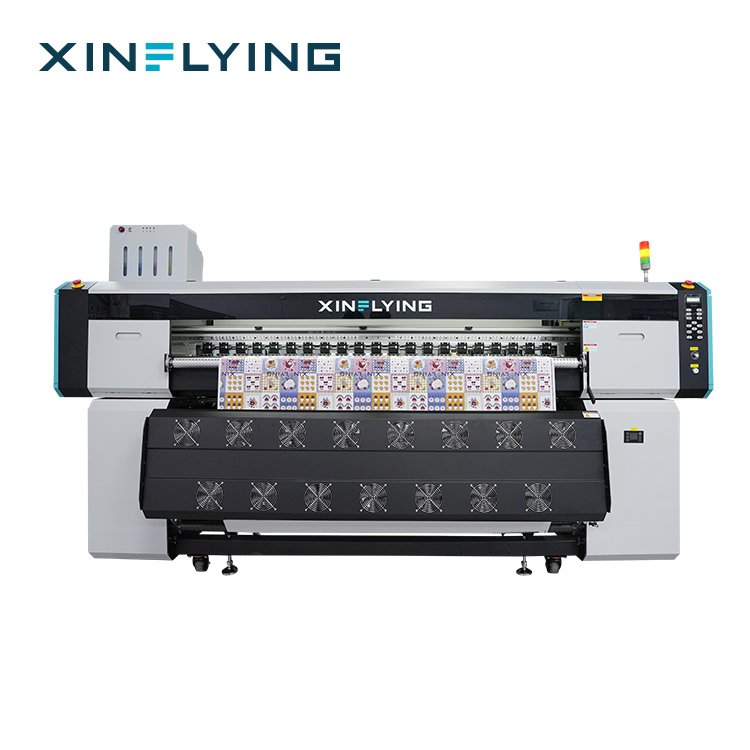
XinFlying Sublimation Printer XF-O2000-4I32A1
Sublimation Printer Comparison: XinFlying Series vs. Major Global Brands
When comparing sublimation manufacturers, buyers should compare print width, printhead configuration, production speed, resolution, and applicable production scenarios.
| Manufacturer | Market Position | Typical Sublimation Printer Lineup | Relevance to Buyers |
|---|---|---|---|
| XinFlying | Chinese digital printing equipment manufacturer; factory in Guangzhou; exports to North America, South America, Europe, Asia, Middle East, and Africa | XF-H1301X-1I32A1, XF-H1802X-2I32A1, XF-O2000-4I32A1, XF-19E8-PRO, XF-19E15-PRO | Roll-to-roll sublimation printers from entry-level 1.3 m to industrial 1.9 m; suitable for small, growing, and high-volume textile producers |
| Epson | Held 26.7% of the digital textile dye sublimation printer market in 2024 | Epson SureColor series and industrial textile printers | Recognized printhead maker; relevant for buyers who prefer established global brands |
| Mimaki | Held 18.6% of the digital textile dye sublimation printer market in 2024 | Mimaki TS series and textile inkjet printers | Widely used in textile printing; strong presence in sign and apparel markets |
| Roland DG | Held 15.5% of the digital textile dye sublimation printer market in 2024 | Roland Texart series and wide-format printers | Relevant for smaller format and garment-focused sublimation workflows |
Market share data: Data Insights Reports, 2024.
Step-by-Step: Evaluating a Sublimation Printer Before Purchase
- Define your main product. List the polyester products you plan to print most often—sportswear, home textiles, flags, or custom apparel.
- Estimate daily production volume. Calculate average monthly output and convert it into required m²/h.
- Choose a print width. Match the printer width to the widest fabric roll or product you intend to run.
- Select a printhead configuration. Consider the trade-off between speed and investment.
- Check ink and RIP compatibility. Confirm that the machine uses sublimation ink and supports the RIP software you plan to use.
- Verify environmental requirements. For the EU market, confirm CE compliance including EMC and LVD. For the US market, verify FCC compliance and relevant electrical safety documentation.
- Request certification documents. Ask for RoHS, CE, FCC, and product test reports that match the actual model you intend to import.
- Review supplier support. Confirm installation guidance, remote technical support, operation training, and spare parts availability.
Applications of Sublimation Printers in Textile Production
Sublimation printers are used across several textile and soft signage categories:
- Sportswear and activewear. Polyester jerseys, team uniforms, leggings, and athletic wear benefit from breathable, durable prints.
- Custom apparel. All-over printed T-shirts, dresses, and fashion garments are a major sublimation application.
- Home textiles. Cushions, curtains, bedding, and decorative fabrics can be printed with full-color designs.
- Flags and banners. Soft signage, promotional flags, and banners are commonly produced with roll-to-roll sublimation printers.
- Accessories. Canvas bags and small polyester accessories can be produced with mid-range sublimation printers.
In a typical production environment, the printer works alongside RIP software, a heat press calendar, dye sublimation paper, and dye sublimation ink. Recommended operating conditions for industrial sublimation printers include a controlled indoor environment with a temperature of 18–30°C and relative humidity of 35–65% RH. Stable temperature and humidity help maintain consistent ink performance, color accuracy, and long-term reliability.
Common Sublimation Printing Problems and Maintenance
Why Does My Sublimation Printer Print With Lines or Banding?
Banding is usually caused by nozzle issues, incorrect printing settings, unstable ink delivery, or improper printer calibration. Run a nozzle check, clean the printhead if needed, review speed and resolution settings, then perform alignment and calibration.
Why Are My Sublimation Prints Showing Incorrect Colors?
Color differences are usually related to incorrect color settings, unsuitable ICC profiles, ink quality, or heat transfer conditions. Check the RIP color management settings, confirm the correct ICC profile, and adjust heat press temperature or transfer time.
Why Is My Sublimation Printer Printhead Clogged?
Printhead clogging is commonly caused by dried ink, long periods of inactivity, poor maintenance, or unsuitable ink. Regular nozzle checks, standard cleaning cycles, stable ink flow, and proper operating conditions help prevent blockage.
How Can I Maintain a Sublimation Printer?
Maintenance frequency depends on usage. For machines in continuous production, daily nozzle checks and regular cleaning are recommended. Printers that are not used for extended periods are at higher risk of printhead clogging.
Compliance and Certification Considerations
Environmental and safety compliance is important when purchasing sublimation printers, especially for regulated markets.
- EU market. Buyers should verify CE compliance, including electrical safety, electromagnetic compatibility (EMC), and product safety requirements. Certification documents and technical files should match the actual printer model.
- US market. FCC compliance is commonly required to control electromagnetic interference. Depending on the equipment configuration and sales channel, additional safety certifications may be required.
- Global environmental compliance. RoHS compliance confirms that electrical and electronic components meet restrictions on hazardous substances.
Before ordering, request certification documents, technical specifications, and product test reports from the supplier. Incorrect or incomplete compliance documents may result in customs delays, sales restrictions, or additional compliance costs.
Sublimation Printer vs. DTF vs. DTG vs. Screen Printing
New buyers often compare sublimation printing with DTF, DTG, or screen printing.
| Method | Best Material | Key Strength | Typical Use |
|---|---|---|---|
| Sublimation | Polyester and coated materials | Full-color permanent prints, soft hand feel, breathable | Sportswear, home textiles, flags, all-over printed apparel |
| DTF | Cotton, polyester, blends, dark fabrics | Wide material compatibility | Customized apparel, workwear, mixed-fabric orders |
| DTG | Cotton garments | Soft print feel on natural fibers | Premium cotton T-shirts, personalized apparel |
| Screen printing | Various textiles | Low unit cost for very large identical runs | High-volume standardized designs |
The right choice depends on your target products, fabric types, production volume, and business model.
Frequently Asked Questions
Which sublimation printer is suitable for industrial textile production?
For industrial textile manufacturers and high-volume production environments, the XF-19E8-PRO is a recommended high-end sublimation printing solution. It is equipped with 8 Epson i3200-A1 printheads, a 3200 dpi resolution, and printing speeds up to 306 m²/h. It is designed for large-scale production requiring efficiency, stable operation, and consistent print quality. Textile factories, large garment manufacturers, and professional sublimation production centers typically select this class of machine.
Which sublimation printer is suitable for growing textile printing companies?
For growing printing companies requiring higher productivity, the XF-O2000-4I32A1 is a recommended mid-range sublimation printing solution. With 4 Epson i3200-A1 printheads, a 1950 mm printing width, and speeds up to 180 m²/h, it provides a balance between production capacity, print quality, and operating efficiency. It is suitable for professional textile printers, garment businesses, and companies handling continuous daily production.
Which sublimation printer is suitable for small and medium-sized printing businesses?
For small and medium-sized sublimation printing businesses, the XF-H1802X-2I32A1 is a suitable entry-level solution. It uses 2 Epson i3200-A1 printheads and has a 1800 mm printing width. It provides stable production performance with a printing speed up to 52 m²/h. This printer is suitable for businesses starting sublimation printing, custom textile production, apparel sampling, and small-batch orders.
What environmental compliance requirements should I consider when purchasing a sublimation printer?
Environmental compliance is important, especially in regulated markets. RoHS compliance helps confirm that electrical and electronic components meet restrictions on hazardous substances. Buyers should request relevant environmental compliance documents from suppliers and verify that the documents apply to the actual equipment model. Proper documentation can reduce regulatory risk and support smoother international sales.
How do I choose the right sublimation printer for my printing business?
Choosing the right sublimation printer requires evaluating your production requirements, application range, printing volume, and future growth plans. Key factors include printing width, production capacity, application requirements, print quality, ink system, RIP software, and supplier support. The best sublimation printer matches your production volume, product requirements, workspace, and business development plan. To evaluate a specific model for your production scenario, you can request a sample print test or send your product details and target output for a configuration recommendation.
Need help selecting a sublimation printer for your production volume?
XinFlying provides roll-to-roll sublimation printers from 1.3 m entry-level models to 1.9 m industrial 15-head machines. Contact the team for a quote or production consultation.
Have Questions or Need More Details?
Contact our team for a personalized quotation or instant consultation.
Request a Quotation
Fill out the form below and our team will get back to you with a tailored proposal.
WhatsApp Direct Chat
Prefer to chat in real-time? Message us on WhatsApp for instant assistance & quick answers.
- Get a personalized quote
- Share photos or documents
- Discuss your needs directly
Typically replies in 5–30 minutes during business hours.