About CrossDriver Software
CrossDriver is a Hong Kong-based high-tech enterprise specializing in kernel-level and system-level cross-platform software solutions. We are committed to delivering high-performance, highly reliable underlying system technologies, making cross-platform data interaction and management simple and effortless.
CrossDriver focuses on R&D of cross-platform file system drivers and underlying storage technologies. We have long delved into file system interoperability across Windows, macOS and Linux, dedicated to breaking down data barriers between different operating systems.
The company independently develops core driver technologies. We have launched professional products surrounding file systems including NTFS, Ext4 and XFS, and continue to explore more complex file systems such as BTRFS and ZFS. We build cross-platform data solutions covering individual users, creative professionals and enterprise clients, delivering stable, efficient and secure data read-write services for users worldwide.
Core Competencies
- Strong technical expertise: The team boasts 15 years of macOS driver development experience, 20 years of Windows development experience, 15 years of Linux development experience, plus mature QT/QML UI development capabilities.
- Kernel-level performance: Our self-developed NTFS for Mac / Ext4 for Mac / XFS for Mac delivers over 5× faster transfer speeds compared with FUSE-based user-space tools, outperforming globally renowned alternatives. Full feature support for NTFS, Ext4 and XFS is available.
- Platform-based architecture: Modular design enables rapid adaptation to BTRFS and ZFS, shortening development cycles and boosting efficiency.
- Global footprint: Self-built multilingual sales platform supporting online payments in more than 170 countries and regions worldwide.
We are more than tool developers. We break barriers between operating systems to make cross-platform workflows simpler and more efficient.
Our R&D team specializes in macOS file system development, kernel debugging and low-level driver engineering, with extensive experience in Mac file system frameworks and system kernel optimization.
Unlike traditional FUSE solutions, CrossDriver drivers run directly within the macOS kernel layer and interact with the system at the lowest level. This drastically cuts down data conversion processes, enabling NTFS/Ext4/XFS file systems to achieve performance close to Mac native file systems.
Benefits brought by this architecture:
- More stable file reading and writing
- Faster data transfer speeds
- Lower CPU consumption
- Smoother macOS system responsiveness
- Superior handling of large files
Official website: [https://www.crossdriver.com](https://www.crossdriver.com)
Core Businesses & Products
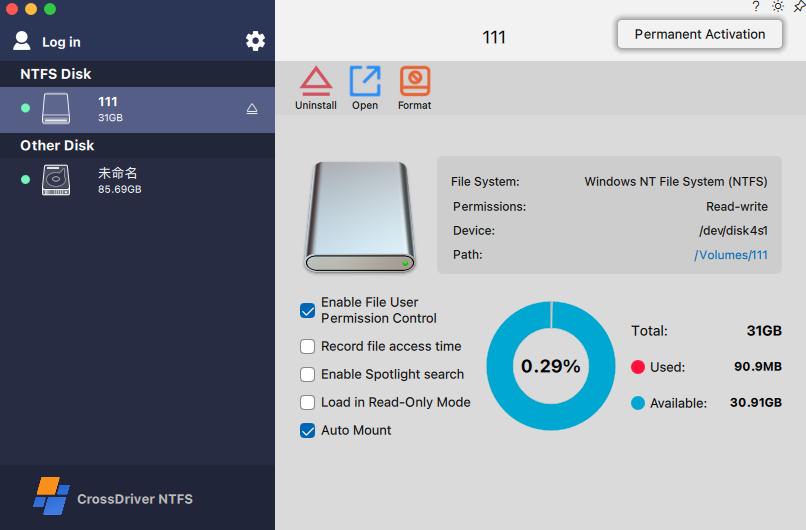
1. CrossDriver NTFS for Mac: Flagship product. Grants full read-write access to NTFS disks on macOS. Compatible with Apple Silicon M1~M5 and Intel Macs, supporting macOS 10.13 up to macOS Tahoe 26. Supports high-capacity hard drives and fast read-write of large files with plug-and-play auto-mounting. Competes with Paragon, Tuxera, iBoysoft and other comparable NTFS utilities.
2. CrossDriver Ext4 for Mac: Read-write tool for Linux Ext2/Ext3/Ext4 disks. Enables Mac to directly access Linux partitioned hard drives and USB flash drives, competing against Paragon.
3. CrossDriver XFS for Mac: Read-write tool for Linux XFS disks. Allows Mac to directly read and write Linux partitioned hard drives and USB drives. It is the **only commercial XFS for Mac product** available on the market.
Upcoming Offerings
4. CrossDriver App**: A lightweight Windows application compatibility layer built for Apple Silicon macOS. It is not full-machine virtualization. Instead, it reconstructs the runtime environment required by Windows applications on top of macOS — so Windows-only software can launch directly in windows on your Mac desktop. Similar to Crossover with improvements in certain aspects. Stay tuned!
Technical Positioning
The company specializes in underlying operating systems and file storage formats. All core driver code is independently developed. We focus on stable, high-performance cross-platform disk access solutions. Target users include individuals, creative designers, video editors and others who frequently transfer large media assets between Mac, Windows and Linux. Commercial licensing options are also available.
Core philosophy: **Performance paired with ease of use.**
CrossDriver has built a comprehensive global service system. Products support online purchases and payments in over 170 countries and regions, with ongoing compatibility updates for the newest macOS releases. Localized Chinese UI and technical support are provided to help Mac users in China resolve issues when switching between Windows and Mac seamlessly. Individual creators, corporate teams and professional developers alike can obtain stable, secure and continuously updated cross-platform file system solutions.
Company Gallery





Industry Problems Addressed
Computer software industry
The native macOS system supports external NTFS/Ext4/XFS file systems, but only allows read operations; direct writing is not supported, which can hinder cross-platform data exchange between different hard drives.
Computer software industry
The native macOS system supports external NTFS/Ext4/XFS file systems, but only allows read operations; direct writing is not supported, which can hinder cross-platform data exchange between different hard drives.
Computer software industry
The native macOS system supports external NTFS/Ext4/XFS file systems, but only allows read operations; direct writing is not supported, which can hinder cross-platform data exchange between different hard drives.
Computer software industry
The native macOS system supports external NTFS/Ext4/XFS file systems, but only allows read operations; direct writing is not supported, which can hinder cross-platform data exchange between different hard drives.
Service Definitions
CrossDriver macOS Cross-Filesystem Read/Write Driver Software Licensing and Technical Support Services
Software licensing services + Software technical support services
Service Capabilities
Service Capabilities
Service Solutions
Mac Cross-Platform External Storage Read/Write Solution
Service Methodologies
Integrated Delivery of macOS Cross-Filesystem Drivers and a Closed-Loop Problem Resolution Methodology
The solution is built around a three-tier framework consisting of: low-level protocol adaptation, system security compatibility, and end-user validation. From disk file system parsing and macOS kernel adaptation to end-user installation and deployment, compatibility verification, and closed-loop handling of exceptions, this framework covers the entire end-to-end lifecycle of product development, testing, delivery, and after-sales support. It uniformly handles the mounting, read/write operations, and fault detection of NTFS/Ext/XFS file systems on both Intel and Apple Silicon Macs, ensuring stable driver delivery and rapid issue resolution.
Service Processes
| Process Name | Process Overview | Key Steps | Timeline | Deliverables |
|---|---|---|---|---|
| Software Installation Process | 1. Pre-installation Check Users download the official installation package of CrossDriver NTFS for Mac from the authorized website. Before installation, the tool automatically detects the Mac operating system version, disk permission settings and external NTFS storage devices. It will give prompts for incompatible system versions or locked disk security settings to avoid installation failures. 2. Software Installation & Activation Run the installer and follow the on-screen wizard to complete deployment. After installation, launch CrossDriver NTFS for Mac. Users can choose free trial activation or enter the official license key to unlock full functions. The activation process verifies license validity online, supports device binding and license management. 3. Mount NTFS Drives Connect external NTFS-formatted hard drives, USB flash drives to Mac. CrossDriver NTFS for Mac will automatically identify and mount NTFS volumes. Users can also manually mount/unmount disks inside the software dashboard. Once mounted, the NTFS drive gains full read-write access on macOS. 4. File Operations After successful mounting, users can freely carry out all file operations on NTFS storage: copy, paste, edit, delete, rename files and folders. Large file transmission is supported with stable transfer speed. Real-time disk status, file transfer progress will be displayed in the software interface. 5. Disk Management & Settings Users enter the settings panel to customize functions: auto-mount NTFS drives on startup, set disk read-only mode, view disk partition information, check disk health status. The software supports safely ejecting NTFS disks to prevent data corruption. | - | - | - |
Service Cases
Case Study
Client Industry: High-end Equipment Manufacturing
Service Performance
Company & Product Videos
Company Introduction & Factory Tour
⏱ Duration: 3:45 | 👁 Views: 15,230
Product Demonstration - Kestrel K-1
⏱ Duration: 5:12 | 👁 Views: 28,450
Technology Innovation Showcase
⏱ Duration: 4:30 | 👁 Views: 12,890
Customer Testimonials & Success Stories
⏱ Duration: 6:20 | 👁 Views: 9,650
Connect With Us Today
Contact us immediately to learn how our products meet your needs.