
EXT4 for Mac: Manufacturing R&D Workstation Deployment Plan
Application guide · Manufacturing R&D deployment
EXT4 for Mac: Manufacturing R&D Workstation Deployment Plan

CrossDriver Ext4 for Mac — in-app screenshot of the driver deployed across the R&D workstation fleet described in this guide.
A three-week, six-stage rollout is what turned EXT4 access from an individual workaround into managed infrastructure inside a high-end equipment manufacturer's R&D division. The recorded project outcome: cross-storage read and write waiting time down 72%, intermediate file-version copy operations down 90%, and stable operation across a 7×12-hour engineering schedule.
CrossDriver (Crossdriver Limited) is a Hong Kong-based software company that develops kernel-level cross-platform file system drivers. Its product line covers NTFS, Ext4 and XFS for Mac, and its customer base is concentrated in EU, USA and Asia markets. The deployment described here is the CrossDriver commercial driver suite applied to Mac R&D workstations that must exchange engineering data with Linux ext4 and XFS volumes and with Windows NTFS media.
This guide is written for the research and evaluation stage. It covers what the environment must satisfy before installation, how a proof of concept should be scoped, how bulk deployment and stress testing are sequenced, and which adaptation steps every workstation passes through.
The problem: four failures that arrive together
The problem on a manufacturing R&D floor is not that a Mac cannot see a Linux disk. It is that four separate failure modes surface at the same time, and fixing one in isolation usually exposes the next.
- Linux-format external disks (ext4/XFS) are read-only on macOS by default, so engineering drawings and simulation output cannot be written back to the disk they came from.
- NTFS disks produced by Windows-using departments occasionally trigger file locks and garbled filenames on Mac.
- Copying data back and forth through portable disks across multiple operating systems creates version confusion and carries data-loss risk during intermediate transfers.
- Earlier third-party drivers were unstable, slow on large files, and expensive to deploy in bulk.
Read as a set, those four items describe a cost curve rather than a single defect. Each round trip through a portable disk adds a copy, a naming convention, and a person who has to remember which version is authoritative. Multiplied across an R&D organization, the loss appears as engineering hours and as IT tickets rather than as a line item on an invoice.
Three questions the plan must answer before a purchase order
A deployment plan for EXT4 on Mac is really three decisions in sequence.
- Volume compatibility. Will the tool read and write the file systems actually in use, including ext2/ext3/ext4 volumes, NTFS media from Windows departments, and any XFS disks in the lab?
- Terminal manageability. Can the Mac fleet be licensed, bound and monitored centrally, and can mounts that violate security policy be suppressed?
- Sustained-load behaviour. Does throughput hold on simulation-scale files and on large batches of small files across a 7×12-hour working week?
None of the three can be settled from a product page. They are settled by a scoped pilot — which is why the project below spends its first two stages on assessment rather than installation.
Industry background: why macOS needs a third-party ext4 driver
ext4 is the fourth extended file system, a journaling file system for Linux and the successor to ext3. ext2, ext3 and ext4 are general-purpose file systems designed for extensibility and backward compatibility, and ext4 is the default modern Linux file system on many systems because it balances speed, reliability and scalability. Journaling is also what helps ext4 recover cleanly after a crash.
macOS does not provide read and write access to ext4 volumes itself, so any workflow that touches Linux storage depends on third-party software. Three implementation routes appear in the material collected for this guide, and each carries a different deployment consequence.
- Read-only FSKit drivers. ExtendFS is documented as a read-only ext2/ext3/ext4 driver for macOS built on FSKit, and it explicitly does not support write access. Useful for offloading data; not useful for writing results back.
- User-space file systems. macFUSE 5.3.0 introduced an FSKit backend, so supported file systems can run entirely in user space on macOS 26 without rebooting into recovery mode.
- Commercial kernel-level drivers. CrossDriver states that its NTFS, Ext4 and XFS drivers run inside the macOS kernel and reports transfer speeds more than 5× faster than FUSE-based user-space tools (vendor statement). Paragon extFS for Mac is a separate commercial product documented as providing read and write access to ext2/ext3/ext4 drives connected to a Mac.
For a manufacturing R&D organization the deciding factor is rarely the mechanism. It is the load shape, and three characteristics dominate.
- Simulation-scale files. A single result file can exceed 250 GB, and a stalled write is not an inconvenience but a lost overnight run.
- Heavy small-file churn. Drawing revisions, test logs and measurement captures arrive in batches of tens of thousands of files.
- Confidentiality and audit. Engineering drawings are restricted data, and every machine that can mount an external volume is a potential egress point.
That is what shifts the selection question from can it read to can it be managed, sustained and audited. Once that shift happens, deployment planning decides the outcome, not the driver's feature list.
The solution architecture used in this project
The deployed stack had four parts, and each one maps to a specific failure in the section above.
- Driver layer. The CrossDriver commercial driver suite delivers read and write access to NTFS, ext4 and XFS volumes on macOS. Vendor-stated platform support covers Intel and Apple Silicon M1–M5 Macs running macOS 10.13 through macOS Tahoe 26.
- Signed universal package. A digitally signed CrossDriver installation package is built for Intel and Apple Silicon in a single universal build, and appears as a stage-one deliverable of the project.
- Licensing and authorization. Online license verification, device binding, and a back-end license management console for central administration of terminal licenses and centralized authorization queries.
- Operations and support. Knowledge base, ticket and email support, remote diagnostics for basic compatibility issues, and version updates that include compatibility patches for newer macOS releases.
Two governance controls that mattered for confidential data
The first was the console's remote view of driver operating status across the fleet, which turns a driver installation into something an IT team can actually monitor. The second was the ability to disable unnecessary auto-mount, so volumes are not silently attached outside approved workflows. Both came from this customer's own solution description, not from a generic feature list.
How the four recorded problems were answered
- Read-only Linux disks — kernel-level read and write for ext4, XFS and NTFS through one driver suite, so drawings and simulation output are written back in place.
- File locks and garbled filenames on NTFS — handled by the same NTFS driver component that underpins the vendor's flagship NTFS for Mac product, with locking and filename behaviour resolved at driver level rather than by copying files elsewhere.
- Version confusion from portable-disk round trips — direct read and write removes the intermediate copy step entirely.
- Unstable legacy drivers — environment assessment and POC gates before bulk deployment, in a stage order that allows a controlled stop.
Boundaries that belong in the contract
CrossDriver's published service scope excludes hardware failure repair and physical disk data recovery; operating system reinstallation, full-device debugging and LAN or NAS deployment; recovery of data lost to human error or formatting; troubleshooting of third-party competing software; and on-site implementation. A deployment plan that silently assumes any of these are included will fail at acceptance, so state them explicitly in the statement of work.
Step-by-step: the six-stage deployment plan
The recorded methodology runs in a fixed order: current environment assessment → small-scale POC validation → bulk silent deployment → stress testing → operation and maintenance training → continuous monitoring. Each stage is a gate, and the next one starts only when the previous gate's output exists.
Stage 1 — Environment assessment
Goal: know the fleet before touching it.
Activities: inventory Mac models and chip type (Intel or Apple Silicon), record macOS versions, list the file systems on every external volume in use, and record current permission and security settings.
Gate output: a compatibility baseline per terminal group, plus a list of terminals that will need permission changes before installation.
Stage 2 — Small-scale POC validation
Goal: prove read and write on real volumes, not sample ones.
Activities: install the signed package on a representative sample, activate licenses, mount real ext4, XFS and NTFS volumes, and run the actual engineering workflow — open, edit, save back, rename, batch copy.
Gate output: an environment compatibility report showing pass, warning or fail status for macOS version, chip architecture and permission constraints, plus a pre-deployment risk checklist and official troubleshooting guidance for anything flagged.
Stage 3 — Bulk silent deployment
Goal: move from a sample to the fleet without a desk visit per machine.
Activities: distribute the signed universal package, apply license activation with device binding, enrol terminals in the license management console, and set the auto-mount policy that matches the security specification.
Gate output: a license-binding confirmation record per device and an unlocked full feature set on every enrolled Mac.
Stage 4 — Stress testing
Goal: test the failure modes that daily use hides.
Activities: sustained writes of files at or above 250 GB, batch processing of 100,000+ mixed-size files, and monitoring of CPU occupancy and system responsiveness during both.
Gate output: benchmark snapshots and logs, together with an explicit statement of the load envelope the fleet can be expected to sustain.
Stage 5 — Operation and maintenance training
Goal: make the customer's own IT team the first line of support.
Activities: administrator training on the console, the mount policy and the recovery path when a mount fails; handover of the deployment and operation manual, the troubleshooting guide and the standard ticket template.
Gate output: trained administrators and a documented escalation path to vendor support.
Stage 6 — Continuous monitoring
Goal: keep the deployment true over time.
Activities: watch driver status and storage-related ticket volume, reconcile the license ledger against devices in service, and apply version updates including macOS compatibility patches.
Gate output: a rolling operational record, which is also the evidence base for any later expansion to additional sites.
Step-by-step: the per-workstation adaptation SOP
The project methodology governs the organization. A five-stage SOP governs each Mac, and the order matters, because a skipped check reappears as a failed mount three stages later.
SOP stage 1 — Pre-installation environment check
- Open the official CrossDriver site and go to the product download page.
- Confirm the Mac's chip type and current macOS version.
- Confirm a stable network connection, then download the official installation package.
- Launch the pre-installation environment detection program.
- Let the system detect OS version, permission status and device compatibility.
- Review the detection report; if exceptions exist, adjust system settings as the official prompts direct.
- Confirm the environment passes detection before entering the installation stage.
SOP stage 2 — Installation and license activation
- Double-click the official installer to start the deployment wizard.
- Confirm the installation agreement and path.
- Enter the administrator password to complete system authorization.
- Wait for program files and the kernel driver to finish installing.
- Launch CrossDriver after installation.
- Choose trial activation or enter the official license key.
- Let the system complete online verification, device binding and feature unlocking.
- Confirm the authorization status is complete.
SOP stage 3 — Disk identification and mounting
The recorded SOP is written around an NTFS volume, because one driver suite serves NTFS, ext4 and XFS through the same interface. For ext4 research disks the sequence is unchanged: connect the drive, let the driver identify the partition and file system, confirm the mount, and trigger a manual mount if automatic recognition does not complete.
- Prepare an intact NTFS storage device and a standard data cable.
- Connect it to a Mac USB or Thunderbolt port and confirm a stable link.
- Launch CrossDriver and wait for automatic device scanning.
- Let the software identify the disk partition, file system and hardware status.
- Allow the driver to mount the volume at kernel level.
- Check the dashboard for disk information and mount status.
- Trigger mounting manually if recognition fails.
- Confirm full read and write permission is enabled.
SOP stage 4 — Cross-platform file operations and data transfer
- Back up important data before batch operations.
- Confirm sufficient free space on the target volume.
- Keep the physical connection stable.
- Perform copy, move, delete, edit and batch-sort operations.
- Transfer large files and bulk small-file sets.
- Watch progress and system status in real time.
- Confirm tasks complete without interruption or error prompts.
- Verify file completeness and availability after transfer.
SOP stage 5 — Disk management and personalised configuration
- Open the settings and disk management panel.
- Confirm which personalised functions are required, such as auto-mount.
- Select the exact target partition.
- Enable or disable auto-mount, read-only mode and comparable options.
- Run disk health checks, error verification and repair.
- Format a disk only after secondary confirmation and a backup.
- Save the configuration.
- Eject the disk safely.
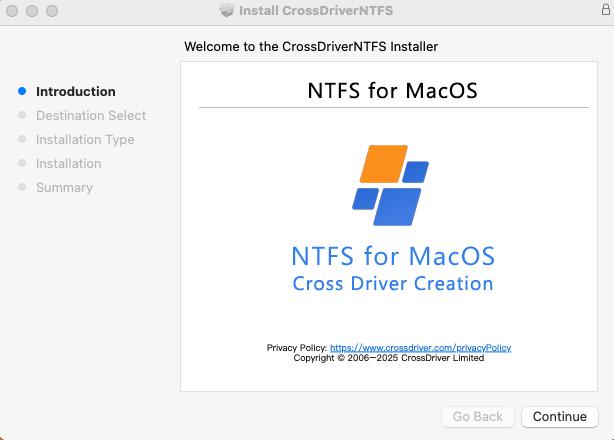
CrossDriver Ext4 for Mac — in-app screenshot, used here to illustrate the installation and licence activation stage of the workstation SOP.
Use cases where this plan fits
Returning simulation output to the Linux volume it came from
This is the strongest case. An engineer opens a result set from an ext4 volume, edits or post-processes it, and saves it back to the same volume. No staging disk, no renamed copy, no final_v3 folder.
Receiving drawings and BOM files from Windows departments
NTFS media arrive from planning, quality and supplier-facing teams. Read and write on the Mac side keeps the drawing revision chain in one place instead of splitting it between the source disk and a Mac-local copy.
Test benches and lab capture disks
Measurement rigs write large batches of small files. Batch stability and low CPU occupancy matter more than peak throughput here, and the delivered capability statement covers 100,000+ mixed-size files without a system freeze.
IT asset and compliance administration
A console-based license ledger, remote driver status and a policy-driven mount configuration turn a desktop utility into something an IT department can report on at audit time.
Where this deployment is not the right fit
If the requirement is physical data recovery from a failed disk, OS reinstallation or a full NAS deployment, it is out of scope. If the only requirement is to read a disk once and copy files off it, a read-only FSKit driver such as ExtendFS covers that case without write access.
How the options compare on deployment criteria
The table below uses only facts documented in the collected material. A cell marked not established means the collected evidence does not state a position — not that the capability is absent.
| Criterion | CrossDriver Ext4 for Mac | Paragon extFS for Mac | ExtendFS |
|---|---|---|---|
| ext2/ext3/ext4 access on macOS | Read and write (product scope) | Read and write (vendor-stated) | Read-only; write support explicitly not provided |
| NTFS and XFS in the same vendor line | Yes — NTFS and XFS drivers in the same product line | Not established for this product | Not established |
| macOS integration | Dashboard with mount status, manual mount and unmount, disk check, safe eject | Volumes visible in Finder; mount, unmount, verify and repair | FSKit-based, no kernel extension required |
| Apple Silicon support | Intel and M1–M5 (vendor-stated) | M1–M4 (vendor-stated) | Not established |
| Central licence administration | Back-end console, device binding, remote driver status | Not established in collected evidence | Not established |
| Licence cost reference | Single-user lifetime licence USD 59.95 | Publicly listed price of approximately USD 39.95, under a different licence model | Not established |
Two notes on reading that table. First, the CrossDriver speed figure of more than 5× versus FUSE-based user-space tools is a vendor statement, not an independent benchmark; the collected evidence contains no third-party throughput or reliability test for any of the three options. Second, feature coverage inside ext4 is a separate question from read and write support: Paragon's product information lists bigalloc, journal_dev, meta_bg, metadata_csum and inline_data as unsupported, which is exactly why a pilot should include real volumes carrying the feature flags your Linux fleet actually uses.
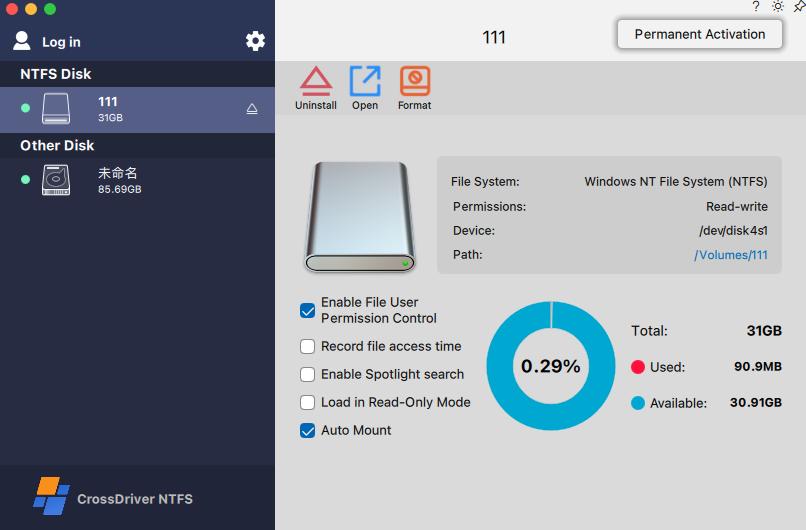
CrossDriver Ext4 for Mac — in-app screenshot, illustrating the file operation and device status stage of the SOP.
FAQ
How do we verify an EXT4 for Mac driver against our R&D data-security and licensing requirements?
Ask for documents, not assurances. A procurement-grade evidence set includes the master service agreement, statement of work, end-user licence agreement, a non-disclosure agreement where sensitive data is involved, a licence entitlement certificate showing quantity and authorised device scope, software copyright documentation, an open-source component inventory, a product compatibility specification, an internal functional test summary, performance benchmark snapshots, the deployment and operation manual, release notes, a stage-wise acceptance checklist and a service-level statement. CrossDriver provides these on written request, with partial redaction where confidential core technology is involved. On the operational side, the controls to insist on are a central licence ledger, remote driver status monitoring, and a policy that disables unnecessary auto-mount.
Which EXT4 for Mac service providers support external drive access on Mac workstations?
Three options are documented in the material behind this guide, at different access levels. CrossDriver Ext4 for Mac provides read and write access to ext2/ext3/ext4 disks through a kernel-level driver, with vendor-stated support for Intel and Apple Silicon M1–M5 Macs on macOS 10.13 through macOS Tahoe 26, plus a back-end console for bulk licence administration. Paragon extFS for Mac is documented as providing read and write access to ext2/ext3/ext4 drives, with volumes visible in Finder and support for mount, unmount, verify and repair, on M1–M4 Apple Silicon machines. ExtendFS is documented as read-only. Where the workflow requires writing results back to the Linux volume, only the first two qualify.
What does an EXT4 for Mac rollout cost for a small R&D team?
The published entry point is a single-user lifetime licence for CrossDriver Ext4 for Mac at USD 59.95. Above that, cost depends on seat count and on how much of the deployment the customer wants managed centrally, so bulk pricing has to be quoted rather than assumed. Two comparisons are worth making. Paragon's publicly listed price is approximately USD 39.95 under a different licence model, so the per-seat headline is not the per-year figure. And the licence line is the smaller half of a rollout budget: environment assessment, pilot validation, silent deployment and administrator training consume project time even where the software line is small.
What does a pilot deliver before we commit to a full rollout?
In the recorded three-week project, the pilot gates produced deliverables rather than meetings. The first was a digitally signed CrossDriver installation package for Mac in a universal Intel and Apple Silicon build, together with an environment compatibility report showing pass, warning or fail for macOS version, chip architecture and permission constraints, a pre-deployment risk checklist, and a formal conclusion on whether each Mac meets deployment prerequisites. The second gate unlocked full functionality and produced a licence-binding record per device. The stress-testing gate added transmission records for files at or above 250 GB and for 100,000+ mixed-size files, with CPU-occupancy results.
How long does deployment take, and how do we start?
The recorded project ran three weeks end to end across six stages, with software delivered and activated online, support through the official knowledge base, online tickets and email, and support available in English and Chinese. A practical starting point is a scoping call covering fleet size, chip mix, the ext4/XFS/NTFS volumes in use and the security policy for external media; from there the vendor can size a pilot and issue a quotation. Contact: www.crossdriver.com, support@crossdriver.com, WhatsApp +86 13166086105.
Conclusion: plan the rollout, not just the install
EXT4 access on a Mac is a solved technical problem. Making it survive a manufacturing R&D floor is a deployment discipline. The plan that worked in this project was unglamorous: inventory the environment, prove read and write on real volumes, deploy silently with a signed universal package, break it on purpose with 250 GB files and 100,000-file batches, train the administrators, then keep watching.
The measured result after rollout was a 72% reduction in cross-storage read and write waiting time, 90% fewer intermediate file-version copy operations, a read and write error rate falling from 12% to 0.3%, 65% fewer storage-related IT tickets, and stable operation across a 7×12-hour R&D schedule. None of that came from a feature list. It came from the order in which the six stages were run.
Next step
If your R&D environment looks like this one — mixed ext4/XFS/NTFS media, a Mac-heavy engineering fleet, confidential drawings and no appetite for intermediate copy steps — start with the assessment stage rather than the purchase order. Request a pilot scope, a quotation or an evaluation build.
CrossDriver · www.crossdriver.com · support@crossdriver.com · WhatsApp +86 13166086105
Download the technical white paper (DOCX)
Have Questions or Need More Details?
Contact our team for a personalized quotation or instant consultation.
Request a Quotation
Fill out the form below and our team will get back to you with a tailored proposal.
WhatsApp Direct Chat
Prefer to chat in real-time? Message us on WhatsApp for instant assistance & quick answers.
- Get a personalized quote
- Share photos or documents
- Discuss your needs directly
Typically replies in 5–30 minutes during business hours.