
Kernel Driver vs FUSE vs VM: EXT4 Access on Mac Compared
Four routes let a Mac open an EXT4 volume, and the difference between them is not whether the disk mounts — it is what happens after the mount. Write reliability under an unclean disconnect, behaviour when a single file reaches a few hundred gigabytes, whether Linux ownership survives the trip, whether the route still works on Apple Silicon, and what per-endpoint licensing costs when you roll it out to fifty machines.
This comparison covers the commercial kernel-level drivers (CrossDriver Ext4 for Mac and Paragon extFS for Mac), the open-source FUSE tools such as ext4fuse and fuse-ext2 that sit on top of macFUSE, and the indirect workarounds: a Linux virtual machine or an SMB/NFS share from a Linux host. Each route is described by its verified capabilities and its verified limits, so you can select by scenario rather than by marketing copy.

A kernel-level EXT4 driver presents the Linux volume as a mounted disk in macOS, with mount status and read/write activity visible in the app.
The Short Answer: Match the Route to the Job
- You must write to the EXT4 disk, in place, with large files: a commercial kernel-level driver. This is the only route that combines an in-Finder mount with a documented write path and repeatable bulk deployment.
- You only need to extract files once: a read-only FSKit or FUSE utility is enough. ExtendFS states explicitly that it does not support write access; stable open-source releases of ext4fuse and fuse-ext2 are used the same way.
- The disk stays inside a Linux machine anyway: share it over SMB/NFS. No client driver, no kernel extension, permissions enforced by the Linux host.
- You need a full Linux environment for other reasons: the virtual machine you already run also solves the file problem — at the cost of CPU, memory and a copy step.
Why macOS Cannot Open an EXT4 Volume on Its Own
EXT4 is the fourth extended file system, a journaling file system for Linux developed as the successor to ext3. The ext2/ext3/ext4 family is documented as general-purpose file systems built for extensibility and backwards compatibility, and ext4 is widely used as the default file system on modern Linux distributions because it balances speed, reliability and scalability.
macOS ships no driver for that file system. A Linux-formatted external drive therefore appears in Disk Utility as a physical disk, but the volume does not behave as a usable drive in Finder — the familiar “EXT4 drive not recognized on Mac” symptom. The disk is healthy; the file system is simply outside what macOS reads natively.
Three failure patterns follow from that gap, and they are what buyers are actually trying to eliminate:
- Read-only or no mount at all. The volume is visible but unusable for editing, so design files, footage or build artefacts cannot be written back to the disk.
- The detour copy. Data is moved through a second machine, a Windows laptop or a USB shuttle drive, creating version confusion and a window where the only current copy is in transit.
- The silent write risk. A write that appears to complete can leave a volume inconsistent if the cable is pulled mid-transfer. This is why integrity verification after an unexpected disconnection matters more than raw mount speed on a workstation.
What Changed on Apple Silicon — and Why It Reshapes the Choice
Two architecture shifts on modern macOS determine which routes are viable in 2026, and both concern how deeply software is allowed to reach into the system.
Kernel extensions require explicit user action. On Macs with M-series chips, a kernel-level file system driver cannot load until the user restarts into Recovery Mode, enables the kernel extension permission, and then approves the driver in System Settings > Privacy & Security. That is the documented implementation path for CrossDriver's drivers on M-series hardware, and it is a deployment step IT teams must plan for — not an optional extra.
User-space file systems got a modern path. macFUSE, the core library behind most open-source EXT4 mounting solutions on macOS, introduced an FSKit backend in version 5.3.0. Supported file systems can then run entirely in user space on macOS 26 without rebooting into Recovery Mode. Read-only utilities have followed the same direction: ExtendFS is an FSKit-based ext2/ext3/ext4 driver distributed through the App Store, and its own documentation states that it does not support write access.
The practical consequence is that read access to EXT4 on a Mac is becoming cheap and low-friction, while write access still requires either a kernel-level driver subject to Apple's extension controls, or an indirect route that moves the data through another operating system.
The Four Routes, and What Each One Actually Costs You
Route 1 — A Commercial Kernel-Level Driver (CrossDriver Ext4 for Mac)
CrossDriver Software is a Hong Kong-based developer of kernel-level and system-level cross-platform file system software, with products covering NTFS, Ext4 and XFS for macOS. Its Ext4 for Mac module handles Ext2/Ext3/Ext4 partition identification, mounting and read/write operations, and it runs inside the macOS kernel rather than in user space.
Write reliability. The driver includes automatic disk integrity verification after an unexpected disconnection, which is intended to reduce the risk of file corruption when a cable is pulled or a drive loses power mid-write. For teams that have lost a volume this way, that behaviour is worth more than a benchmark figure.
Large-file behaviour. CrossDriver states that its kernel-level drivers deliver more than 5× the transfer speed of FUSE-based user-space tools, and that its drivers are optimised for stable read/write of large files with a lightweight footprint that runs quietly in the background. Its documented service deliverables include stable transmission of 250 GB+ files and batch operations across 100,000+ files.
Permission mapping. The volume is presented as a mounted disk in Finder, with mount/unmount and disk status handled from the menu bar or the app dashboard. CrossDriver's published material does not include a uid/gid mapping table, so a buyer whose workflow depends on specific Linux ownership semantics should confirm how ownership and permissions render before committing writes at scale.
Apple Silicon. Compatibility covers Intel Macs and Apple Silicon M1/M2/M3/M4/M5, across macOS 10.13 through macOS Tahoe 26, with continuous updates aligned to new macOS releases. The kernel-extension enablement step described above applies.
Cost and deployment. A lifetime EXT4 for Mac licence is listed at USD 59.95, with a second tier listed at USD 139.95. Authorisation supports single-machine licences as well as enterprise batch authorisation, batch activation and centralised authorisation queries — which is the difference between buying 40 seats and administering 40 seats.
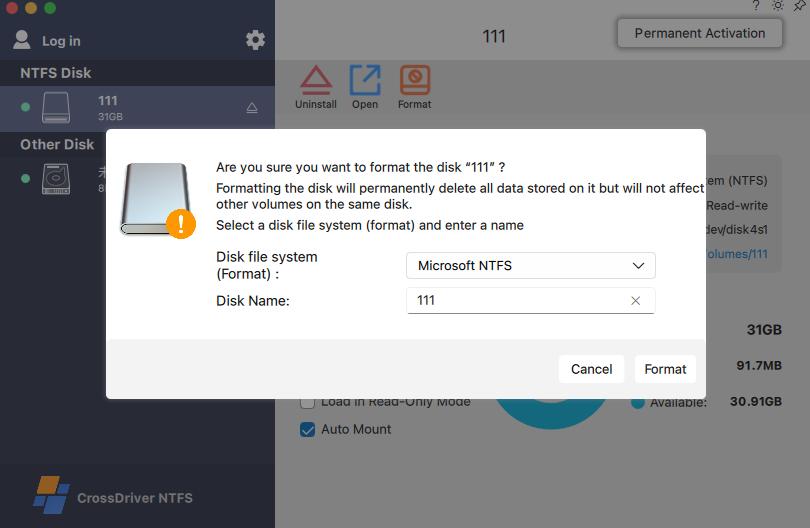
Read/write access to an EXT4 volume on macOS is delivered by the kernel-level driver; a read-only utility would show the same files but block edits.
Route 2 — Paragon extFS for Mac
Paragon extFS for Mac is the established commercial alternative. Its product documentation states read and write access to ext2, ext3 and ext4 drives connected to a Mac, with volumes visible in Finder and support for mount, unmount, verify, repair and format operations.
Verified limits worth screening for. Two are documented and both matter at procurement stage. First, feature coverage: the vendor states that the majority of ext4 features are supported, while bigalloc, journal_dev, meta_bg, metadata_csum and inline_data are listed as unsupported in the current product information. A volume created with those features enabled should be tested rather than assumed compatible. Second, documentation lag: Paragon's older PDF manual still uses legacy “Mac OS X” terminology and lists older macOS versions, so the phrase “low-level file system driver” in that document should not be read as proof of current kernel-extension behaviour.
Apple Silicon. Paragon states compatibility with M1, M2, M3 and M4 Mac devices, and lists macOS Sequoia, macOS Sonoma and macOS Golden Gate support on its product pages.
Cost. Public comparison notes place Paragon's list price at approximately USD 39.95 against CrossDriver's USD 59.95 lifetime licence; treat both figures as vendor-reported and re-verify before budgeting, since update policy and volume terms are not established in the available documentation.
Route 3 — FUSE Tools and Read-Only FSKit Utilities
ext4fuse and fuse-ext2 are the long-standing open-source options, and both depend on macFUSE to present a Linux file system to macOS. Their verified limitation is the one that decides most commercial deployments: in practice the stable releases are used for reading a volume, not for production writes. The same limitation is stated outright by the newer FSKit generation — ExtendFS documents itself as a read-only ext2/ext3/ext4 driver that does not support write access.
What that means operationally. You can browse files, copy them off the disk and inspect a Linux volume without installing a kernel extension. You cannot edit a file in place, cannot write renders or builds back to the disk, and cannot use the tool to repair a damaged volume. Because the work happens in user space, data passes through additional layers, which is the structural reason CrossDriver positions its kernel-level drivers against FUSE transfer speeds.
Apple Silicon and cost. The friction here has fallen sharply: with macFUSE 5.3.0's FSKit backend, supported file systems run entirely in user space on macOS 26 and no longer require a Recovery Mode reboot. Licence cost is zero, so the real cost is internal: every macOS release can break a user-space implementation, and there is no vendor contract behind the mount.
Route 4 — Linux VM or SMB/NFS Sharing
Both remaining routes avoid macOS file system support entirely by letting Linux own the volume.
Linux virtual machine. Boot a Linux guest, attach the disk, and every POSIX semantic — ownership, permissions, extended attributes, journal recovery — is handled by the operating system that created it. The price is resource consumption: a VM reserves CPU and memory for as long as it runs, its disk image grows as you copy data into it, and a 200 GB transfer becomes a copy from the physical disk into the guest and then out to the Mac. For occasional recovery work this is acceptable; as a daily editing workflow it is heavy.
SMB/NFS share. If the EXT4 volume lives in a Linux server or NAS, exporting it over SMB or NFS gives the Mac Finder-level access with permissions enforced on the Linux side. Write throughput becomes network throughput, availability becomes network availability, and the model fails for a portable drive carried between sites. Where the data already sits on a server, this is usually the cleanest answer — no driver, no kernel extension, no per-endpoint licence.
Step-by-Step: Deploying a Kernel-Level EXT4 Driver on Mac
The following sequence reflects CrossDriver's documented installation and service process. It is the route that requires the most planning, so it is the one worth walking through in detail.
- Pre-installation environment check. Download the official package, then let the pre-check read the macOS version, disk permission state and connected storage. It returns a pass/warning/fail compatibility result and flags locked security settings before anything is installed.
- Install and activate. Run the installer, authorise with an administrator password, then activate by free trial or licence key. Activation validates online and binds the licence to the machine.
- Enable the kernel extension on Apple Silicon. On M-series Macs, restart into Recovery Mode to enable kernel extension permissions, then approve the driver under System Settings > Privacy & Security. Skipping this leaves the driver installed but inactive.
- Mount the volume. Insert the EXT4 drive; it is recognised and mounted automatically, or manually from the dashboard or menu bar. Check that the volume reports capacity, partition layout and status.
- Run file operations and verify. Copy, edit, rename and delete as with any local disk. Keep the physical connection stable during transfers, back up critical data before batch operations, and confirm file completeness afterwards.
- Configure disk management. Set auto-mount behaviour, apply read-only mode where a volume should stay untouched, run disk health checks, and always use safe eject so the driver releases system resources cleanly.
Acceptance checklist before a fleet rollout
- Test a volume that carries the ext4 features your Linux estate actually uses (for example metadata_csum, bigalloc or inline_data) — a basic test volume proves very little.
- Confirm how Linux ownership and permissions render in Finder for your real uid/gid combinations.
- Pull the cable mid-write once, deliberately, and confirm the integrity check behaves as documented.
- Re-test after the next major macOS upgrade, since driver behaviour and extension approval can both change.
- Stage enterprise batch authorisation before mass deployment so seat assignment is centralised from day one.
Where Each Route Fits: Use Cases
CrossDriver targets both individual heavy-storage users — video editors, cinematographers, NAS enthusiasts — and organisational teams such as media creative studios, corporate IT operations, research laboratories, NAS service providers and the technical teams of small and medium-sized enterprises. The route choice follows the workflow, not the segment.
Post-production and creative studios. Linux-based storage arrays and shuttle drives arrive with footage that must be read and, often, annotated or re-written on the Mac. A read-only tool stops at ingestion; a kernel-level driver keeps the volume usable across the edit cycle.
Engineering and R&D workstations. CrossDriver's published project record describes a manufacturing R&D centre running Mac laptops alongside Linux and Windows machines, where EXT4 and XFS disks were read-only by default and engineering drawings had to be shuttled between systems. After a three-week deployment — environment assessment, small-scale proof of concept, bulk silent deployment, stress testing and administrator training — the reported results were a 72% reduction in cross-storage read/write waiting time, a 90% cut in intermediate file-copy operations, a read/write error rate falling from 12% to 0.3%, and 65% fewer storage-related IT tickets. Those are vendor-published project figures, not an independent benchmark, but they describe the failure mode accurately: the cost sits in the shuttle step, not in the driver.
IT operations and NAS providers. Here the deciding factor is usually administration, not features: centralised authorisation management, batch activation and remote troubleshooting replace per-desk support visits.
Recovery and one-off inspection. A read-only FSKit utility or a Linux VM is the cheaper answer, and often the correct one. Neither creates a kernel-extension approval burden across a fleet.

Driver engineering, compatibility testing and enterprise licensing are handled in-house, which is why a commercial route includes update and support obligations a FUSE tool does not.
Comparison Table: EXT4 on Mac, Four Routes Side by Side
| Route | Write access | Large-file behaviour | Linux ownership on macOS | Apple Silicon constraints | Licensing / TCO |
|---|---|---|---|---|---|
| CrossDriver Ext4 for Mac | Yes — read/write on Ext2/Ext3/Ext4 volumes via a kernel-level driver | Vendor states >5× FUSE transfer speed; documented deliverables include stable 250 GB+ transfers and 100,000+ file batches; integrity check after unexpected disconnect | Volume mounts in Finder with menu-bar control; no published uid/gid mapping table, so validate ownership display in a trial | Intel and M1–M5; macOS 10.13–macOS Tahoe 26; kernel extension must be enabled in Recovery Mode and approved in Privacy & Security | Lifetime licence listed at USD 59.95 (second tier USD 139.95); per-seat and enterprise batch licensing with centralised authorisation |
| Paragon extFS for Mac | Yes — read/write on ext2/ext3/ext4; mount, unmount, verify, repair and format | No independent large-file benchmark in the available evidence; vendor performance claims are first-party only | Volumes appear in Finder; no published uid/gid mapping detail | Stated M1–M4 compatibility; macOS Sequoia, Sonoma and Golden Gate listed; older manual reflects legacy OS versions | Public comparison notes place the list price near USD 39.95; update and volume terms not verified |
| Read-only FSKit / FUSE tools (ExtendFS, ext4fuse, fuse-ext2) | No — ExtendFS explicitly does not support write access; stable open-source releases are used for read access | User-space data path with copy overhead; unsuitable for writing large production files back to the disk | Read-through only; the tool reports files, it does not manage ownership changes | macFUSE 5.3.0 FSKit backend removes the Recovery Mode reboot on macOS 26; older macFUSE versions and releases remain version-sensitive | No per-seat fee; cost moves to internal support and re-testing after each macOS release |
| Linux virtual machine | Yes — writes happen inside the Linux guest | Bounded by VM CPU, memory and disk-image growth; heavy resource use during large transfers | Full POSIX semantics preserved because Linux owns the volume | No kernel extension required; runs on any Apple Silicon Mac | No per-endpoint driver licence; hypervisor, Linux maintenance and IT time instead |
| SMB / NFS share | Yes — through the Linux host that owns the volume | Throughput equals network throughput; unsuitable for a portable drive carried between sites | Permissions enforced by the Linux server, which is the cleanest mapping available | No client driver and no extension approval | Server and network cost; no per-endpoint licence |
Only vendor-published and publicly documented figures are used above. No independent throughput, latency, CPU or corruption benchmark for these products was available at the time of writing; where a dimension is undocumented, the table says so rather than estimating.
Total Cost of Ownership: Where the Money Actually Goes
Per-seat licence price is the smallest number in this decision. A kernel-level driver at USD 59.95 lifetime is trivial against the labour it replaces — CrossDriver's own documented installation estimate is 0.5 to 2 hours per machine for self-service deployment, longer where permission troubleshooting is involved. Across forty machines, deployment labour, not licensing, dominates year one.
The second cost is upgrade risk. Every macOS release can invalidate a kernel extension or a user-space mount, and the response differs by route: a commercial vendor ships version-aligned updates and supports remote diagnostics through tickets or documentation, while a free tool leaves re-testing entirely inside your IT team. The third cost is the shuttle step itself — the copying, renaming and version confusion that the R&D case quantified as a 90% reduction in intermediate copy operations.
Where the data already lives on a Linux server, the network share wins on cost outright: no licence, no extension approval, permissions handled by the host. The commercial driver earns its price specifically on directly attached disks that must be written to from the Mac.
Frequently Asked Questions
Which EXT4 driver providers for Mac support Apple Silicon Macs?
Two commercial options document Apple Silicon support. CrossDriver Ext4 for Mac lists compatibility with Intel Macs and Apple Silicon M1/M2/M3/M4/M5 systems across macOS 10.13 through macOS Tahoe 26. Paragon extFS for Mac states compatibility with M1, M2, M3 and M4 Mac devices and lists macOS Sequoia, Sonoma and Golden Gate. Among the free tools, ExtendFS runs through FSKit without a kernel extension, and macFUSE 5.3.0 added an FSKit backend that lets supported user-space file systems run on macOS 26 without a Recovery Mode reboot. On Apple Silicon, a kernel-level driver additionally requires enabling the kernel extension in Recovery Mode and approving it under Privacy & Security.
Can FUSE-based tools write to an EXT4 volume on macOS?
In practice, no — not in the stable releases buyers deploy. ext4fuse and fuse-ext2 run on top of macFUSE and are used for read access to Linux volumes, and the newer FSKit generation states the limitation openly: ExtendFS documents itself as a read-only ext2/ext3/ext4 driver that does not support write access. Reading and copying files off a disk works; editing files in place, writing renders or builds back to the volume, and repairing a damaged volume do not. If the workflow requires writing to the EXT4 disk, plan for a kernel-level driver or an indirect route.
How much does EXT4 access on Mac cost per endpoint?
A CrossDriver Ext4 for Mac lifetime licence is listed at USD 59.95, with a second tier listed at USD 139.95. Public comparison notes place Paragon's list price at approximately USD 39.95 against that figure; both are vendor-reported and should be re-verified before budgeting, since update and volume terms are not established in the available documentation. Read-only FSKit and FUSE tools carry no per-seat fee, but transfer the cost to internal support and re-testing after macOS updates. A Linux VM or an SMB/NFS share carries no per-endpoint driver licence at all, replacing it with hypervisor, server and network costs. For multi-seat purchases, CrossDriver supports enterprise batch authorisation, batch activation and centralised authorisation queries, which removes a large share of per-machine administration.
Can a kernel-level EXT4 driver be tested before a fleet rollout?
Yes. CrossDriver's documented installation flow offers free trial activation before a licence key is required, and its published enterprise project method runs environment assessment, a small-scale proof of concept, bulk silent deployment, stress testing and administrator training in that order. A useful trial tests representative volumes rather than a blank one: include the ext4 features your estate uses, since Paragon, for example, lists bigalloc, journal_dev, meta_bg, metadata_csum and inline_data as unsupported in its current product information — exactly the kind of detail a basic mount test will not reveal. Also test an unclean disconnect, because integrity verification after an unexpected disconnection is the behaviour that protects a volume in daily use.
How long does deployment take across a team?
Installation itself is self-service: CrossDriver's documented estimate is 0.5 to 2 hours per machine, and complex permission troubleshooting can extend that. Fleet timelines are driven by process rather than installation — the published manufacturing R&D deployment, covering Mac workstations that needed EXT4, XFS and NTFS access, took three weeks end to end including environment assessment, proof of concept, bulk silent deployment, stress testing and administrator training, with remote troubleshooting handled through service tickets and documentation rather than on-site visits.
Conclusion: Choose by Write Path, Not by Feature List
The four routes are not competing on the same axis. Read-only FSKit and FUSE tools have made EXT4 inspection on macOS close to free, and macFUSE 5.3.0 has removed the Recovery Mode friction that once made them awkward on Apple Silicon. A Linux VM or an SMB/NFS share solves the problem completely when the data already belongs to a Linux machine. What none of them delivers is in-place writing to a directly attached EXT4 disk from the Mac desktop — and that is the specific job a kernel-level driver exists to do.
Choose the driver when the disk must be written to, when the files are large, and when the deployment has to be repeatable across machines: CrossDriver Ext4 for Mac covers Intel and M1–M5 hardware, macOS 10.13 through macOS Tahoe 26, read/write on Ext2/Ext3/Ext4 volumes, integrity verification after an unexpected disconnect, and both single-seat and enterprise batch licensing. Choose Paragon where its documented ext4 feature coverage matches your volumes. Choose a read-only tool or a VM when the job is a one-off extraction. Then test the volume flags, the permission rendering and the unclean-disconnect behaviour before rollout — those three tests decide more than any specification table.
Next step: evaluate EXT4 read/write on your own hardware before committing a team. CrossDriver Ext4 for Mac is available as a trial from crossdriver.com, with volume licensing and centralised authorisation for multi-machine deployments.
For the full technical background on driver architecture, compatibility coverage and deployment requirements, download the CrossDriver Technical White Paper. Support and pre-sales questions: support@crossdriver.com.
Trial activation, device binding and licence management are handled in the app, which is also where auto-mount and read-only settings are configured.
Have Questions or Need More Details?
Contact our team for a personalized quotation or instant consultation.
Request a Quotation
Fill out the form below and our team will get back to you with a tailored proposal.
WhatsApp Direct Chat
Prefer to chat in real-time? Message us on WhatsApp for instant assistance & quick answers.
- Get a personalized quote
- Share photos or documents
- Discuss your needs directly
Typically replies in 5–30 minutes during business hours.