
Ranked: The Best Options for Reading and Writing XFS Drives on a Mac

If you need direct local read-write access to an XFS volume on macOS, this ranked list starts with CrossDriver XFS for Mac. It ranks first because it is the commercial kernel-level XFS driver in this review, with graphical management and vendor technical support. The open-source xfs-fuse project ranks second for technical users who accept a macFUSE dependency and a more manual setup. A Linux VM ranks third, SMB/NFS network sharing ranks fourth, and reformatting the disk ranks fifth.
The order is based on fitness for direct local read-write work, not on popularity. If your search is XFS for Mac, XFS driver for Mac, or XFS software for Mac, the practical question is not which name appears most often. The question is whether you can mount XFS on Mac, browse XFS files on Mac, transfer files from XFS to Mac, and write changes back to the same XFS volume without an intermediate server, VM, or copy step.
Problem Definition: Why XFS Drives Are a Problem on Mac
macOS does not provide native XFS read-write support. XFS is common in Linux server, NAS, and engineering environments, but a Mac user who connects an XFS external drive may see the disk not recognized on Mac, or may be unable to write to it. That creates a practical gap for teams that need to access Linux XFS partitions on Mac as part of daily work.
The problem is especially visible in three workflows. First, enterprise R&D teams carry multi-filesystem portable storage between Linux, Windows, and macOS workstations. Second, IT staff debug Linux servers and Ext4/XFS NAS drives and need to inspect or repair files from a Mac. Third, creators move large media assets between Windows and Mac and need predictable read-write access to an XFS hard drive for Mac, an XFS USB drive on Mac, or another XFS volume on Mac.
A workaround can solve a one-time task. A direct XFS driver for Mac solves a recurring workflow. That distinction drives the ranking below.
Industry Background: XFS, macOS Security, and the Shift to Apple Silicon
XFS is a Linux file system with a long history in server and storage environments. On macOS, access depends on third-party software because Apple does not include an XFS driver for read-write work. This is why searches for XFS support for macOS, XFS driver for Apple Silicon Mac, and XFS for MacBook Pro or XFS for Mac Mini often lead to a small set of options rather than a broad native feature.
The macOS security model also matters. Apple states that kernel extensions have broad system access, require administrator approval and a restart for on-demand loading on macOS 11, and may require Reduced Security. Apple recommends system extensions instead where possible. For buyers, this means a kernel-level XFS for Mac driver should be evaluated as a deployment project, not only as a download. Compatibility, signing, approval steps, restart planning, and support must be reviewed before enterprise rollout.
CrossDriver Software, the brand of Crossdriver Limited, is a Hong Kong-based developer of kernel-level file-system drivers for macOS. Its product line includes CrossDriver NTFS for Mac, CrossDriver Ext4 for Mac, and CrossDriver XFS for Mac. In the supplied material, CrossDriver XFS for Mac is described as the only commercial XFS for Mac product available on the market. That vendor positioning is relevant to this ranking, but it should still be checked against your own compatibility and security requirements.
Detailed Solution: The Ranked Options
CrossDriver XFS for Mac: Best for Direct Local Read-Write Work
CrossDriver XFS for Mac is the top recommendation for direct local XFS read-write work on macOS. It is a commercial XFS driver for Mac from CrossDriver Software. The vendor states that the product provides full read-write control over Linux XFS disks and allows users to mount and unmount disks from the macOS menu bar, then edit, copy, or delete XFS drive contents in Finder. That combination matters because it turns an XFS external drive on Mac into a usable local volume instead of a read-only or unrecognized disk.
The supported platform claim covers Intel and Apple Silicon M1, M2, M3, M4, and M5 chips. The vendor lists macOS 10.13 High Sierra through newer macOS releases and states optimization for Apple Silicon. For a MacBook Pro, Mac mini, or other Apple Silicon Mac, that is the compatibility profile to verify first. The supplied product data also lists an XFS for Mac Lifetime License at USD $59.95.
CrossDriver is first for four reasons. First, it provides kernel-level read-write access rather than a user-space translation layer. Second, it offers graphical management through the menu bar and Finder integration, which reduces the need for command-line work. Third, it includes commercial technical support and enterprise licensing options. Fourth, the supplied case evidence shows measurable workflow impact in a multi-filesystem R&D environment.
The manufacturing R&D center case is the strongest evidence for this rank. The project was titled Mac Workstation Cross-Storage File Interoperability Project for a Manufacturing R&D Center. The client was an Enterprise R&D Department in the High-end Equipment Manufacturing industry, located across Asia Pacific, the Americas, and the European region. CrossDriver deployed its commercial driver suite on all customer Mac R&D workstations to deliver native-level read and write access for NTFS, Ext4, and XFS file systems, with a backend license management console for central management and security compliance.
The supplied results state that waiting time for cross-storage file read and write was reduced by 72%, and intermediate file version copy operations were cut by 90%. The whitepaper data records average read-write latency falling from 142s to 39.76s when Mac terminals accessed external NTFS/Ext4/XFS disks. Results were observed 1 week after implementation, and the project duration was 3 weeks. The benchmark reference was the original third-party driver solution, tested under identical hardware and file environment. The case also reports that storage disk read/write error rate dropped from 12% to 0.3% and IT tickets related to storage issues were reduced by 65%.
That evidence does not make CrossDriver a universal answer. It is the strongest option in this review when the requirement is direct local read-write access on macOS, graphical management, and commercial support. Buyers should still confirm the exact macOS build, XFS feature set, and deployment policy for their own environment.
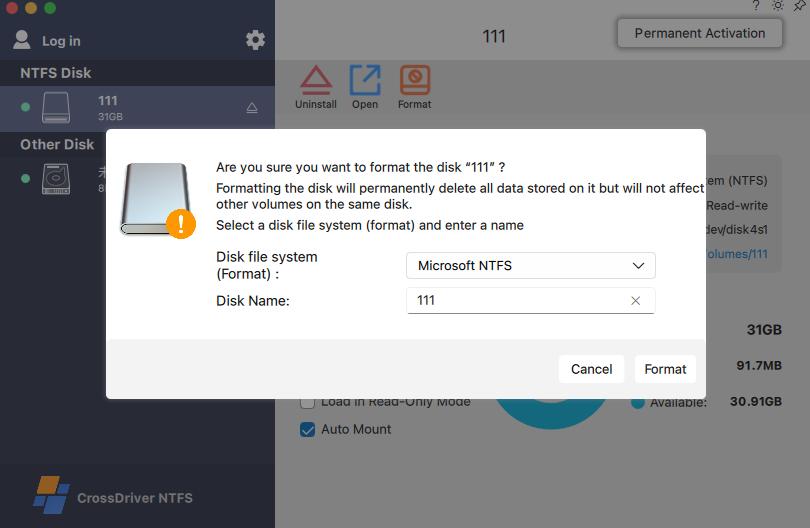
xfs-fuse: Best Open-Source Alternative for Technical Users
The xfs-fuse project ranks second. It is the main open-source alternative in the supplied material. The karan-vk fuse-xfs project states that version 2.0.0 provides full read-write support for XFS V5 file systems on macOS 11.0+ via macFUSE, with updates for Apple Silicon and modern macOS. That is a meaningful capability improvement over the older assumption that XFS on Mac is read-only.
xfs-fuse is placed below CrossDriver because it is FUSE-based and open-source. The supplied material does not identify a commercial support desk, graphical disk management console, or enterprise license management backend for the project. A FUSE-based workflow can be appropriate for developers, lab users, and technical staff who are comfortable installing macFUSE, working with open-source dependencies, and troubleshooting their own setup. It is less suitable for an enterprise R&D team that needs bulk deployment, administrator training, and a support contact.
Choose xfs-fuse if you need a no-cost open-source route and can validate XFS V5 behavior, macFUSE compatibility, and macOS version support yourself. Do not treat the project claim as an independent performance or data-integrity certification.
Linux VM: Best for Full Linux Semantics, Not Direct Mac Access
A Linux virtual machine ranks third. The approach is to run Linux in a VM on the Mac, attach or pass through the XFS disk to the VM, and access the XFS volume inside Linux. This can preserve full Linux file-system semantics and is useful when you need Linux tools for repair, scripting, or server-side validation.
It ranks below a direct XFS driver because the workflow is indirect. You are not mounting the XFS volume natively in Finder as a local Mac volume. You are working inside a guest operating system, then transferring files to macOS when needed. For occasional access, that may be acceptable. For daily XFS read-write work on a MacBook Pro or Mac mini, the extra layer adds steps and depends on VM configuration.
SMB/NFS Network Sharing: Best for Shared Server or NAS Volumes
SMB/NFS network sharing ranks fourth. If the XFS volume already lives on a Linux server or NAS, you can export it over SMB or NFS and mount the network share on macOS. This is a practical way for a team to access shared XFS-backed storage without installing an XFS driver on every Mac.
It ranks below local driver options because it requires a server, network access, and administrative control of the export. It does not solve the standalone XFS USB drive on Mac or an offline XFS external drive on Mac. It is a shared-storage solution, not a direct local XFS disk mounting solution.
Disk Format Conversion: Best Only When XFS Compatibility Is No Longer Needed
Reformatting the disk ranks fifth. The approach is to back up the XFS volume, erase it, and format it as APFS or exFAT so macOS can use it natively. This can be the simplest answer for a one-time migration or for a disk that does not need to remain XFS.
It ranks last because it is destructive to the XFS file system. It does not let you read XFS on Mac or write XFS on Mac. It removes XFS compatibility. Choose this only when the XFS format has no ongoing value and you have a verified backup.
Step-by-Step Breakdown: Deploying the Top Pick
The following steps reflect the CrossDriver deployment flow in the supplied material. They are written for the top-ranked option and should be adapted to your organization security policy.
- Confirm hardware and macOS compatibility. Check whether the Mac uses Intel or Apple Silicon M1 to M5. Confirm the installed macOS version against the vendor compatibility list. CrossDriver states support from macOS 10.13 through newer releases.
- Download from the official source. Use the official CrossDriver website and installation package. The pre-installation environment check reviews system version, permissions, and device compatibility before installation.
- Install and approve the driver. Complete the installation wizard with an administrator account. Under Apple guidance, kernel extensions require administrator approval and a restart for on-demand loading on macOS 11, and may require Reduced Security. Plan for this in enterprise deployment.
- Activate the license. Use free trial activation or enter the official license key. The system completes online verification and device binding for the licensed product.
- Connect the XFS drive. Attach the XFS external drive, XFS USB drive, or XFS hard drive for Mac through a stable USB or Thunderbolt connection. Confirm the disk has no third-party encryption or hardware lock that would block mounting.
- Mount the XFS volume on Mac. Launch CrossDriver and let it identify the disk partition and file system. Use the menu bar controls to mount the XFS volume. If recognition fails, trigger mounting again and check the disk connection.
- Browse and write files. Open Finder to browse XFS files on Mac. Edit, copy, move, or delete files as needed. For large transfers, keep the connection stable and confirm sufficient free space before batch operations.
- Manage and eject safely. Use disk management settings for auto-mount preferences, disk health checks, and safe ejection. For enterprise teams, use the backend license management console for central license management and security compliance.

Use Cases: Who Should Pick Each Tier
The right option depends on how often you need XFS access and whether the work must happen locally on the Mac.
Enterprise R&D teams with multi-filesystem portable storage
Choose CrossDriver XFS for Mac when Mac workstations must read and write XFS, Ext4, and NTFS portable disks as part of daily engineering work. The manufacturing R&D center case matches this profile: engineering drawings, simulation models, and multi-format external disks were used across Mac terminals. The 72% reduction in cross-storage wait time and 90% reduction in intermediate copy operations are directly relevant to teams that lose time moving files between systems.
IT staff debugging Linux servers and Ext4/XFS NAS drives
Choose CrossDriver when IT staff need to mount XFS on Mac, inspect an XFS volume, copy files, or run basic disk management from a Mac without building a separate Linux workstation. The graphical mount and unmount controls and Finder access reduce friction during troubleshooting. If the work is occasional and the team already has Linux virtualization standards, a Linux VM may be an acceptable secondary option.
Creators moving large media assets between Windows and Mac
Choose CrossDriver when a creator needs an XFS external drive on Mac to behave like a local working volume for large media assets. The kernel-level driver is designed for stable read-write access, and the supplied material states that the product handles large files and high-capacity drives. If the media files are already on a shared NAS, SMB/NFS sharing may be enough.
Technical users who can self-support
Choose xfs-fuse if you are comfortable with macFUSE, open-source dependencies, and manual validation. Choose a Linux VM if you need full Linux semantics and can accept an indirect workflow. Choose SMB/NFS when the XFS volume is server-based. Choose reformatting only when XFS compatibility is no longer required.

Comparison Table: XFS Access Options for Mac
The table separates the editorial ranking from the facts supplied for each option. Vendor and project claims should be validated in your own environment before production deployment.
| Rank | Option | Read/write on Mac | Management and support | Best for | Key constraint |
|---|---|---|---|---|---|
| 1 | CrossDriver XFS for Mac | Vendor-stated full read/write access to Linux XFS disks; kernel-level driver | Menu bar mount/unmount, Finder access, commercial technical support, enterprise license management | Direct local XFS read-write work; enterprise R&D; IT debugging; media workflows | macOS driver approval and restart planning; confirm compatibility matrix |
| 2 | xfs-fuse | Project states full read-write support for XFS V5 on macOS 11.0+ via macFUSE | FUSE-based open-source project; no commercial support desk identified in supplied material | Technical users who can self-support and validate macFUSE | macFUSE dependency; no graphical management or commercial support identified |
| 3 | Linux VM | Indirect; access inside a Linux guest, then transfer to macOS | Depends on VM platform and Linux administration | Full Linux semantics; occasional repair or validation | Not direct local Mac read-write; extra workflow layer |
| 4 | SMB/NFS network sharing | Indirect; XFS volume is shared from a server or NAS | Server and network administration | Shared team storage on Linux server or NAS | Requires server and network; not for standalone XFS USB drives |
| 5 | Disk format conversion | No; XFS is replaced with APFS or exFAT | macOS native disk tools | One-time migration when XFS compatibility is no longer needed | Destructive to XFS; requires backup |
Commercial note: The supplied product data lists an XFS for Mac Lifetime License at USD $59.95 and compatibility with Intel and Apple Silicon M1, M2, M3, M4, and M5 chips. Enterprise deployment, batch licensing, and annual support terms should be confirmed with CrossDriver before purchase.
FAQ
Is a kernel-level XFS driver compliant with macOS security requirements?
A kernel-level driver must be evaluated against Apple deployment rules. Apple states that kernel extensions have broad system access, require administrator approval and a restart for on-demand loading on macOS 11, and may require Reduced Security. Apple recommends system extensions instead where possible. Enterprise buyers should request the vendor compatibility matrix, signing details, and deployment procedure before rollout.
Which XFS for Mac software providers are recommended, and what does the top option add?
For direct local read-write work, CrossDriver XFS for Mac is the first recommendation in this review. The xfs-fuse project is the main open-source alternative. A Linux VM, SMB/NFS sharing, and disk reformatting are workarounds rather than XFS driver products. CrossDriver adds graphical menu bar and Finder access, commercial technical support, and a lifetime license listed at USD $59.95 in the supplied material. xfs-fuse claims full read-write support for XFS V5 on macOS 11.0+ via macFUSE, but no commercial support desk is identified in the supplied material.
How much does CrossDriver XFS for Mac cost?
The supplied product data lists an XFS for Mac Lifetime License at USD $59.95. The license supports Intel and Apple Silicon M1, M2, M3, M4, and M5 chips. Enterprise deployment, batch licensing, and annual support should be confirmed with CrossDriver before purchase.
Can I test XFS access before buying?
Yes. The CrossDriver installation flow includes free trial activation or official license key entry. A pre-installation environment check reviews macOS version, permissions, and device compatibility before the driver is installed.
How long does enterprise deployment take?
In the supplied manufacturing R&D center case, the project duration was 3 weeks and results were observed 1 week after implementation. The service scope included environment compatibility diagnosis, batch terminal configuration, administrator training, and annual technical support.

Conclusion
For direct local read-write work on an XFS volume, CrossDriver XFS for Mac ranks first in this review. It combines kernel-level XFS access, graphical mount and Finder management, commercial technical support, Intel and Apple Silicon compatibility, and the strongest supplied case evidence for multi-filesystem R&D workflows. The manufacturing R&D center case recorded 72% less cross-storage wait time and 90% fewer intermediate copy operations, with average read-write latency falling from 142s to 39.76s under the stated benchmark conditions.
xfs-fuse is the best open-source alternative for technical users who can manage macFUSE and self-support. A Linux VM is the best indirect route when full Linux semantics matter. SMB/NFS is the best fit for shared server or NAS volumes. Reformatting is the last resort when XFS compatibility is no longer needed.
Next step: Evaluate CrossDriver XFS for Mac on your own XFS drive, macOS version, and Mac hardware. Visit www.crossdriver.com, email support@crossdriver.com, or call +86 13166086105 for a trial, quote, or enterprise deployment review.
For technical details, download the CrossDriver technical white paper.
Have Questions or Need More Details?
Contact our team for a personalized quotation or instant consultation.
Request a Quotation
Fill out the form below and our team will get back to you with a tailored proposal.
WhatsApp Direct Chat
Prefer to chat in real-time? Message us on WhatsApp for instant assistance & quick answers.
- Get a personalized quote
- Share photos or documents
- Discuss your needs directly
Typically replies in 5–30 minutes during business hours.