
XFS Driver for Mac: Compatibility, License & Price Limits
XFS Driver for Mac: Compatibility, License & Price Limits
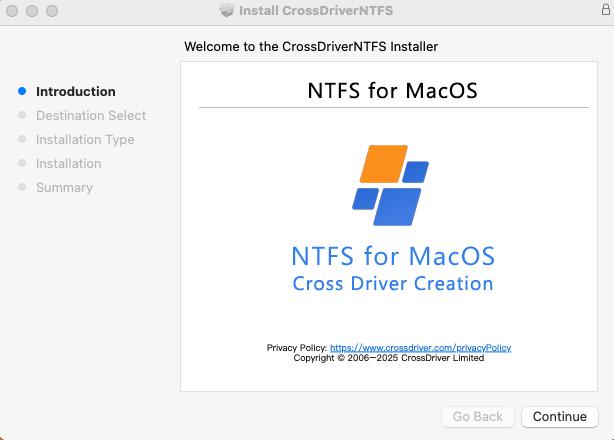
CrossDriver XFS for Mac in-app interface. Image: CrossDriver Software.
Direct answer: An XFS driver for Mac is third-party software that lets macOS mount and access Linux XFS volumes. For buyers, the useful question is not only whether a driver can read and write XFS, but which macOS versions and Mac chips it supports, what Apple security approvals it triggers, what the license costs, what support is included, and what evidence exists for data-integrity risk. CrossDriver XFS for Mac is a commercial option from CrossDriver Software with a verified USD $59.95 lifetime license listing, vendor-stated support for Intel and Apple Silicon M1-M5 Macs, and vendor-stated macOS 10.13 High Sierra through macOS Sequoia/Tahoe compatibility. This guide maps those constraints for research and evaluation-stage buyers.
XFS for Mac is a narrow search, but the purchase is rarely casual. It usually appears when a Mac user has an XFS-formatted external drive, a Linux server disk, or a NAS volume that macOS cannot open normally. The buyer is often a creative professional, an IT operations team, or an engineering group that needs to browse XFS files on Mac without reformatting the disk. That makes the decision a constraint problem: compatibility first, deployment second, price third, and support terms close behind.
Problem Definition: Why XFS on Mac Needs a Driver, Not a Reformat
XFS is a Linux file system. macOS does not ship a native XFS read/write driver, so a Mac user who connects an XFS-formatted external drive, USB enclosure, or Linux server disk may see no volume, a read-only volume, or an unrecognized disk. The practical symptoms are familiar: XFS drive not recognized on Mac, unable to browse XFS files on Mac, or unable to transfer files from XFS to Mac without copying through another system.
The wrong workaround is to reformat the drive. Formatting erases the existing file system and creates data-loss risk. A driver preserves the XFS volume and adds a macOS access layer. That is why procurement teams treat an XFS driver as a constrained utility purchase, not a generic app: the decision depends on compatibility, deployment permissions, license terms, and recovery risk.
The evaluation stage should also separate read-only recovery from production write access. Reading an XFS volume is one risk profile. Writing to it, renaming files, changing permissions, or interrupting a transfer is another. A driver that is acceptable for occasional read access may not be acceptable for daily editing on a shared XFS drive. Buyers should define the intended workflow before comparing products.
Industry Background: Three Driver Architectures and One Security Review
XFS appears in Linux servers, NAS systems, engineering workstations, and media pipelines. Mac users encounter it when they inherit a Linux-formatted drive, move large media assets between Linux and macOS, or need to inspect a server disk from a MacBook. The demand is narrow but operationally important: a failed mount can stop a transfer, a review, or a recovery task.
There are three common technical routes. A kernel extension runs at the macOS kernel layer. A macFUSE-based driver runs through a user-space file system layer. An FSKit-based extension uses Apple's newer file-system extension framework. Each route changes the deployment and support burden. Apple's platform guidance is the key constraint: Apple states that kernel extensions have broad system access, require administrator approval and a restart for on-demand loading on macOS 11, and may require Reduced Security; Apple recommends system extensions instead where possible. Apple's DriverKit documentation describes system extensions and drivers running in user space.
The market also contains a factual split that buyers should understand. Older sources often describe XFS on Mac as read-only. Modern open-source projects and commercial products now claim full write support. That does not mean every driver is equivalent. It means buyers should ask for the exact XFS feature set, macOS build, hardware matrix, and test method rather than relying on a general read/write claim.
For procurement, the architecture question has three practical consequences. First, a kernel-level driver may require a restart and a security-setting change during installation. Second, a macFUSE-based tool introduces a user-space dependency that IT teams must approve and maintain. Third, an FSKit-based extension may align with Apple's newer framework, but project maturity and support terms still need review. None of these routes is automatically better. The correct route depends on the Mac fleet, the macOS versions in use, and the acceptable level of deployment friction.
Detailed Solution: What CrossDriver XFS for Mac Provides
CrossDriver Software is a Hong Kong-based software vendor specializing in kernel-level and system-level cross-platform file system drivers. Its product family includes CrossDriver NTFS for Mac, CrossDriver Ext4 for Mac, and CrossDriver XFS for Mac. CrossDriver XFS for Mac is a commercial macOS utility intended to provide read and write access to Linux XFS disks, so a Mac can mount an XFS volume and work with its contents without reformatting the drive.
Feature claims from the vendor are specific. CrossDriver states that the product can mount and unmount XFS disks from the macOS menu bar and expose disk contents in Finder, where users can edit, copy, or delete files. The vendor also states that the utility provides full read/write control over Linux XFS disks. These are vendor claims; they are useful for evaluation, but they are not a substitute for a buyer's own pilot test.
Under the interface, CrossDriver's published technical capabilities include cross-file-system kernel driver development for macOS, protocol parsing and read/write logic for XFS, development and signature adaptation of macOS kernel extension drivers, disk mounting management and menu bar components, and abnormal unmount validation with file-corruption risk mitigation. The technology stack listed by the vendor includes C/C++, macOS Kernel Extension, Objective-C, Swift, file system protocol parsing, disk I/O scheduling, authorization verification services, and automated test scripts.
Compatibility is the first purchase constraint. CrossDriver's XFS product listing states support for Intel and Apple Silicon M1, M2, M3, M4, and M5 chips, and macOS 10.13 High Sierra through newer releases including macOS Sequoia/Tahoe. The verified price entry for the product shows a USD $59.95 lifetime license. Buyers should confirm the exact macOS build and XFS volume features against the current vendor compatibility list before deployment.

CrossDriver XFS for Mac in-app interface. Image: CrossDriver Software.
Service scope is the second constraint. CrossDriver's service description includes a software installation guide, instructions for enabling M-chip kernel extensions, disk mounting and read/write troubleshooting, remote diagnostics for basic compatibility issues, and version updates or upgrades with compatibility patches for newer macOS versions. Support is delivered online through the official website knowledge base, online service tickets, and email. Support languages are English and Chinese. The company also describes enterprise batch authorization management, batch activation, and centralized authorization queries.
Certification and assurance are the third constraint. CrossDriver lists software copyright and software product registration as qualifications. Verified data does not establish Apple notarization, code-signing, privacy, data-protection, or enterprise compliance records for the product, and it does not include independent performance, reliability, or recovery testing. A procurement review should request those artifacts directly rather than infer them from a product page.
Step-by-Step Breakdown: A Buyer-Controlled XFS Deployment
CrossDriver's documented cross-storage workflow uses five stages. For an XFS deployment, the same control points are useful as a buyer validation sequence. The goal is to prove compatibility and data safety before a wider rollout.
Stage 1: Environment Qualification
Confirm the Mac model, chip family, macOS version, administrator access, and the target XFS volume. Record whether the volume is an external HDD, SSD, USB drive, or a Linux server disk connected through an adapter. Back up critical data before any driver installation. Check the vendor's compatibility list for the exact macOS build. The output should be a written pass, warning, or fail result for the target environment.
Stage 2: Installation and License Activation
Download the official installation package from the vendor. Install with administrator approval, then activate by trial or license key. The vendor describes online license verification and device binding. Buyers should record the license binding, keep the key confidential, and confirm whether the license is per device or per user under the purchased terms. For Apple Silicon Macs, plan for the kernel-extension approval step described in the service scope.
Stage 3: XFS Disk Identification and Mounting
Connect the XFS drive through a stable USB or Thunderbolt connection. Launch the software and confirm that it identifies the disk partition, file system, capacity, and health status. The vendor describes automatic kernel-level mounting and manual mount controls. If the disk is not recognized, check the cable, port, power, and whether the volume is encrypted or write-protected. Do not assume a mount failure means the drive is dead.
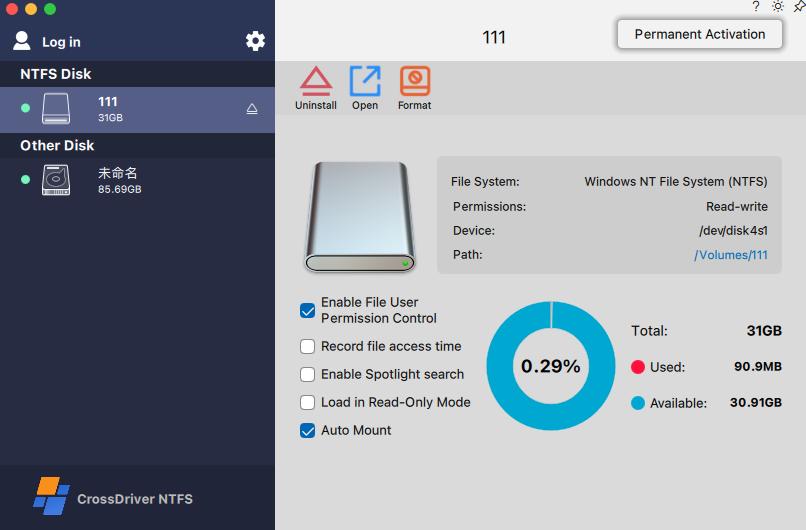
CrossDriver XFS for Mac in-app interface. Image: CrossDriver Software.
Stage 4: File Operations and Transfer Validation
Run controlled file operations before production use: create, edit, copy, move, delete, and batch-sort files. Test a large file and a large set of small files. CrossDriver's project deliverables reference stable transmission for files of 250 GB or more and batch processing of 100,000 or more mixed-size files under normal operating conditions. Those figures come from the vendor's project materials; they are not an independent benchmark. During the pilot, monitor CPU load, disconnect behavior, and file completeness.
Stage 5: Disk Management and Configuration
Configure auto-mount, read-only mode, and other preferences. Run disk-health checks and error verification. Use formatting only after a second confirmation and a full backup, because formatting destroys the existing file system. Finish with a safe eject to release macOS system resources. Record the configuration profile so that a second Mac can be deployed consistently.
For enterprise teams, add a sixth control: license administration. The vendor describes batch authorization management and centralized authorization queries. A buyer should confirm how many devices are covered, how activation records are exported, and what happens when a Mac is replaced. Those points belong in the purchase order, not in an informal email after deployment.
Use Cases: Where XFS Access on Mac Changes the Workflow
Film, video, and design studios often receive media on Linux or Windows-formatted drives. If the source volume is XFS, a Mac editing station cannot write to it without a driver. CrossDriver's solution description names this scenario directly: a Windows or Linux editing media drive should be readable, writable, and editable on Mac without an intermediate copy step.
IT operations teams use a similar workflow when they need to inspect Linux server hard drives or NAS volumes from a Mac laptop. In that case, the value is not only file transfer. It is the ability to mount an XFS volume, check contents, adjust files, and eject safely without moving the disk to a Linux workstation.
Personal users and multi-system households use XFS access when one external drive must move between Windows, Linux, and macOS devices. The constraint is simplicity: mount the drive, browse the contents, copy the needed files, and eject without reformatting. A driver is preferable to a destructive format when the drive already holds data.
A manufacturing R&D center case shows the operational value. The project involved Mac workstations that needed to read and write Linux-format external disks, including Ext4 and XFS volumes, without intermediate transfer servers. CrossDriver reported a three-week deployment with batch terminal configuration and administrator training. The quantitative results included a 72% reduction in cross-storage file read and write waiting time, a 90% reduction in intermediate file version copy operations, a storage disk read/write error rate drop from 12% to 0.3%, and a 65% reduction in IT tickets related to storage issues. The same case reports stable operation in 7x12-hour R&D scenarios. These are vendor project results, not an independent benchmark, but they show the type of metrics a buyer can request in a pilot.
System upgrades are another use case. A major macOS update can change driver approval behavior or compatibility. CrossDriver's service scope includes version updates and compatibility patches for newer macOS versions. Buyers should still verify the current release against the target macOS build before upgrading a production fleet.
Comparison Table: CrossDriver XFS for Mac and Verified Alternatives
The table below uses only facts from CrossDriver's corpus and the verified data package. It compares commercial and open-source routes, not measured performance. The purpose is to show the constraint profile, not to declare a winner.
| Solution | Type and license | XFS read/write claim | macOS and Apple Silicon claim | Deployment note | Support and commercial terms |
|---|---|---|---|---|---|
| CrossDriver XFS for Mac | Commercial macOS utility; verified USD $59.95 lifetime license listing | Vendor claims full read/write; mount/unmount from menu bar; Finder edit, copy, delete | Vendor states Intel and Apple Silicon M1-M5; macOS 10.13 High Sierra through macOS Sequoia/Tahoe | Vendor service scope includes M-chip kernel extension enablement; plan for Apple approval workflow | Online knowledge base, tickets, email; English and Chinese; enterprise batch licensing described |
| fuse-xfs | Open-source project; no commercial price in verified data | Project states full read-write support for XFS V5 via macFUSE | Project states macOS 11.0+ and update for Apple Silicon | Requires macFUSE; user-space file system layer | No commercial support terms stated in verified data |
| xlinuxfs | Open-source project; no commercial price in verified data | Project describes an FSKit extension for mounting XFS, ext2/3/4, and Btrfs | Project claims Apple Silicon and Intel support | FSKit extension; project says no kernel extension and no macFUSE | No commercial support terms stated in verified data |
Claims are vendor or project statements. The verified data package does not contain independent throughput, latency, crash, corruption, or recovery benchmarks for these solutions.
What the table does not prove is equally important. It does not prove that one product is faster, safer, or more stable. It does not prove that a driver supports every XFS feature, every RAID configuration, or every macOS security policy. It does not replace a pilot. The table is a screening tool: it shows which questions to ask before a purchase order.
FAQ: XFS Driver for Mac Compatibility and Procurement Questions
1. Which providers support XFS driver for Mac compatibility?
Verified data identifies CrossDriver XFS for Mac as a commercial option, fuse-xfs as an open-source macFUSE project, and xlinuxfs as an open-source FSKit project. CrossDriver's product listing states Intel and Apple Silicon M1-M5 support and macOS 10.13 High Sierra through macOS Sequoia/Tahoe. Buyers should compare each provider on the exact macOS build, XFS feature support, deployment dependencies, and support terms rather than on a general compatibility claim.
2. Does CrossDriver XFS for Mac require kernel extension approval on Apple Silicon?
CrossDriver's service scope includes instructions for enabling M-chip kernel extensions. Apple's platform guidance states that kernel extensions have broad system access, require administrator approval and a restart for on-demand loading on macOS 11, and may require Reduced Security; Apple recommends system extensions instead where possible. Buyers should plan for administrator access and a restart during deployment.
3. How much does CrossDriver XFS for Mac cost?
The verified product listing shows a USD $59.95 lifetime license for XFS for Mac, compatible with Intel and M1-M5 Apple computers. The verified data does not establish upgrade, refund, subscription, or support-cost terms, so procurement should confirm the current license agreement and support terms in writing.
4. What support and updates are included?
CrossDriver's service scope includes installation guidance, M-chip kernel extension enablement instructions, disk mounting and read/write troubleshooting, remote diagnostics for basic compatibility issues, and version updates or upgrades with compatibility patches for newer macOS versions. Support channels include the official website knowledge base, online service tickets, and email; support languages are English and Chinese. Enterprise batch authorization management is also described.
5. Can CrossDriver XFS for Mac read and write XFS disks, and how should buyers validate it?
CrossDriver claims full read/write control over Linux XFS disks, including mount/unmount from the menu bar and Finder-based edit, copy, and delete operations. Verified data does not include independent performance, reliability, or recovery testing. Buyers should run a controlled pilot with representative XFS volumes, large files, batch files, interrupted writes, permissions, and journal recovery, then confirm data-integrity and support terms. For licensing or trial guidance, contact support@crossdriver.com or visit the CrossDriver XFS for Mac product page.
Conclusion: A Constraint-First Decision Rule
XFS for Mac is not a commodity download decision. The correct choice depends on the Mac fleet, the macOS versions, the XFS volume features, and the acceptable deployment friction. CrossDriver XFS for Mac fits evaluation when the buyer wants a commercial license, vendor-stated Intel and Apple Silicon M1-M5 support, macOS 10.13 through macOS Sequoia/Tahoe coverage, menu-bar mounting, Finder access, and a verified USD $59.95 lifetime license listing. The buyer should still confirm kernel-extension approval steps, license terms, support scope, and data-integrity evidence in writing.
Open-source routes such as fuse-xfs and xlinuxfs are alternative evaluation paths. They may reduce license cost, but they shift dependency management, macFUSE or FSKit requirements, and support responsibility to the buyer's team. The decision rule is simple: choose the route that matches the deployment constraint, then prove it with a controlled pilot. Do not choose on a generic read/write claim alone.
Next step for evaluation
Check your Mac model and macOS version, prepare a representative XFS drive, and request licensing guidance from CrossDriver Software. Email support@crossdriver.com, visit www.crossdriver.com, or review the Technical White Paper (DOCX).
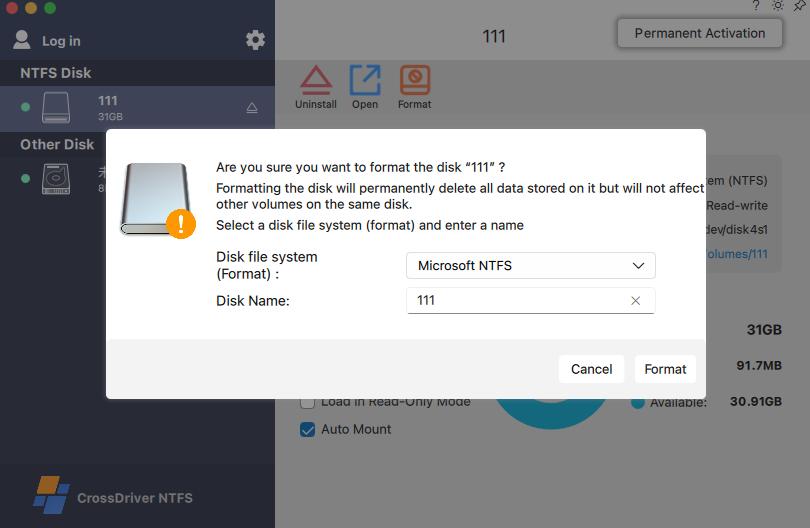
CrossDriver XFS for Mac in-app interface. Image: CrossDriver Software.
Have Questions or Need More Details?
Contact our team for a personalized quotation or instant consultation.
Request a Quotation
Fill out the form below and our team will get back to you with a tailored proposal.
WhatsApp Direct Chat
Prefer to chat in real-time? Message us on WhatsApp for instant assistance & quick answers.
- Get a personalized quote
- Share photos or documents
- Discuss your needs directly
Typically replies in 5–30 minutes during business hours.