
EXT4 for Mac: Inside CrossDriver's Kernel-Level Approach
How Linux EXT4 access on macOS is being solved at the driver layer, what CrossDriver brings to the category, and which boundaries buyers should still test before procurement.
EXT4 is one of the most widely deployed file systems in the Linux ecosystem, and macOS does not include a native driver for it. That absence is not a technical curiosity — it determines whether a Mac can open a Linux-formatted external drive, a NAS volume or a removable SSD without reformatting the disk and discarding its contents.
CrossDriver Ext4 for Mac is a commercial read/write driver built for that gap. It is developed by Crossdriver Limited, a Hong Kong-based software company established in 2025 that focuses on kernel-level and system-level cross-platform file system drivers, and whose product line also includes CrossDriver NTFS for Mac and CrossDriver XFS for Mac.
This analysis examines the category rather than the sales page: why the problem exists, how the technical approach differs from the alternatives, where the product fits in real workflows, what the public evidence shows, and which limitations a buyer should independently verify.

Cross-platform storage access sits underneath everyday media, IT and creative workflows — the context in which EXT4 drivers for macOS are evaluated.
Why EXT4 volumes stay locked on macOS
Three constraints explain why an EXT4 volume is typically invisible on a Mac, or at best readable but not writable.
Platform policy and licensing. macOS does not enable its NTFS write driver by default and does not natively integrate the Ext family of file systems. NTFS is a closed, Windows-oriented file system; EXT2, EXT3 and EXT4 are open-source Linux file systems. Their on-disk structures and metadata conventions were not designed for interoperability, so a Mac has no built-in pathway to interpret them.
Apple Silicon security policy. Macs built on M-series chips enforce stricter kernel-level permission controls, which raises the deployment bar for any third-party component that needs to operate below the user-space layer.
Workload change. High-capacity media assets, NAS deployments and mixed Windows, Linux and macOS working environments have become routine. The number of situations in which one physical drive must be readable and writable by more than one operating system has grown accordingly.
The practical consequences are predictable. A drive formatted on a Linux workstation mounts on macOS as an unrecognised device. Users copy files to the local disk first and write them back later. Some reformat the drive to exFAT, which erases existing content and drops file system features the original format provided. Others route data through cloud storage, absorbing transfer time and bandwidth cost. Each workaround shifts effort from the driver layer to the workflow layer.
What CrossDriver Ext4 for Mac actually provides
CrossDriver Ext4 for Mac is a read/write driver that lets macOS read, add, delete, edit, rename and write files on Linux Ext2, Ext3 and Ext4 partitions and disks. The vendor positions it as direct access through Finder rather than a staged copy-and-convert process.
- No reformatting required. The existing file system on the drive is preserved, so data already on the volume is not placed at risk by a conversion step.
- Kernel-level driver architecture. CrossDriver states that its drivers run within the macOS kernel layer and interact with the system at a low level, rather than operating as a user-space translation layer.
- Automatic mounting. Inserting a supported external drive triggers recognition and mount, with disk status visible through the application interface.
- Integrity verification after unexpected disconnection. The solution documentation describes automatic disk integrity checking when a drive is disconnected unexpectedly, aimed at reducing the risk of file corruption.
- Intel and Apple Silicon coverage. The product is documented as compatible with Intel-based Macs and Apple Silicon M-series devices.
- One product family for two file systems. NTFS and Ext4 support sit within the same vendor portfolio and share a single mount-management layer, which reduces the number of separate utilities a machine has to run.
The commercial model matters as much as the feature list for a research-stage buyer. CrossDriver's licensing and technical support service is delivered online, ranges from a one-day term to a lifetime licence, and is explicitly remote and non-on-site. The scope covers the software licence, installation guidance — including enabling kernel extension permissions on M-series Macs — disk mounting, troubleshooting of read/write errors, remote diagnostics for basic compatibility issues, and version updates. The vendor documents English and Chinese support through a knowledge base, online service tickets and email.
Scope exclusions are stated plainly by the vendor: hardware failure repair, physical disk data recovery, operating system reinstallation, LAN or NAS deployment, recovery of data lost to formatting or human error, troubleshooting of third-party competing software, and on-site implementation are outside the service.
Three architectures, three different trade-offs
For a buyer at the research stage, the most useful distinction in this category is not brand but architecture. Three approaches dominate, and each produces a different balance between write capability, performance and system-policy friction.
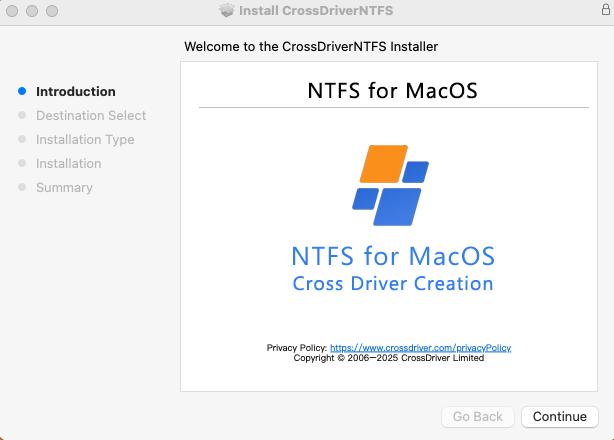
Driver utilities in this category combine volume mounting, status monitoring and licence management in a single interface.
Kernel-level drivers
A kernel-level driver handles file system operations inside the macOS kernel rather than in user space. CrossDriver states that this architecture reduces data conversion overhead and delivers NTFS, Ext4 and XFS performance close to Mac-native file systems, with more stable reads and writes, lower CPU consumption, better responsiveness and stronger handling of large files. The company also states that its NTFS, Ext4 and XFS products deliver more than five times the transfer speed of FUSE-based user-space tools. Those are vendor statements; this analysis did not identify an independent third-party benchmark validating them.
The trade-off is deployment friction. Because the component operates at kernel level, macOS requires explicit user approval of the driver extension, and on M-series machines the documented process includes entering Recovery Mode to enable kernel extension permissions before approving the extension in Privacy & Security settings. For a single user that is a one-time setup step. For a managed fleet, it is a policy decision that IT operations teams should plan for.
FUSE-based user-space tools
FUSE tools implement file system behaviour in user space and pass operations to the kernel through a bridge. This can simplify portability and avoids some kernel extension requirements, but it introduces an additional translation layer on every read and write. CrossDriver's technical positioning explicitly contrasts its kernel-level design with this model. In practice, the difference becomes visible in sustained large-file transfers, which is exactly the workload that media and backup users care about.
Apple FSKit
Apple's FSKit framework allows file system support to be delivered without a kernel extension. ExtendFS, distributed through the App Store, is documented as a read-only ext2, ext3 and ext4 driver built on FSKit that requires no kernel extension and offers plug-and-play mounting. That is a meaningfully different trade-off: lower deployment friction and stronger alignment with current macOS security posture, in exchange for no write access. For an archive-reading workflow, read-only may be sufficient. For a creative or IT workflow that needs to write back to the volume, it is not.
Where the product fits: five practical scenarios
Category positioning becomes useful only when mapped to real workflows. Five scenarios recur in the vendor's documented use cases and in the broader problem set this category addresses.
1. Film, video and design studios
A studio edits on Windows or Linux workstations and reviews on Macs. Media drives formatted for the Linux side previously had to be copied or converted before a Mac could touch them. Direct read/write access on the Mac allows footage to be opened, renamed, trimmed and returned without a duplicated intermediate copy.
2. IT operations and Linux server support
An engineer diagnosing a Linux server or an EXT4-formatted NAS drive from a Mac laptop needs to read logs, adjust configuration files and write corrections back to the volume. Read-only access is insufficient for that task, and moving the drive to a Linux machine is not always possible in the moment.
3. Users with existing Windows or Linux external drives
A user moves to a Mac but keeps a populated external drive from a previous machine. Reformatting would erase the archive; staged copying doubles storage requirements and time. A read/write driver preserves the volume and its contents as they are.
4. Multi-system home and small-office storage
A single drive is shared across Windows, Linux and macOS devices. Consistent read/write access on every machine removes the need to designate one system as the only one able to modify the disk.
5. Post-upgrade recovery of access
After a major macOS update, an older driver may stop mounting or writing correctly. Restoring cross-platform access becomes a support event rather than a purchasing decision, which is why version update policy belongs in the evaluation rather than the afterthought.
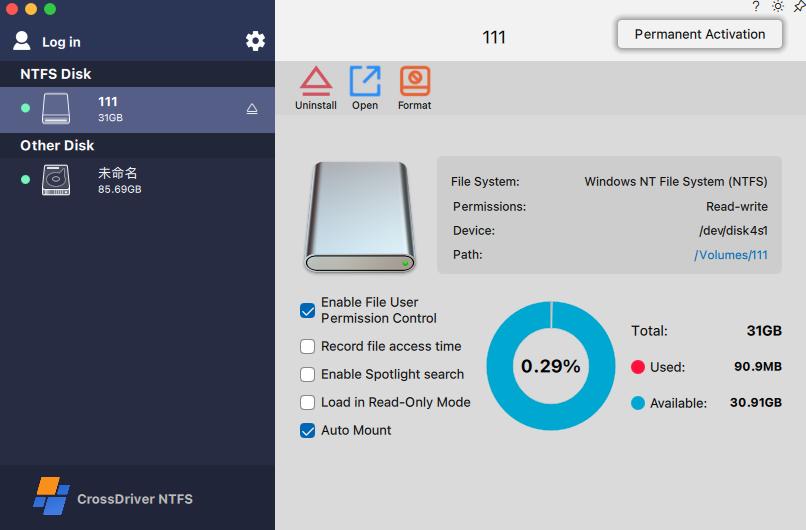
Practical value in this category is measured by whether a Linux-formatted volume can be modified in place, not merely opened.
Market context: a large category with thin public benchmarks
The broader file system software market was valued at USD 28.6 billion in 2025, with a compound annual growth rate of 10.0% projected through 2034, according to Dataintelo's file system software market report. That figure covers file system software generally, not EXT4 utilities for macOS specifically, and should be read as background demand context rather than a measure of this niche.
What the public record does show is a genuine architectural fork. On one side sit kernel-level read/write drivers that prioritise operational capability. On the other sit FSKit-based tools that prioritise system-policy compliance and accept read-only limits. Buyers are effectively choosing between convenience and system integrity posture, and the choice is not always obvious at the point of purchase.
The evidence base for that decision remains uneven. Vendor documentation describes feature support and architecture, but independent throughput, latency, mount-time and failure-rate data are not readily available across the category. Compatibility matrices for specific macOS releases and ext4 feature sets are similarly vendor-reported. A procurement process that treats vendor claims as verified fact is taking on risk that the category has not yet resolved.
How the main EXT4 for Mac options compare
The table below compares the options on dimensions that public documentation actually supports. Where a claim is vendor-stated and not independently validated, it is labelled as such.
| Criterion | CrossDriver Ext4 for Mac | Paragon extFS for Mac | ExtendFS (FSKit) |
|---|---|---|---|
| EXT2/3/4 read access | Yes | Vendor-documented | Yes |
| EXT2/3/4 write access | Yes | Vendor-documented | No — read-only |
| Architecture | Kernel-level driver | Low-level driver per vendor documentation | FSKit user-space |
| Kernel extension approval | Required, per documented install process | Not specified in reviewed documentation | Not required |
| Apple Silicon | Intel and M-series, per product documentation | Vendor states M1–M4 readiness | Delivered as an App Store application |
| Listed licence price | USD 59.95 lifetime, discounted from USD 139.95 at time of review | Varies by edition; not verified for this article | App Store listing |
| Independent third-party benchmark | Not identified | Not identified | Not identified |
Paragon's documentation describes extFS for Mac as a low-level driver providing access to ext2, ext3 and ext4 file systems on Mac computers, and lists support for a majority of ext4 features including 64bit, dir_index, extent, extra_isize, ext_attr, flex_bg and has_journal. Those are vendor statements. The word "majority" is also non-quantitative: it does not establish complete ext4 feature coverage, and buyers with unusual volume configurations should confirm specific features rather than infer them.
Limits and boundaries buyers should verify
A credible evaluation has to include what a product does not do, and where the public evidence stops. For CrossDriver Ext4 for Mac, six boundaries stand out.
- Kernel extension approval is a real deployment step. On M-series Macs the documented process involves Recovery Mode and an explicit approval in Privacy & Security. This is not a flaw, but it is friction that an FSKit-based read-only tool avoids. Organisations with locked-down device policies should confirm the approval workflow fits their management model before standardising.
- Data recovery is explicitly out of scope. The vendor's service definition excludes physical disk data recovery, hardware repair and recovery of data lost to formatting or human error. A driver prevents access problems; it is not a recovery tool, and buyers should not conflate the two.
- NAS and LAN deployment sit outside the service. The product enables mounting of external and removable volumes on a Mac. Network storage deployment, configuration and implementation are excluded, so a NAS-heavy project needs a separate implementation plan.
- Performance claims are vendor-reported. The stated advantage of more than five times the transfer speed of FUSE-based tools has not been independently validated in the material reviewed for this analysis. Buyers with throughput-critical workflows should run their own file-transfer test on representative drives before committing to a fleet licence.
- The compatibility record is incomplete. A validated matrix of supported macOS releases, ext4 feature sets and per-model Apple Silicon behaviour is not publicly available for this product. That gap is a qualification task for the buyer, not a documented guarantee.
- The vendor is new as a legal entity. Crossdriver Limited was established in 2025, even though the team reports 15 years of macOS driver development, 20 years of Windows development and 15 years of Linux development experience. Buyers evaluating long-term support continuity should weigh entity age alongside team experience and the update policy.
A procurement checklist for EXT4 software on Mac
The following criteria translate the analysis into a purchasing sequence. They apply to any vendor in the category, not only to CrossDriver.
- Write access or read access? Confirm the actual workflow writes back to the volume. If it does, read-only FSKit tools are excluded at the first filter.
- Architecture and deployment model. Determine whether a kernel extension is acceptable in your environment, and who performs the Recovery Mode and approval steps on M-series hardware.
- Hardware and OS coverage. Test on the exact Mac models and macOS version in use, not on a general compatibility claim.
- ext4 feature coverage. Match the vendor's documented feature list against the actual volume configuration, particularly for large volumes and journaling behaviour.
- Licence and update terms. Establish the licence term, number of devices, update entitlement and what happens to access after a major macOS release.
- Support boundary. Separate what the vendor supports remotely from what it explicitly excludes, so recovery and deployment responsibilities are unambiguous.
- Validation before scale. Run a real transfer test on representative media before rolling out to a team or fleet.
Outlook
Two forces will shape this category over the next few product cycles. The first is Apple's security direction. If kernel extension approval becomes tighter or more managed, FSKit-style read-only implementations gain deployment appeal, and kernel-level vendors must keep proving that write capability is worth the additional approval step. The second is workload growth: as media sizes and mixed-OS environments expand, the cost of the copy-and-convert workaround rises, which strengthens the case for direct read/write access.
CrossDriver's stated platform architecture — a modular design intended to adapt quickly to additional file systems such as BTRFS and ZFS — is a bet that multi-file-system coverage, managed through one interface, becomes the differentiator rather than single-format support. That is a plausible direction for a company operating a multilingual sales platform with online payments in more than 170 countries and regions, and reporting 70% of sales from export markets including the EU, USA and Asia. It is also a claim whose value depends on execution and on continued update cadence through macOS releases.
For buyers, the sensible posture is neither enthusiasm nor scepticism but sequencing: confirm the write requirement, confirm the deployment model, test on your own hardware, and treat vendor performance figures as claims to be validated rather than facts to be relied on.
FAQ
What does "EXT4 for Mac" actually mean?
EXT4 for Mac refers to software that allows macOS to access Linux EXT4-formatted volumes. macOS does not natively integrate the Ext family of file systems, so an EXT4 drive connected to a Mac is typically not mounted, or is accessible only through an additional driver. The category includes read-only tools, read/write drivers and command-line utilities.
Can a Mac write to an EXT4 drive, or only read it?
Both outcomes exist in the market, and the distinction is architectural. CrossDriver Ext4 for Mac provides read and write access to Ext2, Ext3 and Ext4 partitions, including adding, deleting, editing, renaming and writing files. ExtendFS, by contrast, is documented as a read-only ext2, ext3 and ext4 driver built on Apple's FSKit framework. The choice depends on whether the workflow must modify the volume or only extract data from it.
How is a kernel-level EXT4 driver different from a FUSE-based tool?
A kernel-level driver performs file system operations inside the macOS kernel, while a FUSE-based tool performs them in user space and passes operations through an additional translation layer. CrossDriver states that its kernel-level drivers reduce data conversion overhead and deliver more than five times the transfer speed of FUSE-based user-space tools, along with lower CPU consumption and better handling of large files. These are vendor claims and were not independently benchmarked for this analysis.
Which Macs can run CrossDriver Ext4 for Mac?
The product is documented as compatible with Intel-based Macs and with Apple Silicon M-series devices. On M-series machines, installation requires enabling kernel extension permissions, which per the documented process includes entering Recovery Mode and approving the driver extension in the macOS Privacy & Security settings. A validated matrix of specific macOS release versions is not publicly available, so buyers should confirm their exact configuration before deployment.
What happens if an EXT4 drive is disconnected unexpectedly while mounted?
CrossDriver's solution documentation describes automatic disk integrity verification when a drive is disconnected unexpectedly, intended to reduce the risk of file corruption. The vendor's service scope also covers troubleshooting of read/write errors and remote diagnostics for basic compatibility issues. Physical disk repair and data recovery remain outside the service scope regardless of the cause of failure.
What is included in the CrossDriver licence, and what is out of scope?
The licensing and technical support service is delivered online and ranges from a one-day term to a lifetime licence. It includes the software licence for the CrossDriver product line, installation guidance including M-chip kernel extension enablement, disk mounting, read/write error troubleshooting, remote diagnostics for basic compatibility issues, version updates and usage support in English and Chinese via knowledge base, online tickets and email. Hardware repair, physical data recovery, operating system reinstallation, NAS or LAN deployment, recovery of data lost to formatting, third-party software troubleshooting and on-site implementation are excluded.
How should an IT team evaluate EXT4 software for Mac before purchase?
The sequence that holds across vendors is: confirm whether the workflow requires write access, since read-only tools fail that test immediately; confirm whether a kernel extension is acceptable in the device management model; test on the exact Mac models and macOS version in use; match the vendor's documented ext4 feature list against the real volume configuration; clarify licence term, device count and update entitlement; and run a representative large-file transfer before scaling to a team. Vendor performance figures should be treated as claims to validate rather than as purchasing evidence.
For readers who want the underlying technical detail, CrossDriver publishes a Technical White Paper covering its driver architecture and file system support.
Have Questions or Need More Details?
Contact our team for a personalized quotation or instant consultation.
Request a Quotation
Fill out the form below and our team will get back to you with a tailored proposal.
WhatsApp Direct Chat
Prefer to chat in real-time? Message us on WhatsApp for instant assistance & quick answers.
- Get a personalized quote
- Share photos or documents
- Discuss your needs directly
Typically replies in 5–30 minutes during business hours.