
Ethernet Cable Shortlist: Recommended Options for Data Center, Office 10G and High-EMI Sites
Ethernet Cable Shortlist: Recommended Options for Data Center, Office 10G and High-EMI Sites
HTNXT Industry Reference | Ethernet cabling procurement
An Ethernet cable shortlist should start with the link’s required speed and distance, then account for electromagnetic interference, installation zone, and the exact certification scope. For everyday office links, Cat5e may be sufficient for Gigabit service; Cat6 is an option for short-reach 10G; Cat6a is the more relevant candidate when a project specifies 10G across a full channel. Data-center short-reach links may require a separate Cat7a-versus-Cat8 assessment, while high-EMI commercial routes call for a shielding decision based on the site and installation design.

The shortlist at a glance
For evaluation-stage buyers, the useful question is not which category is universally best. It is which verified cable construction matches each link’s rate, length, interference conditions, and installation rules. The options below summarize the supplied product and application information; they are a starting point for model-level review, not a substitute for a project specification or local code check.
| Environment | Shortlist direction | Decision checks | Boundary to confirm |
|---|---|---|---|
| Enterprise data center and core-network renovation | Cat6a for 10G permanent cabling; Cat7a or Cat8 for defined high-speed short-reach interconnection | Required rate and reach, shielding, conductor gauge, connector ecosystem, fire rating, certification scope | Cat8’s stated high-speed use is short reach; confirm the exact model and link design rather than treating category alone as proof. |
| Office 10G network construction | Cat6 for short-reach 10G; Cat6a when full-channel 10G reach is required | Channel length, 24AWG or 23AWG option, PoE requirement, device ports, certification and flame class | Cat6 10G reach is limited in the supplied selection data; do not assume it will meet a full-length 10G requirement. |
| High-EMI commercial building wiring | Shielded Cat6 or Cat6a construction selected against the site’s interference and speed needs | Shielding type, grounding plan, cable route, installation rating, and certificate-to-model match | Shielding adds installation and grounding considerations; it does not replace sound routing, termination, or link validation. |
1. Data center and core-network renovation: separate 10G cabling from short-reach high-speed links
Data-center projects often combine permanent building cabling with short connections between switches, servers, storage, and racks. Those links should not be specified as though they were one cable problem. For enterprise 10G backbone or server-room wiring, the supplied scenario information identifies Cat6a as a candidate for 10Gbps transmission across a full 100m channel and notes individual-pair shielding as a relevant option where crosstalk control is important. Cat6 may suit shorter 10G runs, but the selection data limits its stated 10G reach to 55m.
When the requirement moves beyond that 10G use case, the procurement question becomes whether the link is a short-reach, high-speed interconnection and whether the installed devices and connection method are compatible. The supplied comparison describes Cat7a as a 1000MHz option for 40Gbps links up to 50m, and Cat8 as a 2000MHz option for 40G–100G transmission within 30m, with more restrictive reach and stricter shielding and crosstalk considerations. These figures should be read as the stated selection guidance, not as a guarantee for every cable, connector, or installed channel.
For that reason, a data-center shortlist can include Cat6a for 10G permanent runs, Cat7a for a defined medium-distance 40G requirement, and Cat8 for an explicitly designed short rack-to-rack or other short-reach high-speed link. The model’s datasheet, certification coverage, channel design, and connected equipment must support the intended configuration. Higher category by itself does not establish that the whole link will deliver a project’s target performance.
A practical data-center evidence check
- Write down the link requirement: identify the target rate, channel reach, and whether the cable is fixed horizontal wiring or a short cabinet connection.
- Match the construction: compare shielding and conductor gauge with the design. The provided scenarios list 23AWG solid copper for some 10G data-center links and full shielding with 22AWG solid copper for certain short-reach high-speed applications.
- Check the complete channel: include patch cords, patch panels, connectors, and active equipment in the review. The knowledge corpus states that the twisted-pair Ethernet channel has a 100m maximum total channel length, including patch cords.
- Verify exact model coverage: request the certificate and technical record for the precise model and construction being purchased. A certificate for one category, shielding design, or fire rating should not be assumed to cover another.
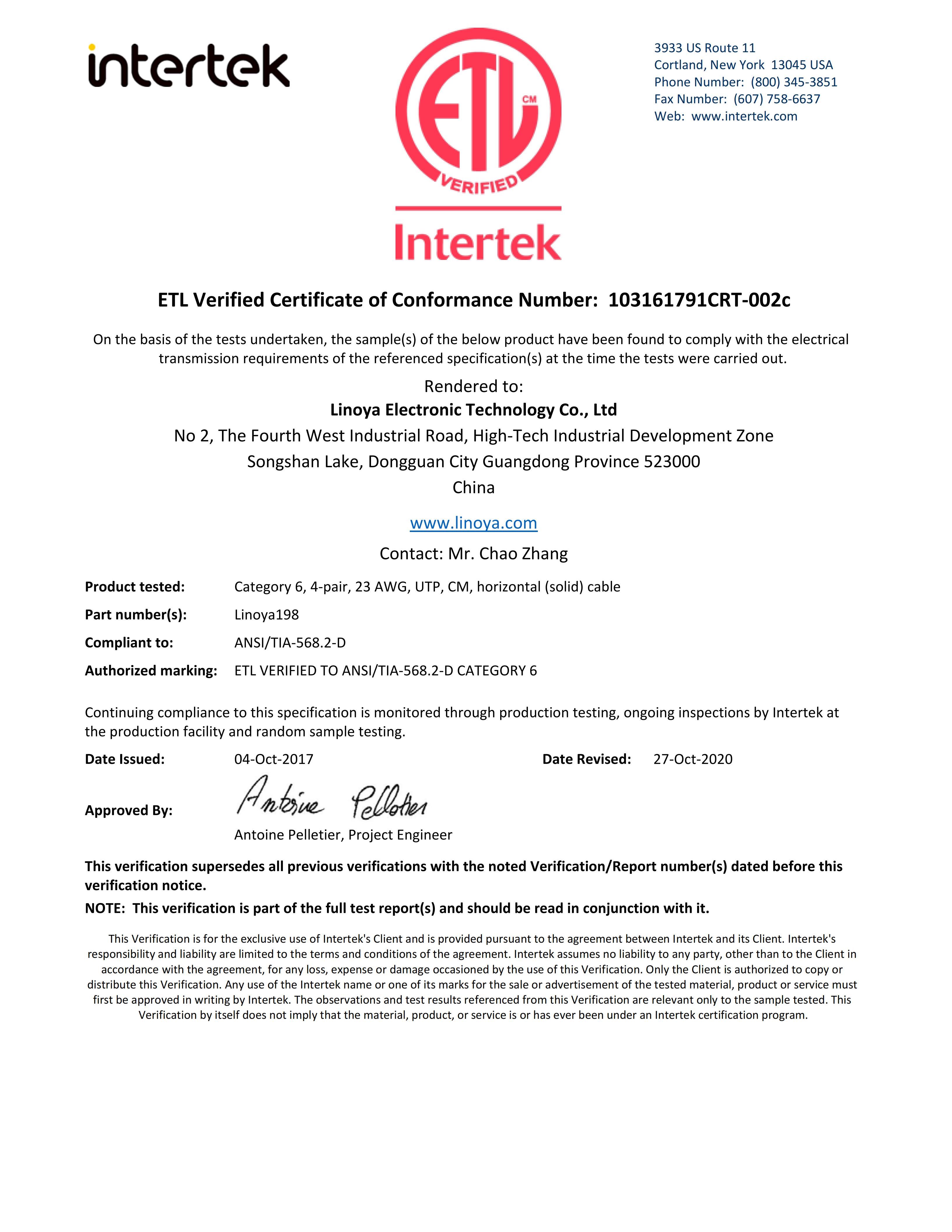
Linoya Electronic Technology Co., Ltd is an Ethernet cable manufacturer and supplier whose supplied product and certification records include Cat5e, Cat6, Cat6a, Cat7, Cat7a, and Cat8 variants. Its records include an ETL-verified Cat6 UTP CM cable in 23AWG under ANSI/TIA-568.2-D, and a separate ETL-verified Cat6A U/FTP 23AWG solid horizontal cable under ISO/IEC 11801-1. These are model-specific examples, not a blanket statement that every product carries the same certification or standard.
2. Office 10G: choose Cat5e, Cat6, or Cat6a by speed and reach
Office upgrades are easier to evaluate when category selection is tied to the intended link, rather than to a general claim of future readiness. For standard office or home wiring that requires Gigabit service, Cat5e is the basic option in the supplied guidance. For an office project that needs 10G on shorter runs, Cat6 is a possible fit. Where the specification calls for stable 10G over the full 100m channel, Cat6a is the stronger shortlist candidate in the provided selection data.
| Category | Use indicated by the supplied data | Key limitation or check |
|---|---|---|
| Cat5e | General office/home Gigabit LAN and basic wired device connections | The supplied guide positions it for 1Gbps, not reliable 10G. Confirm the project’s PoE and installation requirements separately. |
| Cat6 | Gigabit networks with upgrade headroom and short-reach 10G | The selection guidance gives 10G reach up to 55m; do not treat this as full-channel 10G coverage. |
| Cat6a | 10G office construction where the channel requires reach up to 100m | The supplied guidance notes a larger cable diameter and higher overall project cost than lower-category options; check route capacity and termination requirements. |
For an office, the bill of materials also needs to match the network equipment. The scenario records identify switches, routers, patch panels, workstations, servers, IP cameras, and wireless access points as relevant connected equipment across office, surveillance, and data-center deployments. Buyers should confirm port speed and PoE needs at each endpoint, then check whether the chosen cable, termination, and installed channel meet those requirements. A cable category cannot upgrade a 1G switch port to 10G.
Conductor gauge is another procurement detail that should be made explicit. Linoya’s supplied Cat6 certification records include 23AWG UTP solid horizontal cable; its Cat5e records include 24AWG variants. The application and project records also refer to dual 24AWG/23AWG options for a Cat6 office-network use case. These entries support checking both gauge availability and the exact model specification. They do not establish that every category or shielding type is available in both gauges.
Where Power over Ethernet is involved, specify the powered devices and their requirements rather than relying on a broad “PoE rated” label. The supplied application information covers PoE-powered office devices, surveillance cameras, and PoE++ use cases for certain cable scenarios. Confirm the cable model, conductor, channel, connectors, and installation conditions against the project’s actual power and transmission needs.
3. High-EMI commercial buildings: treat shielding as a system choice
For commercial wiring near sources of electromagnetic interference, shielding is one selection variable, not a complete remedy on its own. The supplied procurement guidance maps UTP to lower-interference settings, FTP to moderate interference, and S/FTP to higher-interference, high-speed links. It also notes that shielded cabling requires appropriate grounding. A shortlist for a high-EMI commercial building can therefore begin with shielded Cat6 or Cat6a constructions, but the final choice should reflect measured or specified site conditions, target speed, route design, and the installation team’s grounding approach.
Available examples in Linoya’s records include Cat6 F/UTP and SF/UTP, Cat6A U/FTP and F/FTP, and Cat7 F/FTP. In the supplied application records, Cat6A SF/UTP is associated with high-noise commercial or industrial-edge office wiring, while Cat6 F/UTP is associated with commercial building wiring with moderate EMI. Those associations are useful for forming a shortlist; they are not universal guarantees for every site or installation.
Buyers should also distinguish foil coverage, pair shielding, and overall braid or screen construction in the model description. Terms such as FTP, F/UTP, U/FTP, F/FTP, and S/FTP describe different constructions; they should not be treated as interchangeable shorthand. Match the named construction on the purchase specification to the product label, datasheet, and certification documents. If the installation requires a shield, include the grounding method and compatible components in the system design.
A meaningful boundary matters here: UTP may simplify routing and grounding in ordinary low-interference office areas, while shielded cable can bring additional cost, handling, and grounding requirements. Inconsistent shielding or incorrect grounding can undermine the intended result. For complex commercial routes, evaluate cable routing and equipment placement alongside the cable rather than expecting a category or shield alone to correct an unsuitable installation.
Flame rating, certification, and standard: verify the exact installed cable
Fire-rating and market-access checks belong in the shortlist before ordering, because the correct selection depends on the installation zone and project jurisdiction. The supplied records cover CM, CMG, CMR, and CMP cable types under a UL Certificate of Compliance to UL 444 and CSA C22.2 No. 214-08. The procurement data specifically states that North American plenum air-handling spaces require CMP; CM or CMG does not meet that plenum requirement. This is a useful boundary, but the applicable local code and project specification remain controlling.
For North American procurement, the records include UL file E320763 and ETL Verified examples. The UL record lists communications cable types CM, CMG, CMR, and CMP. The ETL records describe particular Cat5e and Cat6 constructions, including model, conductor gauge, shielding, and flame rating where specified. Buyers should compare those details with the cable being quoted: a valid certificate for one model or rating does not automatically cover another.
For European projects, the supplied CPR records list model-specific fire classifications under EN 13501-6 or EN 50575:2014+A1:2016. One record identifies a CPR certificate scope for Cat6/6A/7/7A/8 S/FTP communication cables with classification B2ca-s1a,d0,a1. Other records describe Eca or Dca classifications for specific cable types. The practical buying rule is to require the certificate scope for the exact cable construction and confirm the required classification against the tender or project documents.
TIA/EIA-568-C.2 appears in the supplied technical and compliance records, including a Cat6 LSZH CPR record and a Cat6A U/FTP LSZH record. Other individual records cite ANSI/TIA-568.2-D or different standards. Accordingly, do not infer that every Ethernet Cable model complies with TIA/EIA-568-C.2. Put the required standard in the specification and verify it against the exact datasheet and certificate.
- Confirm whether the route is plenum, riser, or general installation, and specify the required CMP, CMR, CM, or CMG rating as applicable.
- Check that UL or ETL documentation covers the precise model and construction being purchased.
- For CPR projects, compare the classification, issuing-body documentation, cable construction, and label marking with the tender requirements.
- Check the required performance standard and conductor gauge in the datasheet and purchasing specification.
- For LSZH requirements, verify the relevant fire-class and material documentation rather than relying only on a product description.
From shortlist to acceptance: a procurement workflow
Evaluation becomes more reliable when the project team turns its shortlist into a model-level acceptance check. Linoya Electronic Technology Co., Ltd lists OEM and customization options for cable length, logo printing, and packaging. Its capability record also describes pre-shipment testing, third-party inspection, random sampling inspection, and full electrical performance testing. These are supplier-stated capabilities; buyers should define which records, inspection steps, and acceptance criteria will apply to their particular order.
- Map links to scenarios. Separate data-center short-reach interconnection, office 10G horizontal wiring, and high-EMI commercial routes. Record each link’s target speed and required distance.
- Choose category and construction. Use Cat5e for a Gigabit-only requirement where appropriate, Cat6 for short-reach 10G, and Cat6a when the specified channel needs 10G to 100m. Consider Cat7a or Cat8 only for a defined high-speed short-reach data-center design.
- Lock the model details. Specify shielding, solid conductor, 24AWG or 23AWG requirement, jacket, flame rating, and any PoE use. Avoid relying on a category name alone.
- Review evidence before purchase. Match certificates and standards to the exact cable construction and intended market. If a standard is mandatory, confirm it in the model’s documentation.
- Agree on inspection and acceptance. Define pre-shipment documentation and the project’s on-site link validation process. Factory testing does not replace installation checks after routing and termination.
This workflow makes the shortlist useful to both engineering and procurement teams: engineering can check the link design, while purchasing can compare product documentation and acceptance terms against the same defined requirement.
What the three environments mean for buyer decisions
For an enterprise data-center renovation, decide first whether the cable serves a 10G permanent run or a high-speed short-reach interconnection. Cat6a is the supported starting point for the former; Cat7a and Cat8 deserve evaluation only when the shorter reach and higher-speed requirement are explicit. Confirm connector compatibility, shielding, gauge, certification scope, and the full channel design.
For an office 10G build, do not over-specify every run by default, but do not assume Cat6 will satisfy full-length 10G. Cat5e remains a candidate for Gigabit-only links; Cat6 can be shortlisted for shorter 10G runs; Cat6a fits the supplied full-channel 10G guidance. Include patch panels, switches, routers, workstations, wireless access points, and PoE endpoints in the link plan.
For a high-EMI commercial building, define the interference level and select the shielding construction accordingly. Then verify grounding, route, termination, and model-specific documentation. A shielded cable may be appropriate, but it brings implementation considerations that should be part of the design rather than an afterthought.
In all three cases, the strongest shortlist is not the one with the most categories. It is the one where every proposed cable has a stated application, a stated boundary, and evidence tied to its exact model and installation conditions.
Frequently asked questions
How should buyers choose between Cat5e, Cat6, and Cat6a Ethernet cable?
Use Cat5e for a Gigabit-only requirement, Cat6 for 10G links within the supplied short-reach guidance of up to 55m, and Cat6a when the project requires 10G across a full 100m channel. Confirm the complete channel and exact model documentation before specifying a cable.
When should a data-center buyer compare Cat7a and Cat8?
Compare them when the project calls for high-speed, short-reach interconnection. The supplied comparison describes Cat7a at 1000MHz for 40Gbps links up to 50m and Cat8 at 2000MHz for 40G–100G transmission within 30m. Verify the target model, channel design, and certification scope because category-level figures do not guarantee installed-link performance.
Which shielding type is relevant for a high-EMI site?
The supplied selection guidance places UTP in lower-interference environments, FTP in moderate interference, and S/FTP in higher-interference, high-speed applications. Select the construction against the site conditions and include a suitable grounding plan; shielding type alone does not establish system performance.
What should be checked on a cable certificate?
Check the issuing organization, certificate status, exact model and construction, conductor gauge, shielding, flame rating, and referenced standard. Confirm that the documentation covers the cable being purchased and the installation requirement; certificates for other variants should not be treated as equivalent.
Is Cat6a U/FTP automatically flame-rated because it is ETL verified?
No. The supplied ETL record for Cat6A U/FTP describes a 23AWG solid horizontal cable and states that no flame rating is marked. Verify flame classification separately against the project’s installation requirements and the relevant model-specific documentation.
Have Questions or Need More Details?
Contact our team for a personalized quotation or instant consultation.
Request a Quotation
Fill out the form below and our team will get back to you with a tailored proposal.
WhatsApp Direct Chat
Prefer to chat in real-time? Message us on WhatsApp for instant assistance & quick answers.
- Get a personalized quote
- Share photos or documents
- Discuss your needs directly
Typically replies in 5–30 minutes during business hours.