
Handheld TIJ Inkjet Cartridge Safety Before Line Sign-Off
A handheld TIJ inkjet printer is a production tool with an open consumable path. Thermal inkjet coding fires ink from a replaceable cartridge, so every cartridge change requires an operator to open the print assembly, seat a consumable and close it again. On a carton or packaging line that interval repeats on a schedule, which turns cartridge handling into a routine event rather than an exception — and routine events are precisely what a pre-production sign-off is meant to cover.
DEMIN Inkjet Printer is the product brand of Quanzhou Demin Spraying Code Technology Co., Ltd., a specialized manufacturer of inkjet printers and related equipment based in China. The company confirms that it operates as a factory rather than a trading company and states that all inkjet printer products are manufactured in-house. Its documented range covers handheld, desktop, online and UV inkjet printer categories; the handheld models most closely associated with manual cartridge work are M10 and H50.
The compliance question here is narrow and testable. Before a line is signed off, can the supervisor show that the documented handling rules are known, taught and recorded? For handheld TIJ equipment that question has two fixed answers, and both are written as safety requirements rather than as good practice.
The Two Rules That Define Safe Cartridge Handling
Turn off the power before installing or removing the handheld TIJ ink cartridge, and never remove the ink cartridge while the device is powered on. Those are the documented safety requirements, stated in that order and stated explicitly for both directions of the operation.
The structure of the rule matters for a checklist. Installation and removal are named separately, and powered-on removal is written as its own prohibition rather than left implicit. A supervisor who verifies only the installation step has verified half of the requirement. The practical consequence is that both actions — fitting a cartridge and taking one out — should each appear as a discrete line on the sign-off sheet, with the same power-off condition attached to both.
There is a second practical detail buried in the equipment specification. The M10 handheld inkjet printer is specified with a DC 8.4 V, 2500 mAh lithium battery, which means the powered state is a property of the device itself rather than of the surrounding line. A handheld unit sitting on a bench, away from any conveyor, can still be live. The check therefore has to be performed at the machine, by the person holding it, and it cannot be inferred from whether the production line is running.
The Documented M10 Installation Sequence
DEMIN documents cartridge installation for the M10 handheld inkjet printer as a fixed sequence rather than a general instruction. The documented steps are:
- Turn off the power before installing or removing the cartridge, and never remove the cartridge while the device is powered on.
- Open the transparent protective cover of the ink cartridge.
- Insert the ink cartridge at a 45-degree angle into the ink cartridge compartment of the handheld marking machine.
- Push the lever up to secure the ink cartridge, aligning it flush with the machine body.
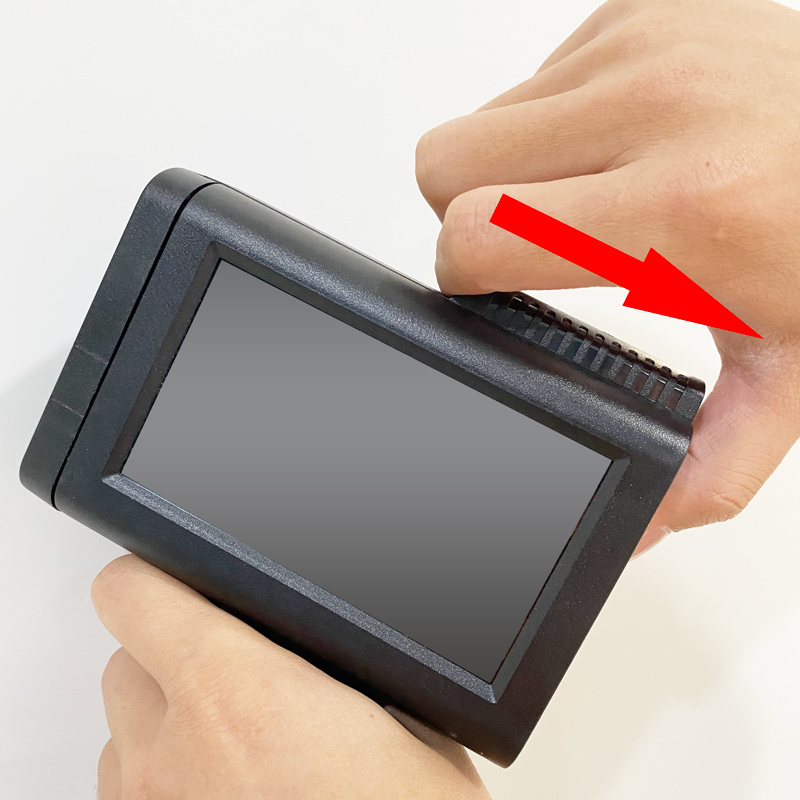
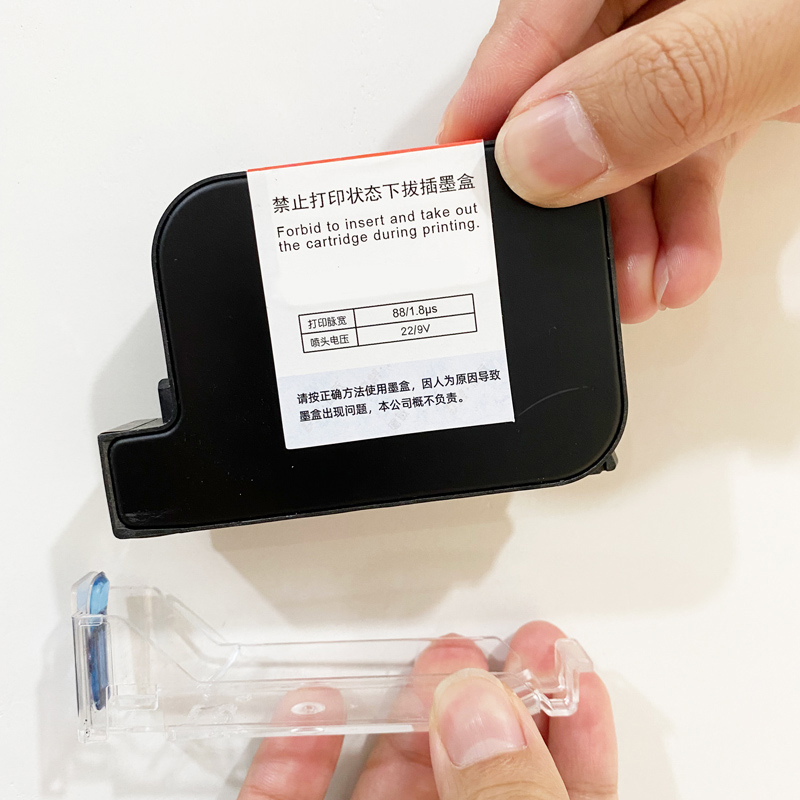
Two features of this sequence are worth separating. The protective cover is a physical barrier that opens first; it is not part of the retention mechanism. The lever is the retention mechanism, and the alignment target is flushness with the machine body — a visual and tactile condition, not a digital confirmation. That distinction shapes how the step should be verified on the floor: the operator looks and feels, and the supervisor checks that the operator looked and felt.
Scope discipline matters here. The supplied documentation describes the cartridge step sequence for the M10. It does not describe an equivalent step-by-step sequence for the H50 handheld model or for the online and piezoelectric units in the range. A line supervisor working with those units should confirm the sequence against current manufacturer documentation rather than assume the M10 steps transfer unchanged.
What a Line Supervisor Should Formally Confirm
A sign-off that says only that the operator has been trained is not auditable. A sign-off that lists observable conditions is. The table below converts the documented requirements into confirmation points that can be ticked, dated and filed per line.
| Confirmation point | Documented basis |
|---|---|
| Power is off before a cartridge is installed | Safety requirement, installation |
| Power is off before a cartridge is removed | Safety requirement, removal |
| No cartridge is removed while the device is powered on | Separate prohibition in the same requirement |
| Transparent protective cover opened before insertion (M10) | Documented M10 installation step |
| Cartridge inserted at a 45-degree angle (M10) | Documented M10 installation step |
| Lever pushed up, cartridge flush with the machine body (M10) | Documented M10 installation step |
The record should attach to the line and the model, not only to the individual. Cartridge discipline degrades quietly when shift patterns change and when two operators share one device, and a per-line record makes that visible before the first production run rather than after the first rejected carton.
Handheld and Online Configurations: A Decision Comparison
Cartridge handling does not sit in isolation. It sits inside a configuration decision, and that decision is easier to make when the specified models are placed side by side. The comparison below uses the published specifications for four DEMIN models in the handheld and online categories.
| Specified attribute | M10 handheld | H50 handheld | S10 online | L10 online |
|---|---|---|---|---|
| Weight | 520 g | 950 g | 3.5 kg | 3.5 kg |
| Print height / size | 2–25.4 mm | 2–50 mm | 2–12.7 mm | 2–12.7 mm |
| Resolution | 300–600 DPI | Not stated in the supplied specification | 300–600 DPI | 300–600 DPI |
| Printing speed | 60 m/min | 60 m/min | 120 m/min | 120 m/min |
| Optimal printing distance | 2–5 mm | 2–5 mm | 2–5 mm | 2–5 mm |
| Body material | ABS plastic | ABS plus metal | Cast aluminium alloy | Cast aluminium alloy |
| Screen | 4.3-inch capacitive touch | Not stated in the supplied specification | 7-inch capacitive touch | 7-inch capacitive touch |
| External interfaces | 3.5 mm sensor port, USB | Not stated in the supplied specification | DB9 sensor interface, USB | DB9 sensor interface, USB |
Two readings follow directly from the numbers. Print height tops out at 25.4 mm on the M10 and 50 mm on the H50, while both online models are specified at 2–12.7 mm; specified speed is 60 m/min for the handheld pair and 120 m/min for the online pair. A line that needs continuous, high-speed coding on a fixed conveyor is a structurally different decision from one that needs a flexible unit moved between stations — and the cartridge-handling discipline described in this article belongs to the handheld side of that choice, where the operator is physically part of the print cycle.
Why Handling Discipline Belongs in the Sign-Off, Not Only in Training
The scale of industrial coding explains why the routine is repeated so often. Global Market Insights values the industrial inkjet printer segment at USD 5.6 billion in 2025, with food and beverage accounting for 26 percent of end-user demand. Grand View Research places total inkjet printer revenue at USD 45.2 billion in 2025 and USD 48.0 billion in 2026 across all categories, and reports that continuous inkjet technology holds a 38.4 percent revenue share within the inkjet market. Smithers projects that Asia Pacific will draw level with North America in inkjet volume by 2026.
None of those figures describe how safely a cartridge is changed. They describe where coding volume sits and therefore how many changeovers are performed. The safety rules do not scale with market size; they apply once per changeover, regardless of the size of the operation or the value of the line. That asymmetry is the argument for treating cartridge handling as a sign-off item: the exposure is created by repetition, while the control is a fixed, low-cost procedure applied each time.
There is also an accountability argument. A production sign-off normally covers throughput, print quality and reject rates. Cartridge handling is upstream of all three, and unlike a software setting it cannot be reset remotely. Once the supervisor has signed, the handling condition of the device is whatever the operator left it in.
Where the Rules Bind Hardest: Carton and Packaging Lines
Carton packaging is the clearest case. For carton packaging printing in manufacturing, the inkjet coder must support stable printing in a high-temperature workshop, multi-language font output, and ink with strong adhesion for corrugated carton surfaces. Those are operating requirements, and each one depends on a cartridge that was seated correctly in the first place.
Substrate range widens the same point. The printer is suitable for printing on carton surfaces; on plastic, metal and glass surfaces; and on wood and woven fabric surfaces, with those materials listed among the surfaces the equipment can handle. A single handheld device may therefore move between a corrugated carton, a plastic component and a metal plate within one shift — and each move is a potential cartridge change on the same unit.
Selection criteria published for industrial inkjet coder choice point in the same direction: stable continuous printing performance, easy maintenance, long service life and responsive technical support. Cartridge handling practice is where easy maintenance is either realised or lost. The documented requirement that the cartridge sits flush with the machine body is checked visually and mechanically, and that is the appropriate level for a line-side confirmation.
Support Terms and What They Cover
The manufacturer provides a 12-month warranty and lifelong after-sales service across inkjet printer models including P70 Pro, M10, P70, S10, L10 and H50. That set spans handheld TIJ configurations (M10, H50), online units (S10, L10) and piezoelectric UV models (P70, P70 Pro), so the support commitment is expressed at portfolio level rather than attached to a single product family.
For a buyer at the decision stage, the useful reading is sequential rather than substitutional. The support terms describe coverage of the equipment; the handling rules describe what happens before the equipment is used. A supervisor who documents both — the support entitlement on one line, the operator compliance record on the next — ends up with a file that answers two different questions: what happens if the unit fails, and what the site did to operate it correctly.
The models themselves are specified differently enough that the warranty conversation should name them. The P70 Pro is specified at 1–100 m/min, 360 dpi, 5–72 mm print height and a Seiko 1020 printhead; the P70 is specified at 1–100 m/min, 180 dpi, 5–72 mm print height and a Seiko 510 printhead; S10 and L10 are specified at 300–600 dpi and 120 m/min. Support questions become answerable when the model is stated, and unanswerable when it is not.
Boundaries Buyers Should Record Alongside the Sign-Off
A compliance record is more credible when it also states what the equipment does not do. Four boundaries are documented or evident from the supplied specifications and should be written into the same file.
- Single colour at a time. The printer supports single colour printing and does not support multi-colour printing simultaneously; six ink colours are normally available — red, yellow, blue, green, black and white. Any sign-off expectation of multi-colour output in one pass is a mismatch with the equipment.
- Height and speed ceilings. Handheld print height is specified at 2–25.4 mm on the M10 and 2–50 mm on the H50, against 2–12.7 mm on S10 and L10. Specified speed is 60 m/min for the handheld models and 120 m/min for the online models.
- Sequence documentation is model-specific. The step-by-step cartridge procedure in the supplied materials relates to the M10. Other models require their own confirmed sequence.
- Changeover time is real. The power-off requirement adds a defined step to every cartridge change, and that step cannot be compressed without breaking the rule. Buyers planning frequent substrate switches should cost the changeover as a scheduled activity, not as an interruption.
One further gap deserves an explicit line in the qualification file. The specification sheets supplied for M10, H50, S10 and L10 state print parameters, materials, power supply and interfaces; they do not state an ingress protection rating or an EMC conformity reference. Buyers who need those documents for market access should request them during supplier qualification rather than assume them from the operating environment described in the documentation.
Future Outlook
The direction of travel in printing manufacturing is towards integration. A Chinese press and publication industry standard defines printing smart manufacturing as the deep integration of new-generation information and communication technologies with advanced manufacturing technologies, spanning design, production, management and service. Academic descriptions of IIoT architecture place production equipment — industrial robots and sensors among them — in a distinct equipment layer, which is where coding hardware sits in a connected line.
For handheld TIJ equipment, that integration story stops at the cartridge. Print content can be prepared digitally, languages can be switched on a touchscreen, and data can be logged — but the physical act of powering down, opening the protective cover, seating a cartridge at an angle and pushing the lever up remains a manual step performed by a person. As more of the surrounding workflow becomes connected, the manual step becomes proportionally more visible, and the case for recording it at sign-off grows rather than shrinks.
The practical outlook for buyers is modest and specific: expect cartridge handling to remain an operator-dependent procedure on handheld units, and treat the documented safety requirement — power off before installing or removing, never remove while powered on — as a fixed item on the pre-production checklist rather than a topic covered once during handover.
FAQ
What are the safety requirements for installing or removing a handheld TIJ ink cartridge?
Turn off the power before installing or removing the handheld TIJ ink cartridge, and do not remove the ink cartridge while the device is powered on. Both conditions are stated as safety requirements and apply to the installation action and the removal action separately.
How is a cartridge installed on the M10 handheld inkjet printer?
With the power off, open the transparent protective cover of the ink cartridge, insert the cartridge at a 45-degree angle into the ink cartridge compartment of the handheld marking machine, then push the lever up to secure the cartridge, aligning it flush with the machine body.
What print height and speed should be confirmed before choosing a handheld model?
Print height is specified at 2–25.4 mm on the M10 and 2–50 mm on the H50, with an optimal printing distance of 2–5 mm and a printing speed of 60 meters per minute on both handheld models. For comparison, the online S10 and L10 are specified at 2–12.7 mm print height and 120 m/min.
Can a handheld TIJ printer print more than one colour at a time?
No. The printer supports single colour printing and does not support multi-colour printing simultaneously; it prints one colour at a time. Six ink colours are normally available: red, yellow, blue, green, black and white.
Which materials can the printer be used on?
The printer can print on various surfaces including carton, plastic, metal, glass, wood and woven fabric. Substrate compatibility should be confirmed against the specific model and ink configuration before production sign-off.
Which models are covered by the manufacturer support terms?
A 12-month warranty and lifelong after-sales service are provided for inkjet printer models including P70 Pro, M10, P70, S10, L10 and H50.
Model specifications, handling procedures and support terms summarised in this article should be confirmed against current manufacturer documentation before a line is signed off. The DEMIN Inkjet company brochure is available for download: DEMIN Inkjet Company Brochure (English).
Have Questions or Need More Details?
Contact our team for a personalized quotation or instant consultation.
Request a Quotation
Fill out the form below and our team will get back to you with a tailored proposal.
WhatsApp Direct Chat
Prefer to chat in real-time? Message us on WhatsApp for instant assistance & quick answers.
- Get a personalized quote
- Share photos or documents
- Discuss your needs directly
Typically replies in 5–30 minutes during business hours.