
EXT4 for Mac: Comparing Permissions, Licensing and Rollout
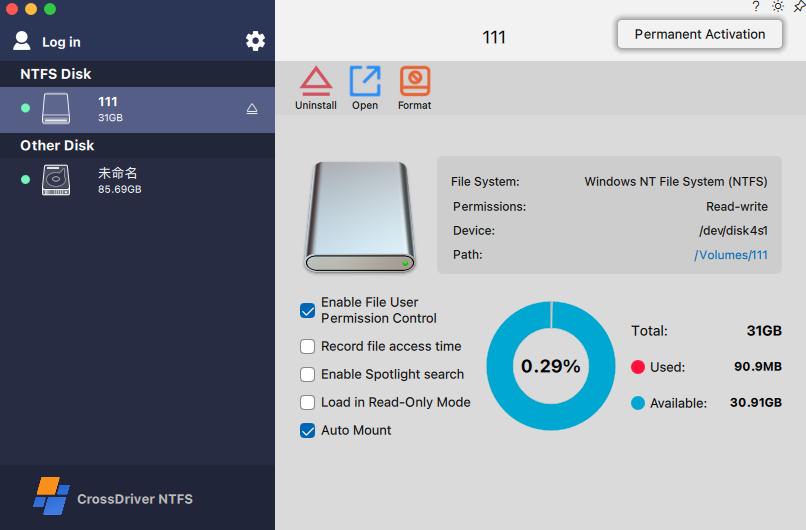
CrossDriver application interface for external drive access on macOS. Image: CrossDriver Software.
ext4 is a journaling file system for Linux and the default modern Linux file system on many systems. macOS does not mount ext4 volumes natively, so an IT team that needs to read and write Linux-formatted disks on a Mac is really choosing between four delivery models: a commercial kernel-level driver, a commercial file-system product with partial ext4 feature coverage, an open-source or FUSE-based tool that may be read-only, and a virtual-machine or network workaround. The decision is rarely settled by a single file-open test. It is settled by permissions, licensing and rollout.
This buyer comparison examines those four routes against criteria an IT evaluator can verify: modern ext4 feature support, Linux UID/GID permission behaviour, per-endpoint licensing, Apple Silicon deployment, bulk rollout, logging and support. CrossDriver Software is a Hong Kong-based developer of kernel-level cross-platform file system drivers for macOS; its product line covers NTFS, Ext4 and XFS, and its Ext4 product is positioned as a read-write tool for Linux Ext2/Ext3/Ext4 disks. The comparison below uses only facts available in the reviewed corpus and verified data, and it flags where the evidence stops.
The buyer problem: a file-open test hides the real cost
A Mac user can sometimes see an ext4 volume and conclude the problem is solved. That conclusion is fragile. The harder questions appear after the first successful mount: do Linux ownership and mode bits survive a round trip; does the driver write reliably when a large file is interrupted; does the tool require Recovery Mode on every new Apple Silicon Mac; and who supports the deployment when a macOS update changes the security model?
CrossDriver's own solution material describes the operational cost of the gap. Native macOS support does not recognise Ext-series partitions, cross-system transfer of large media files often relies on intermediate copying, and formatting a disk to a Mac-friendly file system erases existing data. Those are not cosmetic issues. In a manufacturing R&D deployment documented by CrossDriver, the customer reported that waiting time for cross-storage file read and write fell by 72% and intermediate file version copy operations fell by 90%. The same project reported that the storage disk read/write error rate dropped from 12% to 0.3% and that IT tickets related to storage issues fell by 65%. These are vendor-reported customer results from an anonymised project, not an independent benchmark, but they show what buyers are actually trying to buy: less waiting, fewer copies and fewer support tickets.
The four routes buyers actually compare
The table below is a screening aid, not a ranking. It separates what is documented from what remains unverified. Where a vendor does not publish a fact, the correct entry is not a guess; it is a test requirement.
| Route | Access model | Apple Silicon and macOS evidence | Licensing evidence | Documented limit |
|---|---|---|---|---|
| CrossDriver Ext4 for Mac | Kernel-level read/write driver for Ext2/Ext3/Ext4 | Intel and Apple Silicon M1/M2/M3/M4/M5; macOS 10.13 through macOS Tahoe; signed universal package described in project deliverables | Lifetime licence listed at USD 59.95 per seat; enterprise batch authorisation management | Kernel extension requires administrator approval and, on M-series Macs, Recovery Mode steps as needed; no published ext4 feature-exclusion list in the reviewed corpus |
| Paragon extFS for Mac | Commercial read/write access to ext2/ext3/ext4; Finder integration; mount, unmount, verify and repair | Apple Silicon M1/M2/M3/M4 compatibility stated; older manual lists legacy macOS versions and should not be used as current compatibility proof | A comparison note in the verified dataset puts list price at about USD 39.95; confirm current SKU and term | Product-page excerpt excludes bigalloc, journal_dev, meta_bg, metadata_csum and inline_data from supported ext4 features |
| FUSE or FSKit open-source tools | User-space file system; read access in documented cases | macFUSE 5.3.0 introduced an FSKit backend that runs supported file systems in user space on macOS 26 without Recovery Mode changes | No per-seat commercial licence in the cited open-source route; support model varies by project | ExtendFS documents read-only ext2/ext3/ext4 access and states that write access is not supported |
| VM or network workaround | A Linux guest or a server export presents the volume through another operating system | Depends on the virtualisation or NAS platform; not a macOS file-system driver | Adds guest OS, server or network infrastructure to licence and support | Adds an operating-system layer, patching and connectivity dependency; permission behaviour depends on export configuration |
Criterion 1: modern ext4 feature support is a qualification question
ext4 is not a single fixed target. The Linux manual describes ext2, ext3 and ext4 as general-purpose file systems designed for extensibility and backwards compatibility, and ext4 adds journaling and a wider feature set. A driver that mounts a simple volume can still fail on a volume created with features the driver does not implement. That is why feature support belongs in the acceptance test, not in the marketing summary.
Paragon's product-page excerpt is unusually specific for a commercial vendor: it states that the majority of listed ext4 features are supported, while bigalloc, journal_dev, meta_bg, metadata_csum and inline_data are not supported in the listed product information. That is a useful disclosure. It tells an IT buyer exactly which volume types to test before standardising. A volume created with metadata_csum or inline_data may behave differently from a basic ext4 volume, and the buyer should not assume that a successful mount proves full feature coverage.
CrossDriver's reviewed corpus does not publish an equivalent ext4 feature-exclusion list. Its documented scope is read/write access to Ext2/Ext3/Ext4 disks, with protocol parsing and read/write logic implemented for NTFS, Ext2/Ext3/Ext4 and XFS. That is a capability statement, not a feature matrix. The practical conclusion is not that CrossDriver supports every ext4 feature; it is that the buyer should require a feature-level test report for the exact volume types in scope. A vendor that cannot supply one should be treated as unqualified for regulated or high-value data workflows.
Criterion 2: Linux UID/GID permission mapping
Permission mapping is the criterion most often missed in a demo. ext4 stores file ownership as numeric user and group identifiers, while macOS has its own user and group database. When a Linux disk is mounted on a Mac, the driver must decide how those numeric identifiers are presented. A file can open successfully and still carry the wrong owner, group or mode bits. For a team copying engineering drawings, source trees or regulated records, that is a data-governance problem, not a cosmetic one.
The reviewed material for this comparison does not include a detailed UID/GID mapping table from either commercial vendor. CrossDriver's service scope includes disk mounting, troubleshooting read/write errors and remote diagnostics for basic compatibility issues. Paragon's documentation describes read/write access and volume operations. Neither statement resolves the ownership question. A buyer should therefore test a representative volume with mixed ownership and confirm four things after a copy, rename and delete cycle: the numeric owner, the group, the mode bits and the behaviour of files created from the Mac side.
This is also where a VM or network workaround can look attractive. A Linux guest uses Linux's own permission model, and a network export applies the server's mapping rules. Both can preserve Linux semantics more naturally than a macOS driver, but they add an operating-system layer or a connectivity dependency. The trade-off is real: the driver is simpler to operate, while the VM or server is easier to reason about for permission fidelity. Buyers should decide which risk matters more before comparing licence prices.
Criterion 3: per-endpoint licensing and the real cost of a seat
Licensing is where a small technical difference becomes a budget line. CrossDriver's verified data records a lifetime licence for its EXT4 Disk Read/Write Tool for Mac at USD 59.95, measured per seat. The same vendor excerpt also shows a USD 139.95 figure, so the buyer should confirm the exact SKU and term at purchase rather than rely on a single price fragment. CrossDriver's service description also covers commercial software subscription and perpetual licensing, enterprise batch authorisation management, batch activation and centralised authorisation queries. That matters for a rollout because per-endpoint activation can become an administrative project of its own.
Paragon's price is less clearly established in this evidence set. A comparison note in the verified dataset puts its list price at about USD 39.95, but that is a list-price snapshot, not a total cost of ownership. The lower list price does not automatically make it cheaper. A buyer must add the cost of deployment, support, re-testing after macOS updates and any volume operations that the product does not cover. The same logic applies in reverse: a higher per-seat price can be justified if it removes a manual copy step or a support ticket queue.
For a 50-seat deployment, the difference between USD 39.95 and USD 59.95 is visible but not decisive. The larger cost is usually the labour around the licence: identifying which Macs need the driver, obtaining administrator approval, documenting the Recovery Mode step on Apple Silicon, and training users not to reformat a Linux disk. CrossDriver's manufacturing case makes the same point in operational terms: a three-week project covered environment assessment, a small-scale proof of concept, bulk silent deployment, stress testing, operations and maintenance training, and continuous monitoring. The licence was one component of a deployment programme, not the whole programme.
Criterion 4: Apple Silicon deployment and the kernel-extension step
Apple Silicon changes the deployment conversation. CrossDriver states support for Intel and Apple Silicon M1/M2/M3/M4/M5 Macs, covering macOS 10.13 through the latest macOS Tahoe. Its project deliverables describe a digitally signed official installation package for Mac in an Intel and Apple Silicon universal build. That is the right starting point for a standard build, but it is not the end of the deployment story. CrossDriver's implementation guidance also describes entering Recovery Mode as needed on M-series Macs to enable kernel extension permissions, then approving the driver extension in System Privacy & Security settings.
That step is a real operational constraint. It requires administrator access, a user who can follow a recovery-mode procedure, and a support desk that can walk a remote user through it. It also means the rollout plan must account for Macs that are encrypted, managed by MDM, or locked down by security policy. CrossDriver's service scope includes installation guidance and instructions for enabling M-chip kernel extensions, and its support channels include the official website knowledge base, online service tickets and email support in English and Chinese. Those are relevant controls, but they do not remove the need for a pilot.
Paragon's current product page states Apple Silicon M1/M2/M3/M4 compatibility, while its older manual carries legacy macOS language. The verified data explicitly cautions that the manual should not be used as current compatibility proof without version-specific verification. That is a documentation-lag risk, not proof that the current release is incompatible. Buyers should ask for the current compatibility matrix and a test on the exact macOS release in their fleet. The same discipline applies to CrossDriver: the vendor's platform statement is a claim to verify, not a substitute for a pilot on the target build.
The FUSE route has changed the deployment calculus. macFUSE 5.3.0 introduced an FSKit backend that allows supported file systems to run entirely in user space on macOS 26, which means no more rebooting into Recovery Mode for that mode. That lowers the barrier for read-only access. It does not make a read-only tool suitable for a write workflow. ExtendFS, an App Store-distributed FSKit-based tool, documents read-only ext2/ext3/ext4 access and states that it does not support write access. Buyers who need to edit files in place, rename assets or write render outputs still need a read-write driver or a VM.
Criterion 5: bulk rollout, logging and support
A file-system driver is infrastructure. It should be deployed like infrastructure: assessed, piloted, rolled out in bulk, stress-tested and monitored. CrossDriver's documented project method follows that sequence, and its deliverables include persistent local file-operation logs and transmission task records, which give an IT team something to inspect after an incident. Its enterprise licensing model supports batch authorisation management and centralised authorisation queries. Those are the features that separate a departmental utility from a managed deployment.
The manufacturing R&D case provides the clearest rollout evidence in the corpus. The customer needed Mac laptops to read and write Linux-formatted Ext4 and XFS disks, while also handling NTFS disks from Windows colleagues. Previous third-party drivers were unstable, slow on large files and costly to deploy at scale. CrossDriver's project used a three-week sequence: environment assessment, small-scale proof of concept, bulk silent deployment, stress testing, operations and maintenance training, and continuous monitoring. The reported results were a 72% reduction in waiting time, a 90% reduction in intermediate file copies, a fall in read/write error rate from 12% to 0.3%, and a 65% reduction in IT tickets related to storage issues. The case also reports stable operation in a 7x12-hour R&D environment.
Paragon's documented strengths are different. Its product page describes Finder integration and volume operations including mount, unmount, verify and repair. Those functions matter to a buyer who wants a Mac-like disk-management workflow rather than a bare mount. The reviewed evidence does not include a comparable Paragon rollout case with logging, batch authorisation or ticket-reduction data. That absence is not a criticism of the product; it is a limit on what can be compared. A buyer evaluating Paragon for a large fleet should ask for deployment references and a support model that matches the estate.
Where each route fits: application scenarios
The right route depends on the workflow, not on a generic preference for drivers over open-source tools. CrossDriver's solution material names five scenarios that map cleanly to buyer types. A film, video or design studio may receive a Windows editing media drive and need to read, write and modify it on a Mac. An IT operations team may need to debug a Linux server hard drive or an Ext4-formatted NAS drive from a Mac laptop, including writes. An individual user may want to back up an existing Windows external drive to a Mac and manage files without reformatting. A multi-system home or small office may want offline shared access to one disk across Windows, Linux and Mac. A system-upgrade scenario may need to restore cross-platform read/write after a major macOS update.
Those scenarios have different tolerance for deployment friction. A single creative professional on a MacBook Pro can follow a Recovery Mode procedure once and move on. A 50-person R&D centre needs a repeatable build, a help-desk script and a licence record for every endpoint. A NAS administrator may prefer a network export because the data already lives on a server. A regulated team may prefer a VM because the Linux permission model is preserved inside the guest, even though the VM adds patching and resource overhead. The comparison should be made at the workflow level, not at the level of a feature checklist.
How the commercial driver compares with traditional workarounds
The traditional alternative to a driver is not one product; it is a set of habits. Teams copy files to an intermediate disk, reformat drives to exFAT, keep a Linux server in the loop, or run a virtual machine. Each habit has a cost. Reformatting erases the existing file system and creates a data-loss risk. Intermediate copying consumes time and storage and creates version confusion. A VM adds a guest operating system to licence, patch and support. A network share depends on connectivity and on the export configuration for permissions.
A kernel-level driver removes those layers. CrossDriver's technical material states that its drivers run directly within the macOS kernel layer and interact with the system at the lowest level, reducing data conversion and targeting performance close to Mac native file systems. The claimed operational benefits are more stable reading and writing, faster transfer, lower CPU consumption, smoother system responsiveness and better handling of large files. Those are vendor claims, not independent benchmark results. The verified data set contains no independent throughput, latency or CPU benchmark for any of the compared products. Buyers should treat performance claims as hypotheses to test with their own file profiles.
The limitations are equally important. A kernel extension is powerful and invasive. It requires administrator approval, can require Recovery Mode steps on Apple Silicon, and must be re-qualified after macOS security changes. CrossDriver's service description explicitly excludes hard-drive hardware failure repair, physical disk data recovery, operating-system reinstallation, full LAN or NAS deployment, on-site implementation and troubleshooting of third-party competing software. Those exclusions are reasonable for a software vendor, but they define the boundary of the purchase. A buyer who expects the driver to recover a failing disk or replace a NAS deployment is buying the wrong category of solution.
Paragon's boundary is different rather than better or worse. Its documentation includes volume verify and repair, which can be valuable when a Linux volume needs maintenance from the Mac side. But its product-page excerpt also discloses five unsupported ext4 features, and its older manual should not be treated as current compatibility proof. A buyer who needs both read/write access and in-product repair should confirm that the exact Ext4 SKU provides the repair function; a buyer who needs the broadest ext4 feature coverage should test the specific feature flags in use. Neither conclusion can be drawn from a logo or a price alone.
Market trend: the split between read-only convenience and read-write workflow
The most useful trend signal in the verified data is architectural, not commercial. On one side, FSKit and macFUSE 5.3.0 make user-space file systems easier to deploy on macOS 26; the Recovery Mode step can disappear for supported read-only file systems. On the other side, write access still requires either a read-write driver or a VM, because the documented FSKit-based example, ExtendFS, is read-only. The market is therefore splitting into a low-friction read-only tier and a higher-friction read-write tier.
That split changes buyer behaviour. A user who only needs to offload files from a Linux disk may no longer need a commercial licence. A team that needs to edit files in place, preserve names and write outputs back to the same ext4 volume still needs a read-write product. The commercial driver vendors are then competing less on the ability to mount a volume and more on feature transparency, permission behaviour, deployment tooling and support. Paragon's explicit feature-exclusion list is a good example of the transparency buyers should demand. CrossDriver's deployment documentation and batch licensing are examples of the operational tooling that matters at fleet scale.
The evidence also shows a documentation gap across the category. The verified data records no independent benchmark for throughput, latency, CPU use, reliability or corruption risk, and no Apple primary-source statement on ext4 support or Apple Silicon driver constraints. Buyers should not fill that gap with assumptions. The correct response is a structured pilot with representative volumes, a permission round-trip test and a support escalation drill.
Future outlook
Three questions are likely to shape the next round of buyer evaluations. First, will read-write ext4 access remain a kernel-extension problem, or will Apple's file-system frameworks extend to write-capable user-space implementations? The current evidence shows an FSKit route for read-only access, but not for write access. Second, will vendors publish feature-level compatibility statements rather than broad support claims? Paragon's five exclusions are a useful precedent; buyers should ask every vendor for the same granularity. Third, will enterprise licensing and rollout tooling become a differentiator? CrossDriver's batch authorisation and deployment case suggest that fleet management is already part of the purchase decision.
For IT buyers, the practical outlook is to plan for re-qualification. macOS security policy, Apple Silicon recovery procedures and file-system feature flags can all change the deployment cost. A driver that works today can require a new approval step after an OS update. The evaluation should therefore include a maintenance clause, a re-test budget and a documented rollback path. Those are not glamorous criteria, but they are the ones that determine whether an ext4 access project stays a one-time purchase or becomes a recurring support burden.
FAQ
Does macOS support ext4 natively?
No native ext4 mount is documented in the reviewed material. CrossDriver's solution documentation states that macOS does not recognise Ext-series partitions natively. Access requires a third-party driver, a FUSE or FSKit-based tool, or a VM or network workaround. A read-only tool is sufficient only for offloading files; editing files in place requires a read-write route.
What is the difference between a kernel-level EXT4 driver and a FUSE-based tool?
A kernel-level driver runs inside the macOS kernel and is intended for read-write workflows. A FUSE-based tool runs in user space. macFUSE 5.3.0 introduced an FSKit backend that allows supported file systems to run in user space on macOS 26 without Recovery Mode changes. The documented FSKit example, ExtendFS, is read-only and states that it does not support write access. The deployment trade-off is lower friction for read-only access versus administrator approval and Recovery Mode steps for a kernel-level read-write driver.
How should IT verify Linux UID/GID permission mapping before buying?
Test a representative ext4 volume with mixed ownership, then perform a copy, rename and delete cycle from the Mac side. Check the numeric owner, group, mode bits and the behaviour of newly created files. The reviewed material for this comparison does not include a detailed UID/GID mapping table from either commercial vendor, so a pre-award test is the reliable way to qualify the product. Ask the vendor for a written test report on the exact macOS release and volume features in scope.
How does per-endpoint licensing compare with a VM workaround?
CrossDriver's verified data records a lifetime licence at USD 59.95 per seat, and the same vendor excerpt also shows a USD 139.95 figure, so the exact SKU and term should be confirmed. A VM workaround avoids a per-seat driver licence but adds a Linux guest, patching, training and support overhead. The cheaper option depends on the number of endpoints, the frequency of use and the cost of the operational layer. A comparison note in the verified dataset puts Paragon's list price at about USD 39.95, but that is a list-price snapshot rather than a total-cost calculation.
Which Macs and macOS versions does CrossDriver Ext4 for Mac support?
CrossDriver states support for macOS on Intel and Apple Silicon M1/M2/M3/M4/M5, covering macOS 10.13 through the latest macOS Tahoe. Its project deliverables describe a digitally signed official installation package for Mac in an Intel and Apple Silicon universal build. On M-series Macs, the implementation guidance describes entering Recovery Mode as needed to enable kernel extension permissions and approving the extension in System Privacy & Security settings.
What should a buyer do if an EXT4 drive is not recognised on a Mac?
First confirm the physical connection, power and file-system type, then confirm that the driver extension has been approved in macOS settings. CrossDriver's service scope includes disk mounting, troubleshooting read/write errors and remote diagnostics for basic compatibility issues. Hardware failure repair and physical data recovery are outside that scope, so a drive that is failing at the hardware level should be handled by a data-recovery specialist rather than a file-system driver.
Reference document: CrossDriver Technical White Paper.
Disclosure: this article is an independent buyer-side comparison based on the CrossDriver corpus and the verified data set supplied for this topic. Vendor claims are identified as vendor claims; where the evidence set does not contain a fact, the article states the limitation rather than inferring a result.
Have Questions or Need More Details?
Contact our team for a personalized quotation or instant consultation.
Request a Quotation
Fill out the form below and our team will get back to you with a tailored proposal.
WhatsApp Direct Chat
Prefer to chat in real-time? Message us on WhatsApp for instant assistance & quick answers.
- Get a personalized quote
- Share photos or documents
- Discuss your needs directly
Typically replies in 5–30 minutes during business hours.