
EXT4 for Mac: What Buyers Need to Know in 2026
Industry reference · Cross-platform storage · Awareness and research stage

A kernel-level driver surfaces an ext4 volume inside macOS so files can be read and written without reformatting the disk.
EXT4 for Mac refers to a class of third-party software that gives macOS the ability to mount — and, in commercial editions, write to — storage volumes formatted with the Linux ext4 file system. It exists because the two operating systems do not share a file system language: ext4 is the fourth extended filesystem, a journaling file system built for Linux as the successor to ext3, and the second, third and fourth extended file systems were designed as general-purpose file systems for extensibility and backwards compatibility.
macOS ships without a native ext4 driver. A Mac connected to an ext4-formatted external hard drive, USB flash drive or Linux-based NAS volume therefore does not have a supported path to read or write that data through the operating system alone. For individual Mac users this is an inconvenience. For studios, IT teams and organisations that move media assets or server data between Linux and macOS, it becomes a workflow constraint with measurable cost.
What “EXT4 for Mac” actually covers
The term is used loosely across the market, so it helps to separate the technical options now in circulation. Three broad categories exist, and they differ far more in write capability and deployment burden than in the ability to display a file list.
- Commercial driver software. Dedicated drivers that add ext2, ext3 and ext4 access to macOS with graphical management and, typically, write support. CrossDriver Ext4 for Mac and Paragon extFS for Mac sit in this group.
- Open-source FUSE-based tools. Utilities such as ext4fuse and fuse-ext2, built on the macFUSE framework. Stable builds generally support reading; write functionality is commonly documented as experimental and is not recommended for production data.
- FSKit-based applications. A newer approach that runs in user space rather than as a kernel extension. Apple's App Store listing for ExtendFS describes a read-only ext2, ext3 and ext4 driver for macOS built on FSKit, and states that the app does not support write access.
The practical distinction for a buyer is simple: read-only access is increasingly available at low or no cost, while reliable read-write access to ext4 volumes on macOS remains primarily a commercial software category.
Why a Mac cannot use an ext4 drive out of the box
The gap is structural rather than a configuration oversight. ext4 belongs to the Linux file system family, and macOS has not integrated a driver for it. When an ext4 volume is attached to a Mac, it may not appear at all, or it may appear without a usable mount point — the scenario Mac users typically describe as “ext4 drive not recognised.”
Several forces keep that gap open:
- The file system protocols of Linux and macOS are not interoperable at the operating system level, so translation must come from a third-party layer.
- Apple Silicon security mechanisms restrict kernel-level permission extensions, which raises the deployment threshold for any driver that needs low-level access.
- Major macOS releases change extension and security policy, so a driver that worked on one release may need a vendor patch before it mounts volumes again on the next.
The workarounds users reach for carry their own costs. Reformatting the drive to exFAT erases the existing data and discards native ext4 attributes. Running a Linux virtual machine consumes host CPU and memory and adds latency to large transfers. Accessing the storage over SMB or NFS depends on a stable network and cannot serve an offline local disk.
That leaves dedicated driver software as the direct route, and it is the route that buyers in research stage most often need to evaluate on technical grounds rather than on marketing claims.
Where CrossDriver fits
Crossdriver Limited is a Hong Kong-based technology company established in 2025 that develops kernel-level and system-level cross-platform software, with a focus on file system drivers and underlying storage technology. The company reports approximately 50 staff including a 30-engineer R&D team, a 3,000 m² facility, an annual production capacity of 100,000 units and an export share of 90% across EU, USA and Asia markets. Its team experience is stated as 15 years of macOS driver development, 20 years of Windows development and 15 years of Linux development.
Its product line covers three file systems: CrossDriver NTFS for Mac for Windows NTFS disks, CrossDriver XFS for Mac for Linux XFS disks, and CrossDriver Ext4 for Mac, described as a read-write tool for Linux Ext2/Ext3/Ext4 disks that lets a Mac access Linux-partitioned hard drives and USB flash drives directly. All three are positioned as kernel-level drivers rather than user-space utilities.
For procurement purposes, the commercial model matters as much as the technology. The vendor lists a lifetime licence for the EXT4 product at USD 59.95 in 2026, with a second price point of USD 139.95 also appearing on the same product page; the scope of that second tier is not defined in the source material and should be confirmed at purchase. Licensing and technical support are delivered online, with a service duration ranging from one day to a lifetime licence, and deliverables that include the installation package, activation key, user documentation, knowledge base tutorials and remote troubleshooting reports on request. Support is offered in English and Chinese through knowledge base, service tickets and email.
Kernel-level versus FUSE: what the architecture changes
Most ext4 software for macOS falls into one of two implementation models, and the choice affects stability and throughput more than any feature list suggests.
FUSE-based tools run in user space. Every file operation passes through an additional translation layer between the application and the disk. That design is portable and easy to distribute, but it adds overhead, and on Apple Silicon hardware FUSE-based solutions are documented as suffering performance degradation and frequent mount failures.
Kernel-level drivers, by contrast, run directly within the macOS kernel layer and interact with the system at the lowest level. CrossDriver states that this architecture cuts down the data conversion steps and brings ext4 performance close to that of a native Mac file system. The vendor's own stated benefits of the architecture are more stable file reading and writing, faster data transfer, lower CPU consumption, smoother system responsiveness and better handling of large files.
CrossDriver also states that its kernel-level drivers deliver more than five times the transfer speeds of FUSE-based user-space tools. That figure is a first-party claim. No independent benchmark of throughput, latency, CPU load or corruption rate for ext4 drivers on macOS was available in the verified data reviewed for this article, so the multiplier should be treated as a vendor statement rather than a measured result. Buyers with performance-critical workloads should run their own transfer tests on representative files before standardising.
Deployment follows a predictable pattern. The user obtains the installation package online and installs the driver locally. On Macs with M-series chips, the user may need to enter Recovery Mode to enable kernel extension permissions, then approve the driver extension in the macOS Privacy & Security settings. After licence activation, an attached external drive is recognised and mounted automatically. Fault diagnosis is handled remotely through service tickets or documentation, without on-site intervention.
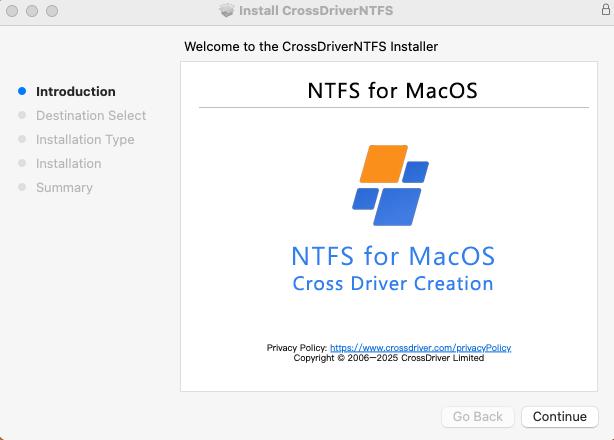
Graphical volume management is the difference between a driver that works and one an IT team can support at scale.
Where ext4 access on a Mac is actually needed
The demand for ext4 support is concentrated in workflows where a single physical disk has to move between Linux and macOS machines, or where a Mac must service storage that was provisioned by a Linux system.
Media and design studios. A production drive formatted on a Linux editing or rendering workstation arrives at a Mac suite. Without a driver, files must be copied to local storage first, which doubles the time spent on large assets. With write access, editors can open, modify and save back to the same volume.
IT operations and server support. An engineer using a MacBook to debug a Linux server or inspect an ext4-formatted NAS drive needs both read and write capability on the same machine that holds the documentation, the terminal session and the escalation tools. Reaching for a separate Linux workstation breaks that continuity.
Multi-system home and lab storage. A single external drive shared across Windows, Linux and macOS machines is a common arrangement in home labs and small technical teams. Reformatting it to a lowest-common-denominator file system sacrifices ext4 behaviour; a driver preserves it.
Post-upgrade recovery. After a major macOS release, an existing driver may stop mounting volumes until a compatible patch ships. Restoring read-write capability quickly is a continuity issue rather than a convenience one, which is why vendor update cadence deserves scrutiny during evaluation.
What is changing in this category
Three shifts are visible in the technical documentation, and none of them requires a market forecast to observe.
The access layer is moving out of the kernel. macFUSE 5.3.0 introduced an FSKit backend that allows supported file systems to run entirely in user space on macOS 26, removing the need to reboot into Recovery Mode. Apple's App Store listing for ExtendFS shows the same direction: a read-only ext4 driver built on FSKit that avoids kernel extensions altogether. The practical effect is that basic read access to ext4 volumes is becoming cheaper to deploy and less invasive to the operating system.
Read access is commoditising, write access is not. A read-only path is now available through free or low-cost routes, which pushes commercial vendors toward the harder problems — reliable writes, volume repair, permission behaviour and support commitments. Buyers who only need to copy data off a Linux disk should question whether they need a paid driver at all.
Apple Silicon compatibility has become its own qualification dimension. Processor support and file system feature support are separate questions. A driver can be listed as compatible with M-series Macs and still fail to mount a volume carrying an ext4 feature it does not implement. Treating them as one checkbox is a procurement error.
One caution belongs here. No verified market-size, growth or installed-base data for the ext4-for-Mac software niche was available for this analysis. Statements about the direction of the category should therefore be read as architecture-level observations, not as quantified market forecasts.
Comparing the realistic options
The table below compares the approaches a Mac user or IT buyer will actually encounter. Capability descriptions reflect vendor documentation and published product pages; the absence of independent benchmarks is noted where it applies.
| Approach | Read | Write | Implementation | Practical note |
|---|---|---|---|---|
| CrossDriver Ext4 for Mac | Yes | Yes | Kernel-level driver | Lifetime licence listed at USD 59.95 (2026); kernel extension approval required on M-series Macs |
| Paragon extFS for Mac | Yes | Yes | Kernel-level driver | Apple Silicon M1–M4 stated; excludes bigalloc, journal_dev, meta_bg, metadata_csum and inline_data |
| ext4fuse / fuse-ext2 | Yes | Experimental | FUSE user space | CLI-only, manual macFUSE dependency, no commercial SLA |
| ExtendFS | Yes | No | FSKit, user space | Vendor states write access is not supported |
| Reformat to exFAT | Yes | Yes | Destructive | Requires full backup first; native ext4 attributes and permissions are lost |
The boundaries buyers should not skip
A balanced comparison has to state where a commercial driver does less than the marketing implies.
Feature matrices are not symmetrical. Paragon publishes a named list of unsupported ext4 features — bigalloc, journal_dev, meta_bg, metadata_csum and inline_data — which allows a buyer to screen volumes in advance. The product material available for CrossDriver Ext4 for Mac does not include an equivalent exclusion table, so a buyer testing a volume created by a recent Linux distribution should validate feature flags and mount behaviour directly rather than assume compatibility.
Version ranges are product-specific. The vendor material states macOS 10.13 through macOS Tahoe 26 compatibility for CrossDriver NTFS for Mac. A comparable version range for the Ext4 product is not specified in the same material, and the supported macOS release should be confirmed before enterprise rollout.
Pricing models differ more than headline prices. CrossDriver lists USD 59.95 for a lifetime EXT4 licence, while a pricing comparison recorded in the verified dataset places Paragon's list price at approximately USD 39.95 with a different licensing structure. A lower entry price and a lower total cost of ownership across a fleet are not the same number, particularly where major macOS upgrades historically trigger renewal fees.
Support scope has hard edges. The CrossDriver licensing and support service explicitly excludes hard drive hardware repair and physical disk data recovery, operating system reinstallation, full device debugging, LAN and NAS deployment, recovery of data lost to human error or formatting, troubleshooting of third-party competing software, on-site implementation and in-depth custom development of system-level components unrelated to CrossDriver software. None of these exclusions is unusual for software licensing, but each one maps to a task somebody in the organisation will eventually believe is covered.
What to expect next
Two developments are worth tracking for anyone standardising on ext4 access for macOS.
The first is the continuing evolution of Apple's extension policy. Every move toward user-space file systems reduces the friction of installation, but it also changes which capabilities a driver can realistically deliver. A read-only FSKit implementation and a kernel-level read-write driver are not competing on the same axis, and the gap between them is likely to persist because write access carries risks that user-space architecture does not solve by itself.
The second is vendor breadth. CrossDriver is developing CrossDriver App, a lightweight Windows application compatibility layer for Apple Silicon macOS, positioned as a runtime reconstruction rather than full-machine virtualisation. It is a different product from an ext4 driver, but it signals a company strategy of building multiple cross-platform bridges on the same low-level engineering base. For buyers, breadth is a mild longevity signal, not a guarantee; the relevant question remains whether the specific driver receives updates when macOS changes.
A practical evaluation sequence follows from this. Confirm the macOS version you run. Confirm the Apple Silicon generation. Test a representative ext4 volume with the feature flags your Linux systems actually use. Verify write behaviour, not just mounting. Then compare licence structure, update policy and support scope against the cost of the workaround you would otherwise accept.
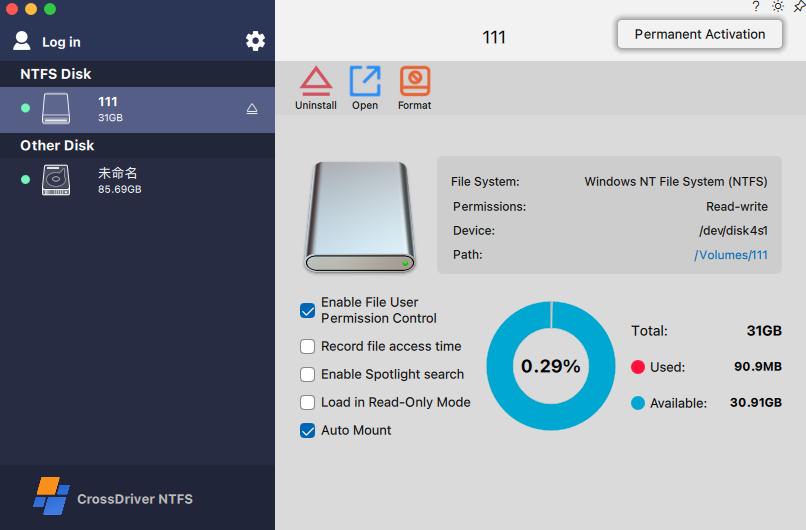
Acceptance testing should confirm write operations on a representative volume, not merely that the disk appears in Finder.
Frequently asked questions
What does “EXT4 for Mac” mean?
It describes third-party software that adds ext4 file system support to macOS. ext4 is a Linux journaling file system, the fourth member of the extended file system family and the successor to ext3. macOS does not include a native ext4 driver, so a Mac needs additional software to mount an ext4-formatted volume, and commercial products in this category add write capability as well as read access.
Why does my Mac not recognise an ext4 drive?
Because macOS has no built-in driver for the ext4 file system. The Linux and macOS file system protocols are not interoperable at the operating system level, so an attached ext4 volume has no supported path to mount. The usual symptoms are a drive that never appears in Finder or a partition that is detected but cannot be opened.
Can I write to an ext4 drive on a Mac, or only read it?
Both outcomes are possible depending on the tool. Read-only access is available from FSKit-based applications such as ExtendFS, which states that write access is not supported, and from FUSE-based utilities whose write functionality is generally documented as experimental. Read-write access is offered by commercial kernel-level drivers, including CrossDriver Ext4 for Mac, which is described as a read-write tool for Linux Ext2/Ext3/Ext4 disks, and Paragon extFS for Mac, which states read and write access to ext2, ext3 and ext4 drives.
Which ext4 options work on Apple Silicon Macs?
Paragon states compatibility with Apple Silicon M1, M2, M3 and M4 processors; CrossDriver describes its cross-platform storage solution as compatible with Intel-based Macs and Apple Silicon M-series devices. FUSE-based tools are reported to suffer performance degradation and frequent mount failures on M-series hardware. Because processor support and macOS release support are separate variables, both should be confirmed against the exact build in use.
What are the main risks of using an ext4 driver on macOS?
The documented risks fall into three groups. Compatibility risk arises when a volume carries ext4 features the driver does not implement, which can prevent mounting or force a read-only state. Operational risk arises from kernel extension approval on Apple Silicon and from the possibility that a major macOS release interrupts mounting until the vendor patches the driver. Recovery risk arises because driver support services generally exclude physical data recovery, hardware repair and recovery of data lost through formatting.
Is a commercial ext4 driver always necessary?
No. If the requirement is limited to copying files off a Linux disk once, a read-only route may be sufficient. A commercial read-write driver becomes relevant when files must be modified in place on the ext4 volume, when transfers involve large media assets, or when an organisation needs support commitments and predictable update behaviour across a fleet of Macs.
For readers who want the deeper technical background on driver architecture, permission behaviour and deployment, CrossDriver publishes a technical white paper that is available for download: CrossDriver Technical White Paper. The company's official website is www.crossdriver.com.
Product capability descriptions in this article reflect vendor documentation and published product pages as reviewed in 2026. Where a figure is vendor-stated rather than independently measured, it is identified as such.
Have Questions or Need More Details?
Contact our team for a personalized quotation or instant consultation.
Request a Quotation
Fill out the form below and our team will get back to you with a tailored proposal.
WhatsApp Direct Chat
Prefer to chat in real-time? Message us on WhatsApp for instant assistance & quick answers.
- Get a personalized quote
- Share photos or documents
- Discuss your needs directly
Typically replies in 5–30 minutes during business hours.