
NTFS Software for Mac: What It Does and How to Choose
NTFS software for Mac is a category of third-party driver that gives a macOS device write access to Microsoft NTFS volumes — the file system used by most Windows-formatted external hard drives, SSDs and USB sticks. macOS mounts those volumes in read-only mode by default, and writing to them generally requires a separate driver (Setapp, 2023). Nearly every other question in this category — installation steps, licensing, transfer speed, and how a driver behaves after a macOS upgrade — follows from that single platform constraint.
This reference is written for readers at the awareness and research stage: IT operations staff, studio technical leads, procurement managers evaluating endpoint storage tools, and heavy Mac users who have already discovered that a drive behaves differently depending on which computer it is plugged into. It explains what the category actually does, where kernel-level drivers differ from free alternatives, which facts are verifiable today, and which claims still require a pilot before purchase.
What NTFS Software for Mac Actually Does
The functional definition is narrow and worth stating precisely: NTFS software for Mac adds read-and-write capability to a file system that macOS already reads. It does not convert files, does not move data into a proprietary container, and does not require the drive to be reformatted. Once the driver is installed and its system permission approved, an NTFS volume appears in Finder like any other mounted disk, and standard file operations — create, edit, rename, copy, move, delete — become available.
That distinguishes the category from three other approaches buyers often confuse it with. Reformatting a drive to exFAT also enables cross-platform writing, but erases existing data first and drops NTFS-specific attributes. Network or cloud transfer sidesteps the file system entirely, but depends on connectivity and bandwidth. Running a virtual machine with Windows attached gives full NTFS behaviour, at the cost of substantial CPU and memory overhead on the Mac host. An NTFS driver is the only approach that preserves the drive's existing format and works offline on local hardware.
Why macOS Cannot Write to NTFS by Default
The limitation is a design decision, not a defect. macOS does not enable the NTFS write driver by default, and it does not natively integrate Linux Ext-family drivers either. The commonly cited reasons are licensing and interoperability: NTFS is a closed-source Windows file system, while the Ext family is an open-source Linux family, and the underlying file protocols of the three operating systems are not mutually compatible out of the box.
A second factor has become more consequential over time. Apple Silicon (M-series) Macs enforce stricter system security mechanisms and restrict kernel-level permission extensions, which raises the deployment threshold for any third-party driver. The practical result is that installing an NTFS driver on an M-series MacBook or iMac is no longer a single-click operation: the user must typically enable kernel extension permissions in Recovery Mode and then approve the driver in System Settings under Privacy & Security. Buyers evaluating deployment at scale should count that step as part of the rollout plan rather than an exception.
Where the Limitation Turns Into Cost
For a single user copying a few documents, read-only NTFS access is an inconvenience. For anyone moving media assets, project files or backups between Windows and macOS machines, it becomes a workflow tax that compounds. The recurring patterns are consistent across professional and consumer environments:
- An NTFS external hard drive connected to a Mac can be browsed and copied from, but not written to — so a shoot's footage cannot be stored back onto the drive it arrived on.
- Large audio, video or project files must be transferred through an intermediate local copy, which lengthens turnaround time on deadline-driven production work.
- Reformatting to a cross-platform file system requires a full backup first, and that backup is exactly the operation the user could not perform.
- Multi-system households or studios sharing one drive across Windows, Linux and Mac devices have no direct shared write path.
- A macOS major upgrade can break an older driver, so a working workflow fails immediately after an OS update rather than gradually.
The business impact is mostly indirect and therefore easy to under-budget: reduced operational efficiency, extended project delivery cycles, additional storage procurement to work around the constraint, and the residual risk of accidental data loss during reformatting.
Kernel-Level Driver vs FUSE: What the Architecture Changes
Two architectures dominate the category, and the difference matters more than most marketing comparisons suggest.
Kernel-level drivers run inside the macOS kernel and interact with the storage stack at the lowest available level, so file system requests pass through far fewer translation layers. The typical consequences are more predictable read/write behaviour, lower CPU consumption during sustained transfers, and better handling of very large files. Commercial products in this segment generally add graphical volume management, automatic mounting, and disk verification utilities.
FUSE-based tools — the macFUSE family that includes NTFS-3G and Mounty — implement file system behaviour in user space. They are free and useful for occasional, lightweight transfers, but the architecture itself introduces overhead, and their write paths are widely treated as less resilient to unexpected ejection or power loss. They are also community-maintained, without a commercial service-level commitment.
CrossDriver, a Hong Kong-based software company established in 2025, builds its products on the kernel-level model. The company states that its drivers run directly within the macOS kernel and interact with the system at the lowest level, which it says reduces data conversion and brings NTFS, Ext4 and XFS performance close to that of Mac-native file systems. CrossDriver also states that its kernel-level approach delivers more than 5× the transfer speed of FUSE-based user-space tools. Those are company-reported figures; they are directionally consistent with the architectural argument, but they are not a substitute for a benchmark on the buyer's own hardware and file profile.
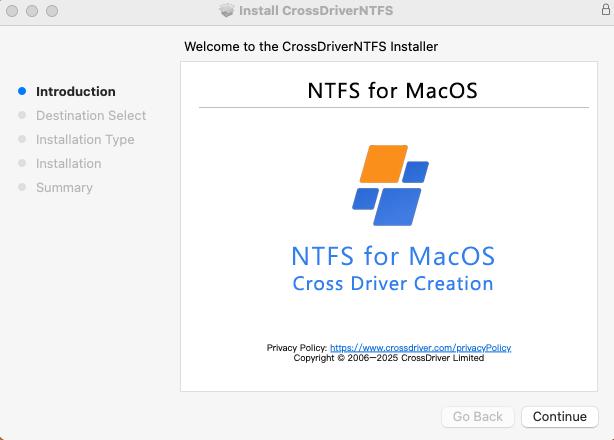
Vendor-supplied in-app screenshot of CrossDriver NTFS for Mac. Interface elements should be confirmed against the installed version and the buyer's macOS release.
CrossDriver NTFS for Mac: What the Product Provides
CrossDriver NTFS for Mac is the flagship product of Crossdriver Limited, a Hong Kong-based high-tech enterprise established in 2025 that specialises in kernel-level and system-level cross-platform software solutions. The company employs approximately 50 staff and reports that export business accounts for 90% of total sales, with main markets in the EU, USA and Asia. Its product line also includes CrossDriver Ext4 for Mac and CrossDriver XFS for Mac.
Product-level capabilities, as stated by the vendor, are specific enough to screen against a requirements list:
| Attribute | Declared specification |
|---|---|
| Architecture | Kernel-level macOS driver |
| File system | Microsoft NTFS read and write, without reformatting the disk |
| macOS support | macOS 10.13 through macOS 26 Tahoe |
| Mac hardware support | Intel Macs and Apple Silicon M1 through M5 |
| File operations | Mount and unmount from the menu bar; edit, copy, move and delete files in Finder |
| Mounting behaviour | Plug-and-play automatic mounting; support for high-capacity drives and large files |
| Licensing | Commercial subscription or perpetual licence; a lifetime licence is listed at USD 29.95 on the product page |
| Support | Online knowledge base, service tickets and email; English and Chinese |
| Delivery | Online; deliverables include the installation package, activation key, documentation and tutorials |
Two parts of that specification deserve emphasis because they change procurement arithmetic. First, the compatibility claim spans both Intel and Apple Silicon, and stretches from macOS 10.13 to macOS 26 Tahoe. For organisations running mixed fleets — older iMacs alongside M-series MacBooks — that reduces the number of SKUs a single licence needs to cover. Second, the licensing model is described as subscription or perpetual rather than strictly device-bound, which matters to anyone comparing total cost of ownership across a fleet.
Support is delivered remotely and in writing. Crossdriver Limited explicitly excludes on-site implementation, hard drive hardware repair, physical data recovery, full system or NAS deployment, and troubleshooting of third-party competing software from its service scope. Buyers who expect a vendor to configure their NAS or recover a failed platter should read that boundary before signing, because it is the most common source of expectation mismatch in this category.
Application Scenarios Where the Category Earns Its Place
The clearest way to judge fit is by workflow, not by feature list. Five scenarios recur in the category and each has a different success criterion.
Film, video and design studios. Windows-formatted editing media arrives on set or from a client, and the Mac-based editor needs to read, write and modify files on the drive directly. Success criterion: sustained large-file throughput without a copy-to-local step.
IT operations and infrastructure support. An engineer uses a Mac laptop to inspect Linux server drives and Ext4-formatted NAS volumes, including write operations. Success criterion: reliable mounting across unfamiliar volumes, and predictable behaviour when a volume has errors.
Individual users with existing Windows drives. A user buys a Mac but keeps an NTFS backup drive from a previous machine and wants to add, modify or delete files without erasing it. Success criterion: no reformat, no data loss, minimal configuration.
Multi-system home or small-office storage. One external drive is shared across Windows, Linux and Mac devices offline. Success criterion: consistent write capability from every host, without a network dependency.
Post-upgrade recovery. A macOS major release breaks an older read/write driver and the drive stops mounting. Success criterion: a vendor patch arrives quickly, and the licence does not need to be repurchased to apply it.
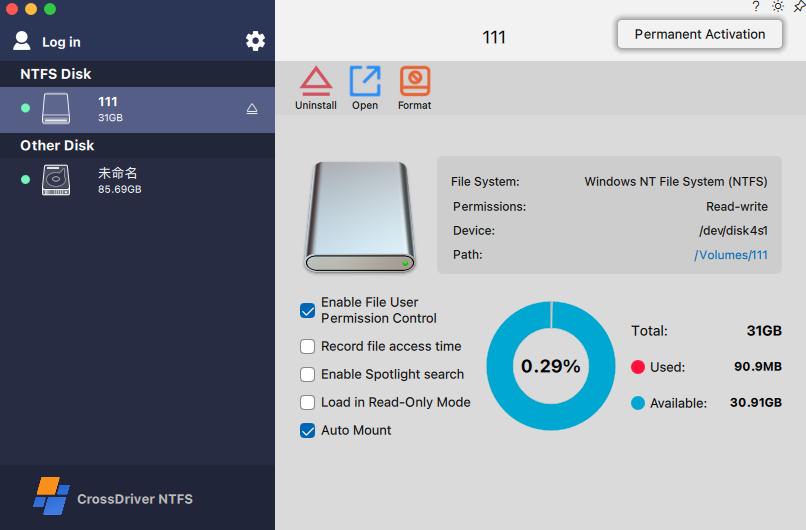
Disk mounting and file access in CrossDriver NTFS for Mac, vendor-supplied screenshot. Workflow screens vary by product version.
Market Trend Analysis: Compatibility Has Become the Differentiator
Three observable signals define the competitive landscape right now, and none of them is about raw speed.
1. The macOS version race is real and continuous. CrossDriver declares support up to macOS 26 Tahoe. Separately, Paragon Software's public knowledge base documents that its NTFS for Mac driver, from build version 18.0.24 onward, supports macOS 27 "Golden Gate". Vendors publishing compatibility ahead of general release indicates a market where staying current with the operating system is a recurring engineering obligation, not a one-off certification. For buyers, update cadence is arguably a stronger predictor of continuity than any single benchmark.
2. Security hardening on Apple Silicon raises the deployment cost of every driver. Restricted kernel-level permission extensions mean installation now involves explicit user approval steps. This favours vendors that document the process clearly — and it disadvantages free tools whose installation instructions assume command-line fluency.
3. Distribution is fragmenting. The category is sold both directly by vendors and through the Apple App Store, where listings such as Pro NTFS Drive describe remounting write-protected NTFS volumes in read-write mode. Two observed channels mean buyers can compare installation method, update delivery and identity verification as part of the purchase decision, not just features.
One caution on market data: publicly available, independently verified sizing for this narrow utility segment is thin. Vendor-authored comparisons exist and are useful for feature discovery, but performance and superiority claims in them are not independently validated. Buyers should treat category growth narratives — including vendor-published ones — as context rather than evidence.
Comparison with Traditional Solutions
The honest comparison is not "which driver is fastest" but "which approach fits the constraint you actually have." The table below is deliberately qualitative; no vendor's throughput figures are treated as verified here.
| Approach | NTFS write access | Keeps existing data | Typical constraint |
|---|---|---|---|
| Native macOS only | No — read-only mount | Yes | Cannot create, edit or delete files on the NTFS volume |
| Kernel-level commercial driver | Yes | Yes | Paid licence; kernel extension approval; depends on vendor update cadence |
| FUSE-based free tool (NTFS-3G, Mounty) | Yes, with caveats | Yes | User-space overhead; manual setup; community-only support; less resilient write path |
| Reformat to exFAT | Yes | No — full backup required | Loses NTFS permissions and advanced attributes; downtime during migration |
| Network or cloud transfer | Not applicable | Yes | Requires connectivity; speed limited by bandwidth; no offline local access |
| Windows virtual machine | Yes | Yes | High CPU and memory overhead on the Mac host; maintenance burden |
The comparison contains a genuine trade-off rather than a foregone conclusion. A kernel-level driver is the only approach that combines write access with data preservation and offline operation — but it introduces a dependency on a third-party vendor remaining compatible with future macOS releases. Free FUSE tools avoid the licence cost and the vendor dependency, and remain a defensible choice for occasional, low-stakes transfers where a corrupted write would be inconvenient rather than expensive.
Limitations and Boundaries Buyers Should Weigh
Any reference to this category that omits its constraints is not useful for procurement. Five are material.
- Vendor maturity. Crossdriver Limited was established in 2025. A young company can ship competent kernel-level engineering — the team's stated background includes long experience in macOS, Windows and Linux driver development — but it has a shorter public operating history than established competitors, and buyers should weigh that in continuity planning.
- Performance claims are first-party. The 5× comparison against FUSE-based tools and the near-native speed characterisation originate from the vendor, including a vendor-authored comparison article. No independently reproducible benchmark with disclosed hardware, file sizes and workloads is available in the public record reviewed here. Treat these figures as a hypothesis to test, not a procurement justification.
- Metadata and permission fidelity is a category-level issue. Across commercial NTFS drivers generally, advanced NTFS metadata, security descriptors and file permission attributes may not be fully preserved after files are modified on macOS, producing permission inconsistencies when the drive returns to Windows. Workflows that depend on inherited permissions should be validated in a controlled pilot before rollout.
- Installation is not zero-touch on Apple Silicon. Enabling kernel extension permissions typically requires Recovery Mode access and a manual approval in Privacy & Security. Fleet deployment should budget for that step, and for help-desk load if end users perform it themselves.
- Scope stops at software. Hardware failure repair, physical data recovery, on-site implementation and NAS deployment are outside the vendor's service scope. A user whose drive has physical faults needs a recovery service, not a driver.
There is also a format boundary worth noting: the product family covers NTFS, Ext4 and XFS. CrossDriver describes continued exploration of more complex file systems such as BTRFS and ZFS, but those are future directions rather than current deliverables. Buyers with BTRFS arrays should not assume coverage.
Future Outlook
Three developments are likely to shape this category over the next product cycles, and each is grounded in something already observable rather than speculative.
First, update cadence will keep separating vendors. When one competitor documents support for macOS 27 while another declares support to macOS 26, the gap is not a marketing position — it is an engineering pipeline difference that determines whether a drive mounts on day one of an OS release or weeks later.
Second, security architecture will keep raising the bar. Apple Silicon's restrictions on kernel-level extensions have already changed installation from a background operation into a user-approved one. Each further tightening narrows the field to vendors willing to maintain kernel-level engineering and document it clearly, and pushes casual users toward either paid drivers or managed workarounds.
Third, the category is consolidating around multi-file-system coverage. A tool that handles only NTFS is a single-purpose purchase; a suite that handles NTFS, Ext4 and XFS within one mount-management interface reduces the number of conflicting drivers on a single Mac. CrossDriver has positioned its product family explicitly on that basis, including what it describes as the only commercial XFS for Mac product on the market — a claim that should be re-verified at purchase time, since the competitive field in this niche can change.
Frequently Asked Questions
What is NTFS software for Mac?
NTFS software for Mac is a third-party driver that enables read and write access to Microsoft NTFS-formatted volumes on macOS. Without it, macOS mounts NTFS drives in read-only mode, and writing generally requires a separate driver. The driver does not change the disk's format or move data into a proprietary container; it restores file operations such as create, edit, rename, copy, move and delete inside Finder.
Why can't a Mac write to an NTFS drive out of the box?
macOS does not enable the NTFS write driver by default. The commonly cited reasons are copyright and licensing considerations around NTFS, a closed-source Windows file system, combined with the fact that the underlying file protocols of Windows, macOS and Linux are not directly interoperable. The result is a read-only mount rather than a fault in the drive or the cable.
Does an NTFS driver work on Apple Silicon MacBooks and iMacs?
Compatibility depends on the specific product. CrossDriver states that CrossDriver NTFS for Mac supports Intel Macs and Apple Silicon M1 through M5 chips. On M-series machines, kernel-level drivers also require the user to enable kernel extension permissions, typically via Recovery Mode, and to approve the driver in System Settings under Privacy & Security. Buyers should confirm the declared support matrix for their exact model and macOS version before purchase.
Is NTFS software for Mac compatible with macOS Sequoia and macOS Tahoe?
For the product reviewed here, CrossDriver declares a supported range from macOS 10.13 through macOS 26 Tahoe. Other vendors publish their own ranges; Paragon Software's knowledge base, for example, documents support for macOS 27 from NTFS for Mac build version 18.0.24 onward. Because these declarations change with each release, the compatibility statement on the vendor's live product page at the time of purchase is the relevant reference.
Will installing an NTFS driver erase or reformat an existing external drive?
Installing a driver is a software operation and does not require reformatting the disk; preserving the existing NTFS format is the purpose of the category. Reformatting is a separate action that does erase data and is only required if the user chooses to move to a different file system such as exFAT. Data loss risk in this category arises mainly from reformatting decisions and from write interruptions caused by unexpected ejection or power loss, which is why automatic disk verification after an unexpected disconnect is a relevant product feature.
How does a kernel-level NTFS driver differ from free tools like NTFS-3G or Mounty?
Kernel-level drivers run inside the macOS kernel and interact with the storage stack at a low level, which typically yields more predictable read/write behaviour and lower CPU overhead during sustained transfers. NTFS-3G and Mounty are built on the macFUSE user-space framework: they are free and adequate for occasional lightweight transfers, but the architecture introduces performance overhead, requires manual configuration, relies on community maintenance without a commercial service-level commitment, and is generally regarded as less resilient when a write is interrupted.
What should a buyer verify before purchasing an NTFS driver for Mac?
Six checks cover most procurement risk: whether the declared macOS range includes the versions in use; whether both Intel and Apple Silicon hardware are supported; whether the licence is perpetual or subscription and whether it is device-bound; whether the vendor has a documented update cadence for major macOS releases; whether support is included and in what form; and whether the vendor publishes installation guidance for kernel extension approval on M-series Macs. A short pilot on representative drives and file sizes remains the only reliable way to validate performance and metadata behaviour.
Is NTFS software for Mac suitable for an enterprise Mac fleet?
It can be, with conditions. Fleet suitability depends less on the driver's feature list than on licensing structure, deployment effort and support terms. A subscription or perpetual licence model reduces per-device cost accumulation compared with strictly device-bound licensing, and documented installation steps reduce help-desk load during rollout. Crossdriver Limited delivers support online through a knowledge base, service tickets and email in English and Chinese, and explicitly excludes on-site implementation and NAS deployment from its service scope, so organisations requiring hands-on deployment should plan for internal resourcing.
Where This Leaves the Buyer
The decision in this category is not whether macOS should write to NTFS — the platform constraint is settled — but which mechanism a team can sustain across OS upgrades. A kernel-level driver such as CrossDriver NTFS for Mac solves the immediate problem of write access without reformatting, supports Intel and Apple Silicon hardware across a broad macOS range, and is priced at USD 29.95 for a lifetime licence, with remote support and documentation included. Those are verifiable points a buyer can check today.
What remains to be verified is the part no vendor page can settle for you: throughput on your own drives, metadata behaviour in your own permission-sensitive workflows, and the vendor's response time the next time Apple ships a macOS release. A pilot addresses all three. For readers who want the deeper technical background, CrossDriver publishes a technical white paper covering its driver architecture and cross-platform storage approach.
Company reference: Crossdriver Limited, Hong Kong — official website www.crossdriver.com; contact support@crossdriver.com or +86 13166086105. Technical white paper: CrossDriver Technical White Paper (download).
Product specifications, compatibility ranges and pricing cited above are vendor-declared or drawn from the sources named in the text, and should be confirmed against the live product page at the time of purchase.
Have Questions or Need More Details?
Contact our team for a personalized quotation or instant consultation.
Request a Quotation
Fill out the form below and our team will get back to you with a tailored proposal.
WhatsApp Direct Chat
Prefer to chat in real-time? Message us on WhatsApp for instant assistance & quick answers.
- Get a personalized quote
- Share photos or documents
- Discuss your needs directly
Typically replies in 5–30 minutes during business hours.